Forum Replies Created

Page 20 of 112
  • Graham Quince

    October 1, 2022 at 1:43 pm in reply to: “Fanning out” documents

    I think the expression index can help you here.

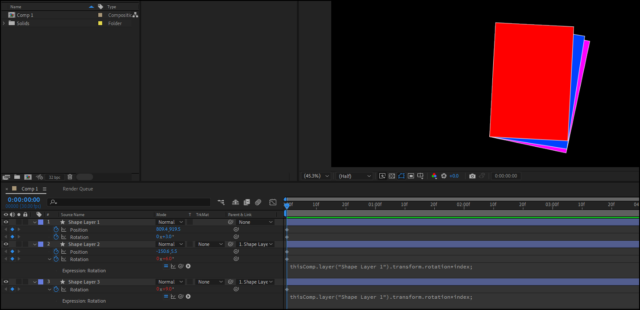
    In the screenshot, I have a shape layer, with the bottom corner as the anchor point. I then have two other layers parented to it, but in the rotation values, I have added:

    thisComp.layer("Shape Layer 1").transform.rotation*index;

    Which is a bit extreme, as each now multiplies by their layer number (eg. *2, *3 etc…), but that’s just a case of dialing in the correct value (ie *2/10 or rather *index/10)

  • Graham Quince

    September 28, 2022 at 9:56 am in reply to: Automatically Rename Comps by Linked CSV
  • Graham Quince

    September 26, 2022 at 8:03 pm in reply to: Text over paper bag

    It’s looking pretty good already.

    You could try using a displacement map on the text, using the bag (or a greyscale version) of the bag as the displacement texture. That would pick up some more of the distortions on the surface.

    And experiment with some of the less well known transfer modes, Overlay or Hard Light might help sell this too.

  • Graham Quince

    September 24, 2022 at 11:02 am in reply to: After Effects Issue – Please Help

    I had this happen too and beleive it is a Windows 11 issue to do with the a GPU conflict.

    I found that removing the HDMI cable from the monitor and reconnecting it triggered the desktop open, but AE would then crash. At least I’m not forcing a restart on my PC anymore, but it’s still not great.

  • Graham Quince

    September 23, 2022 at 2:36 pm in reply to: Natural Page Peel Effect on Photos

    I think CC Page Turn can be worked on to get quite a natural look. You probably need to keyframe the lighting to move as the page does and change a bunch of other settings too.

    If you’re dead set against using it, why not film an actual piece of paper and peel that. Then you can use an animated mask to on it to act as a wipe for your photo.

    If you don’t want your hand in the way, you could try holding the page corner and then dropping it. And then reversing the shot. If you can film at a high-frame rate, you’ll probably get a better result too.

  • Graham Quince

    September 23, 2022 at 2:30 pm in reply to: Instagram Voice to Text Plugin

    A while back there was some posts here with different suggestions for Instagram-style text.

    I ended up making a YouTube Short about it.

    https://youtube.com/shorts/IbZl3lcghYU

    Was that the sort of thig you were after?

    Some contents or functionalities here are not available due to your cookie preferences!

    This happens because the functionality/content marked as “Google Youtube” uses cookies that you choosed to keep disabled. In order to view this content or use this functionality, please enable cookies: click here to open your cookie preferences.

  • Graham Quince

    September 23, 2022 at 2:15 pm in reply to: Map/Location animation

    That’s a really nice service. I was going to post saying you can use Google Earth as long as you leave the attribution information on screen, but that’s slightly different.

  • Graham Quince

    September 23, 2022 at 2:13 pm in reply to: cube transition

    Yes – you’ll need to use the 3D layer option and I would suggest parenting to a null object, but it should be simple.

    • Set up your layers
    • Turn on 3D
    • Create a Null Object layer
    • Make this 3D
    • Move it back in space by half the width of your layers
    • Parent the second layer to the null object
    • Rotate the null 90 degrees
    • Parent the first layer to the null.
    • Keyframe the rotation
  • If you use Alpha Matte as your track matte, instead of lower it’s opacity, leave it turned off, but duplicate it, and control the copy’s opacity

    Sorry, I’ve been stuck at a conference all week, so this is my first chance to reply.

    Would you be prepared to post the project? I can take a look and see if I can spot a solution.

  • Graham Quince

    September 18, 2022 at 1:06 pm in reply to: 100 photos import at once

    When you say the order of images gets messed up, is it because your files don’t have leading zeros?

    For instance, if your files are labled:

    • file 1
    • file 2
    • file 9
    • file 10
    • file 20

    Is the process order:

    • file 1
    • file 10
    • file 19
    • file 2
    • file 20

    If that looks like what’s happening, just rename the first files to be:

    • file 01
    • file 02
    • etc…
Page 20 of 112

We use anonymous cookies to give you the best experience we can.
Our Privacy policy | GDPR Policy