Forum Replies Created

Page 19 of 112
  • I’ve not seen anything like that, but one possible solution might be to set the first vertex point at each keyframe. (Right click on a point and in the masks submenu, there should be an option). AE will use this to count from and so that appearing / disappearing point might stay in the same place.

  • Graham Quince

    October 24, 2022 at 12:01 pm in reply to: After Effects

    I can just make out the blue highlight around the project panel. Make sure your layer is selected – the blue highlight will appear around the timeline panel. That should enable the layer options.

  • Graham Quince

    October 23, 2022 at 9:44 am in reply to: Speech bubbles with dynamically adjustable tail

    You’d have to do a little bit of work, but maybe my Curvy Arrow tutorial can help:

    https://youtu.be/Hem4eWIgseQ

    This uses three coordinate points to set the size of a shape layer line and it’s bend. I think you shoiuld be able to swap out the end point for the bottom of your text layer using sourceRectAtTime

    Some contents or functionalities here are not available due to your cookie preferences!

    This happens because the functionality/content marked as “Google Youtube” uses cookies that you choosed to keep disabled. In order to view this content or use this functionality, please enable cookies: click here to open your cookie preferences.

  • Graham Quince

    October 22, 2022 at 12:12 pm in reply to: Asset size motion track?

    I’m sorry, I’m not sure what you’re asking. Are you saying it took all night to render a 4-second shot?

    The show being a still of a house tracked to a video. If that’s the case then yeah, it should take that long, but without seeing your whole composition, it is quite hard to take a guess at the cause.

  • Graham Quince

    October 22, 2022 at 12:08 pm in reply to: Low memory warning

    Unfortunately, 16Gb is now the minimum required to run AE, so these errors might become more common for you. That being said, I have seen a few posts complaining about a potential bug that Adobe are looking at around previews on mac.

    It might be connected to your graphics card. What happens if you switch to Software only in Project Settings?

  • Graham Quince

    October 22, 2022 at 12:05 pm in reply to: AE Scripts denied despite troubleshooting

    Access is denied implies to me that the program is running without administrator privileges.

    When you say AE Scripts, do you me the aescripts manager you use when purchasing plugins from AEScripts, or do you mean trying to run a script in After Effects.

    Undefined is not an object suggests that the script that running cannot find a file / layer its looking for (Undefined) but is still trying to run.

    What’s the script went to do?

  • Graham Quince

    October 8, 2022 at 6:53 pm in reply to: Expression to hold animation

    Dan,

    Thank you – as always your understanding of code is astonishing.

    I flipped the IF though, as I only want the layer to travel when invisible

    f = fAccum = 0;

    while (f < timeToFrames(time)){

    if (opacity.valueAtTime(framesToTime(f)) < 1) fAccum++;

    f++;

    }

    valueAtTime(framesToTime(fAccum))

    Thank you again

  • Graham Quince

    October 8, 2022 at 9:46 am in reply to: Convert animated source text to shapes

    The only thing I can think of is to split your text layer, so that each value produces a different shape.

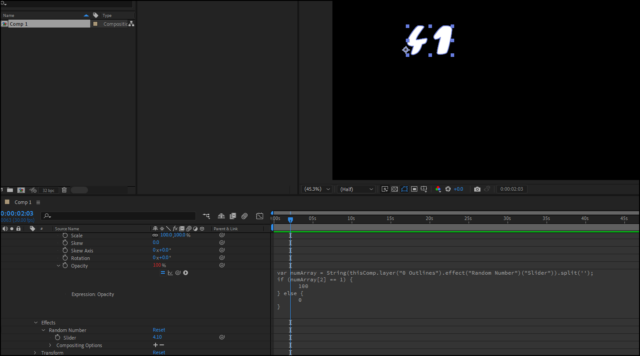
    Alternatively, you could recreate the entire counter using shapes, then drive the opacity of each shape based on the expression. So you’d have shapes in the units column, duplicated and repositioned or the 10s etc… then on each shape, use something like:

    var numArray = String(thisComp.layer("0 Outlines").effect("Random Number")("Slider")).split('');

    if (numArray[2] == 1) {

    100

    } else {

    0

    }

    This is assuming that the slider is produces decimals. In this case, I tested on the value 4.1

    4 was in the 0 position in the array, ‘.’ in the 1 position and numArray[2] was the decimal.

    If numArray[2] equals 1 and the shape is the 1 character, show it, else hide it.

  • Graham Quince

    October 8, 2022 at 9:30 am in reply to: Updated Adobe now it wont import C4D files… Help?

    Have you tried creating a new C4D file in After Effects? At that point C4D Lite should open and prompt you to login. Once C4D knows its you, you should be back to usual.

  • Not had this myself, but try opening C4D Lite – I’ll bet you get asked to login, then the problem will go away.

Page 19 of 112

We use anonymous cookies to give you the best experience we can.
Our Privacy policy | GDPR Policy