Forum Replies Created

Page 18 of 112
  • Graham Quince

    November 20, 2022 at 9:54 am in reply to: Bubble Effect

    Take a look at some ocean water tutorials. I made one myself:

    https://youtu.be/Dhg1eZ3oQjQ

    I used CC Glass to fake a 3D displacement, but you might also find it possible to use Displacement Maps. Another approach is that you could create a solid in C4D Lite and use the deformer tools to get it to bubble.

    Some contents or functionalities here are not available due to your cookie preferences!

    This happens because the functionality/content marked as “Google Youtube” uses cookies that you choosed to keep disabled. In order to view this content or use this functionality, please enable cookies: click here to open your cookie preferences.

  • Graham Quince

    November 16, 2022 at 9:51 am in reply to: Weird inverted ghosting in preview.

    If it’s only in playback and the render is fine, that suggests to me it is the cached preview file. Try clearing your cache and if that doesn’t solve the issue, I’d be really tempted to rename the file and drag it back onto the timeline, so AE thinks it is a new file.

    If the same thing keeps happening, it is possible it is connected to the codec on the video – this is a little straw-clutching admittedly, but you may have to either convert the video to a different format or accept the issue in preview. At least your render is ok.

  • That sounds like it might be the polygon lines like you’ve suggested. Are you adding a diffuse texture as well as the illumination texture?

  • Is particles the best way to achieve this? With any simulation tool you have to spend a lot of time setting up the parameters and tweaking them, whereas if you had a shape with a wiggle on it, all you have to do is attach it to the pony’s head.

    It might also be worth checking out the free plugin, Fake Dynamics: https://www.youtube.com/watch?v=uBSouq8feSchttps://www.youtube.com/watch?v=uBSouq8feSc which can handle the broad movement changes for you.

  • There’s lots of particles going on there, can you let us know when in the video you’re trying to recreate?

  • Graham Quince

    November 14, 2022 at 8:10 pm in reply to: Help with replication of an effect

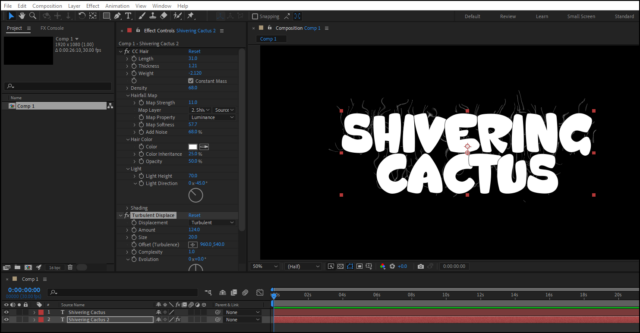
    I think you could either a Roughen Edges with a Turbulent Displace or possibly, CC Hair with Turbuluent Displace.

  • Graham Quince

    November 14, 2022 at 8:02 pm in reply to: Has anyone used the Diopter plug-in?

    That’s a neat plugin, but I’ve not used it. I do have a couple of AEScript plugins though and they have refused to install into AE 2023, however it is possible to copy the plugin files from one folder to the correct one and they work. I imagine AEScripts are working on a fix.

    As to the fact it’s only installing in PP, that’s probably related. But as a workaround, try installing an older version of AE and see if it installs to that plugin folder (then copy it)

    Finally, it’s “only” $39.99 so it’s up to you, but with a little bit of work using adjustment layers, the bulge and magnify effects and masking, I imagine you could get pretty close without the plugin.

  • I think instead of using pixel measurements, you can probably get around the different image sizes using:

    thisLayer.width and thisLayer.height

    These will give you the sizes in order to drive any expressions.

    You could also use thisComp.width etc… to determine the “off screen” placement.

    And you could look at something like this expression:

    transition = 20;       // transition time in frames
    if (marker.numKeys<2){
    tSecs = transition / ( 1 / thisComp.frameDuration); // convert to seconds
    linear(time, inPoint, inPoint + tSecs, 0, 100) - linear(time, outPoint - tSecs, outPoint, 0, 100)
    }else{
    linear(time, inPoint, marker.key(1).time, 0, 100) - linear(time, marker.key(2).time, outPoint, 0, 100)
    }

    which fades a layer in and out automatically. I think it would be pretty straight-forward to adapt for position, but if you get stuck, post back here and I’ll see if I can help you out.

  • Graham Quince

    November 5, 2022 at 1:01 pm in reply to: How to add a 3D text label to VideoCopilot Orb

    It might not be the “best / right” way to add labels, but I made a tutorial a couple of years back where I use 3D null objects, parented in such a way that you can set longitude and latitude coordinates and then link a 3D text layer:

    https://youtu.be/tVVKNs56H4c

    Some contents or functionalities here are not available due to your cookie preferences!

    This happens because the functionality/content marked as “Google Youtube” uses cookies that you choosed to keep disabled. In order to view this content or use this functionality, please enable cookies: click here to open your cookie preferences.

  • If using Particular, then I’d guess it was a motion path. The particles will travel down a mask’s path, which you should be able to animate.

    It might not have been this manual, it might have been controlling the size over life.

Page 18 of 112

We use anonymous cookies to give you the best experience we can.
Our Privacy policy | GDPR Policy