Creative Communities of the World Forums

The peer to peer support community for media production professionals.

Activity Forums Adobe After Effects Convert animated source text to shapes

  • Convert animated source text to shapes

    Posted by Jeff Berube on October 7, 2022 at 2:13 am

    I have an animated number counter generated from an expression that I need to convert to text shapes.


    I have to do this because I am exporting to Lottie animation and the Lottiefiles extension cannot handle the ‘Skew’ effect on a text object.


    I have tried Converting expression to Keyframes and then trying to convert the layer to shape but it only converts the first frame.


    Any ideas/hacks/suggestions?

    Jeff Berube replied 3 years, 10 months ago 2 Members · 2 Replies
  • 2 Replies
  • Graham Quince

    October 8, 2022 at 9:46 am

    The only thing I can think of is to split your text layer, so that each value produces a different shape.

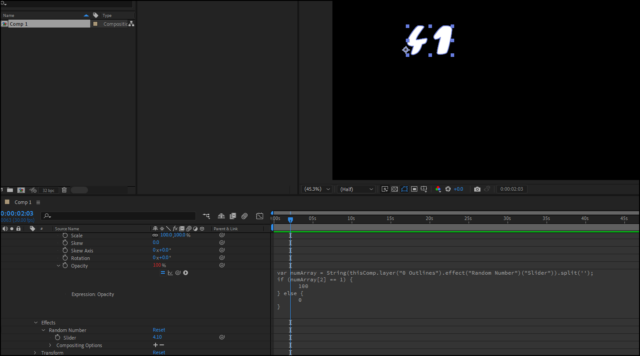
    Alternatively, you could recreate the entire counter using shapes, then drive the opacity of each shape based on the expression. So you’d have shapes in the units column, duplicated and repositioned or the 10s etc… then on each shape, use something like:

    var numArray = String(thisComp.layer("0 Outlines").effect("Random Number")("Slider")).split('');

    if (numArray[2] == 1) {

    100

    } else {

    0

    }

    This is assuming that the slider is produces decimals. In this case, I tested on the value 4.1

    4 was in the 0 position in the array, ‘.’ in the 1 position and numArray[2] was the decimal.

    If numArray[2] equals 1 and the shape is the 1 character, show it, else hide it.

  • Jeff Berube

    October 10, 2022 at 5:49 pm

    This is absolutely brilliant. I will try to implement later and come back with results.

We use anonymous cookies to give you the best experience we can.
Our Privacy policy | GDPR Policy