


Michael Gossen
Forum Replies Created
-

Michael Gossen
July 1, 2008 at 8:38 pm in reply to: QT miscounting number of chapter markers on export/DVD SPI am not sure about QT player, but in DVDSP, each new track gets a default marker at the very start for default connections to menus. I just tested a few chapter markers and exported and it was fine in QT player. I would check your markers to make sure they are all set as CHAPTER…don’t really know what all is going on. good luck.
Michael Gossen
Helium Digital Media -
They have several FCP bays, I have done some work there, they are great.
Michael Gossen
Helium Digital Media -
There is a great place right on the Cahuenga Pass called Shapeshifter. Not on the westside, but probably cheaper than a bigger house.
Michael Gossen
Helium Digital Media -
Michael Gossen
July 1, 2008 at 5:00 pm in reply to: Is there any way to automatically cut a clip every 7 seconds?I just tested it out in automator. You can record actions in automator by hitting the record button. Note that ‘Universal Access’ must be enabled. All I did was hit record, click on the timeline in FCP, hit Shift+Right Arrow 7 times (I think its faster than +700), then typed ‘Control+v’ the default ‘Add Edit’ keys. repeat a couple times, and your automator will look like this:
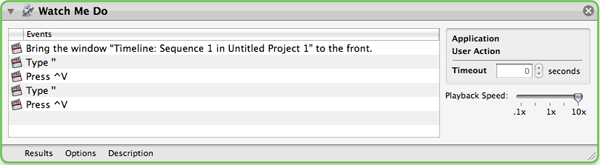
Be sure to set the playback speed to 10x. Duplicate that action as many times as you would like. The problem is it will suck to try to stop it, so maybe do it in reasonable increments. Good luck.
Michael Gossen
Helium Digital Media -
I bet you looked in HD > Library. Preferences are user based, so make sure you go to HD > Users > yourusername > Library > Preferences.
Good luck.
Michael Gossen
Helium Digital Media -
Michael Gossen
June 28, 2008 at 9:56 pm in reply to: HD to SD via Kona to Digibeta, timecode issues!Is this an easy setup? What does your AJA Control Panel setup? Do you have a different setup for output to tape?
Michael Gossen
Helium Digital Media -
Try switching your keyboard layout to “Multi-camera Editing…”, I think this sets the default number keys to ‘cut to angle’ as opposed to ‘switch to angle’ like the default layout. Good luck!
Michael Gossen
Helium Digital Media -
Another thing to do is to make sure you ‘Make Sequence Clips Independent…’ before you media manage. This sheds the master to affiliate clip relationship, creating totally new, independent clip info for upres. Just an idea.
Michael Gossen
Helium Digital Media -
So the “master clips” have the anamorphic check-box checked in the browser? Or are you checking it in the viewer, then item properties? There is a relationship there between affiliate clips and master clips that might be lost somewhere. You could remake you “master clips” by going to ‘Tools > Create Master Clips’. You will have to spend some time reorganizing and setting anamorphic on you clips, but that might help.
Michael Gossen
Helium Digital Media -
Besides, they now offer subscription based service too if you would rather.
Michael Gossen
Helium Digital Media