Creative Communities of the World Forums

The peer to peer support community for media production professionals.

Activity Forums Apple Final Cut Pro Legacy Is there any way to automatically cut a clip every 7 seconds?

  • Is there any way to automatically cut a clip every 7 seconds?

    Posted by Rickey Shideler on July 1, 2008 at 3:02 pm

    I am working on a project and I have 2 cameras and each have about 3 hours of footage and the cameras are synched. I have both camera 1 clips and camera 2 clips in final cut camera 2 ontop of camera 1. I need to cut them every 7 seconds and then I am going to go back and delete every other clip for each camera so the footage alternates between camera 1 and camera 2. Is there any easy way to do this besides going in with the double razor and cutting it every 7 seconds?

    Rickey Shideler replied 18 years, 1 month ago 2 Members · 2 Replies
  • 2 Replies
  • Michael Gossen

    July 1, 2008 at 5:00 pm

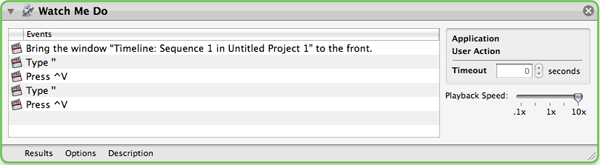
    I just tested it out in automator. You can record actions in automator by hitting the record button. Note that ‘Universal Access’ must be enabled. All I did was hit record, click on the timeline in FCP, hit Shift+Right Arrow 7 times (I think its faster than +700), then typed ‘Control+v’ the default ‘Add Edit’ keys. repeat a couple times, and your automator will look like this:

    Be sure to set the playback speed to 10x. Duplicate that action as many times as you would like. The problem is it will suck to try to stop it, so maybe do it in reasonable increments. Good luck.

    Michael Gossen
    Helium Digital Media

  • Rickey Shideler

    July 2, 2008 at 5:54 pm

    Haha that is awesome. I have never even opened automator before. Thats not exactly what I was looking for but it works. It doesn’t do it as fast as I would like but it is good enough. Thanks!

We use anonymous cookies to give you the best experience we can.
Our Privacy policy | GDPR Policy