Forum Replies Created

Page 6 of 9
  • George Charoupas

    August 11, 2023 at 8:49 pm in reply to: mesh edit to a volume by stitching?

    Hello Hans,

    I don’t understand exactly your issue. Maybe showing some photos or uploading a cinema 4d file can help to better demonstrate what you want to achieve.

  • Hello Joe,

    I don’t see any repeated pattern, indicating that this is a displacement map.

    Are you sure that it is? To my eyes, it looks more like sculpting or Mograph generators. But it can be a very advanced displacement map. If it is, I am not sure whether someone can show you how to do it in a forum. Creating advanced displacement maps are not even Cinema 4D (creating them).

  • George Charoupas

    August 9, 2023 at 10:00 pm in reply to: Dynamics in traffic

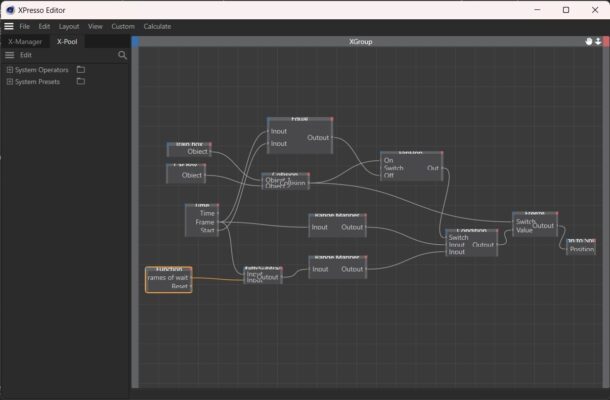
    I think, I need to explain what this xpresso rig does.
    We have a car and a train. The train has a prerecorded path. The car obviously doesn’t. The “aline to spline” tag works with percentage. The 0% is the start of a spline and the 100% is the end. So, to move the car, you take all frames and you convert this to a percentage. In the scene you made, you change the project to 500 frames. When the animation is on 50 frame, the percentage should be 50/500 = 10%. Thats what the “Ranger Mapper” node does. But to work correctly, you need to adjust the Ranger Mapper’s upper limit number. It was 100 cause my example had 100 frames. You changed the total number of frames without changing that. Thats why your car was very fast. The spline was very big and while you had set 500 frames, the mapper was set for 100 frames and the car went 5x faster than it should. I added a user data entry with total number of frames, in the null, to make it easier. The car speed depends on 1) the length of the spline. Bigger spline -> faster car. 2) Number of frames. More frames -> slower car 3) I added a multipler in the end. So if you want to make the car faster change the number 1 to 1.1 or more. For slower change it to 0.8 or less.
    As I said in my previous message, the setup I demonstrated was very basic, just to understand how to use xpresso for what you asked. I think you should focus on learning the basics of Xpresso, cause what you want to accomplish will get very node-complicated.
    Now on your second question. When the train and the car collides, the movement of the car stops (freezes) but the frames keep going. When the collision stops the car movement unfreeze. As I said in the previous paragraph, the frames are being converted into the “aline to spline” percentage. And thats the reason why the car teleports to another position and continues from there. So, the logic goes like that. When the collision starts, you need a counter that counts how many frames the colission is happening and when the collision stops, you need to subtract those frames from the current frame value. Thats what the “Frames of wait” in the user data was for. If your car only has to wait once then you don’t need a counter. Just an entry is enough and thats whay I did. I counted how many frames the collision was happening and I set it manually. If your car can collide many times you need an actual counter. So, in the xpresso editor you need to replace the “Frames of wait” with an actual counter. If you do that, the car will not teleport in the path.
    I think you should try to implement the counter on your own (its not hard). That way you will start to understand xpresso.
    I added some things in your file to help you out:
    1) I added a multiplier in the end so you can adjust the speed of the car manually, just by tweeking the “Speed Adjustment” value in the null.
    2) I added another value with the total number of frames, also in the null. If you change your project’s frame number, just change that value and you will be fine
    3) Also I added an automatic car reset function when you restart your animation. (you can remove it by unconnecting the FlipFlop’s wire to off.)
    If you check the video, you will notice that by setting the “Frames of wait” to 39, the car goes as it should.

  • George Charoupas

    August 8, 2023 at 12:51 pm in reply to: Dynamics in traffic

    One hint that may trouble you. If you play the animation and at some point you want to restart the sequence from 0 frame, you will notice that the car doesn’t go to start. I didnt know if you wanted to reset or loop infinitely so I left the flipflop switch like that. If you want the car to reset its position, you can change the xpresso to this. You can also reset the car manually (without changing anything to the xpress) by enabling and disabling the “off” parameter in the flipflop node.

  • George Charoupas

    August 7, 2023 at 7:57 pm in reply to: make and texture HIGHWAYs in cinema 4d.

    Hello Mauricio,
    I think you should first define what you mean texture “PROPERLY”.
    Texturing can be done properly with many ways, yet the result can be different in all of them.
    It doesn’t matter if its a highway or a road or a building. The process is similar in all of these.
    So if you want to be an advanced material creator, you will first need some things.
    1) Learn how to properly UV unwrap your model
    2) You will have to know Photoshop or Gimp or similar.
    3) You will have to understand how materials work and behave in real life.
    Great materials have imperfections and they dont have a visible repeatition.
    So either you will create your own materials by taking photos of the real objects, which is not simple and then you will have to create/add normal maps and reflections or you will add already made perfect materials and you will add imperfections on them. Both ways are different but can achieve great results.

  • George Charoupas

    August 7, 2023 at 7:34 pm in reply to: Dynamics in traffic

    Hello Michel,

    The scene you describe can get super complicated.

    Here is a scene with an xpresso function that does what you want.

    You will have to modify it to work for you but the logic is the same.

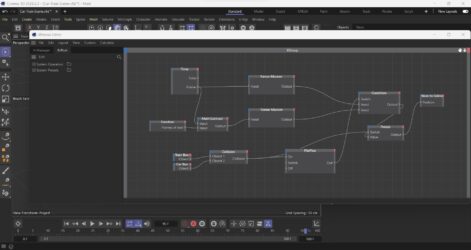
    Check my video to see how it behaves. The cube is the train and the sphere is the car. There are cubes as childrens on both, which are the colliders. You can also see the image too see how the xpresso looks like. There are user data in the null with the name function that states how many frames the car needs to stop.

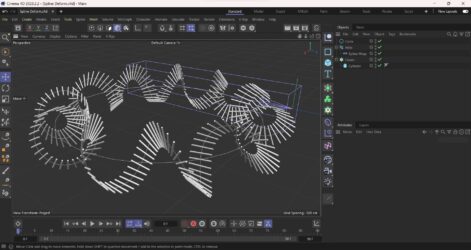
  • Hello Joanpablo. In order to do that, you will need to deform your helix spline.

    I did an example scene for you to look. I did a circular helix, but you can change the circle to whatever you like.

    If I understood correctly what you wanted, this should be it.

  • George Charoupas

    August 6, 2023 at 11:05 am in reply to: all points same distance [SPLINELINE]

    I think Kouraib’s approach is better and easier.

  • George Charoupas

    August 5, 2023 at 10:26 pm in reply to: all points same distance [SPLINELINE]

    Hello Mauriocio,

    I am not aware of an internal Cinema 4D function that can do that.

    The only way I can think of is by using a python script.

    What you can do is:

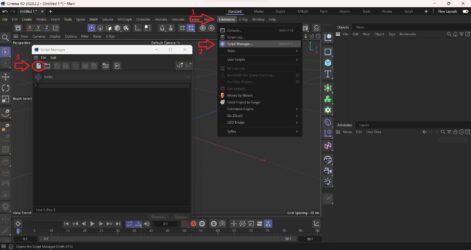
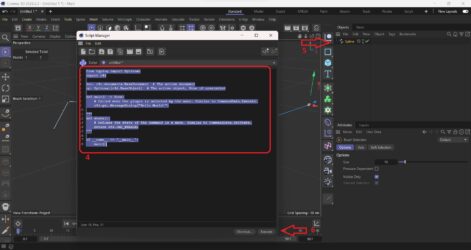
    1) In the menu select the “Extensions”

    2) Then select “Script Manager”

    3) Press the “New Script Button”

    4) Select all the text and replace with the text thats inside the fix spline.txt (check my attachments)

    5) Select your spline that needs to get “fixed”

    6) Press execute.

    A new spline will be created that will have all its points equally spaced BUT:

    a) If there are not many points, they final spline might be different!!

    b) There is a chance that the new spline will be “Linear” type. Change it to whatever you like.

    c) This script works in my Cinema 4D version 2023. If you have an older version, the python SDK might be different and therefore it might not work.

    Please let me know if this worked for you.

  • George Charoupas

    August 2, 2023 at 10:16 am in reply to: Cinema 4d R16 GUI bug

    Then and since this is a bug (Maxon’s kind of problem), I suggest you to contact Maxon and to explain the situation. I think they will resolve your issue.

Page 6 of 9

We use anonymous cookies to give you the best experience we can.
Our Privacy policy | GDPR Policy