

Activity › Forums › Maxon Cinema 4D › Dynamics in traffic
-
Dynamics in traffic
Posted by Michel van Elk on August 6, 2023 at 5:45 pmHello there,
Does anybody know if there is a way to make a car (with an align to spline tag) that will stop automatically for a passing train (also align to spline). Maybe with an xpresso rig? But how?
Greatings, Michel
Michel van Elk replied 3 years, 1 month ago 3 Members · 10 Replies -
10 Replies
-

Kouraib Abdmalek
August 7, 2023 at 10:12 amHi Michel,
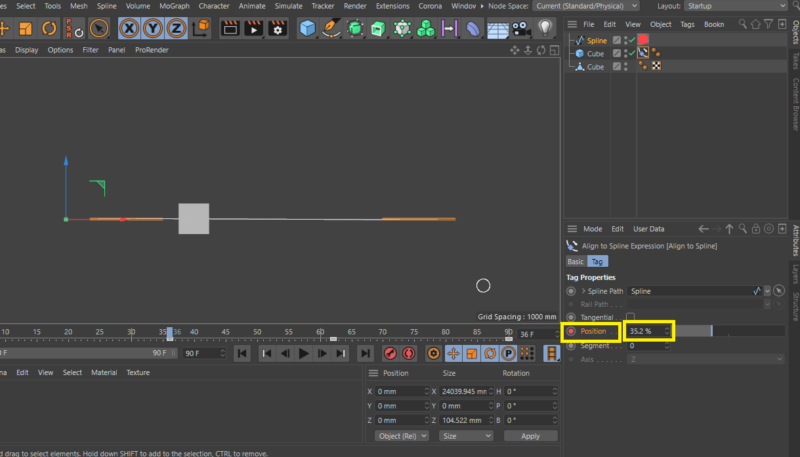
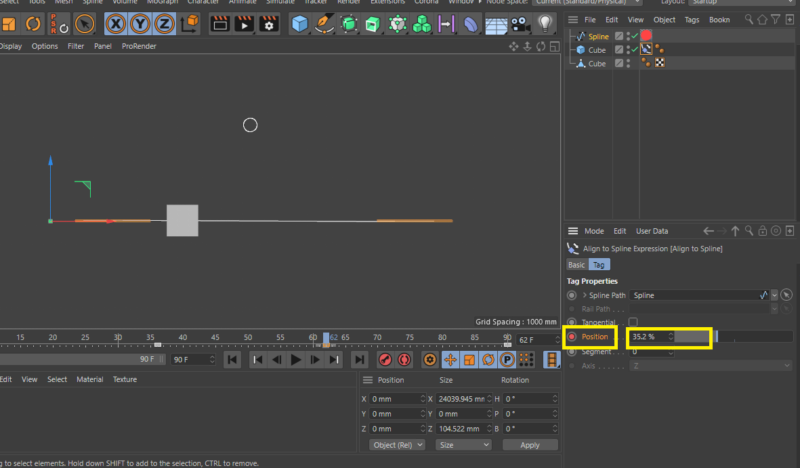
just let your car follow the path and at the point that you want to make the car stop click on the “align to spline” tag and go to “position” appropriate and click to record the position and copy the value then let the car move to the frame that you want the car to still stop and past the previous value in “position” then record the position again like in the screenshots and the file below, if you get any other problems let me know
thanks

-
Kouraib Abdmalek
August 7, 2023 at 10:13 am -

Michel van Elk
August 7, 2023 at 2:01 pmHello Kouraib,
Thank you for your answer. It works, but that is not exact that I wanted.
This works for one train and for one car. But if there are a random numbers of trains passing and a random nrs of cars crossing I want that every random car should stop for every random train.
Greatings, Michel
-

George Charoupas
August 7, 2023 at 7:34 pmHello Michel,
The scene you describe can get super complicated.
Here is a scene with an xpresso function that does what you want.
You will have to modify it to work for you but the logic is the same.
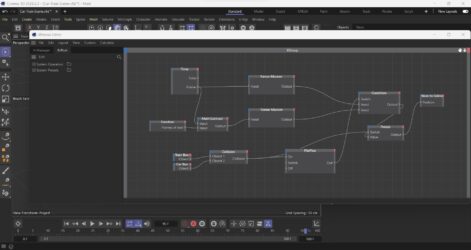
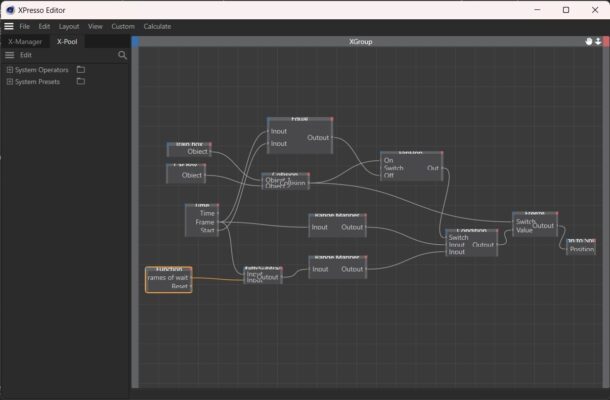
Check my video to see how it behaves. The cube is the train and the sphere is the car. There are cubes as childrens on both, which are the colliders. You can also see the image too see how the xpresso looks like. There are user data in the null with the name function that states how many frames the car needs to stop.
-
Michel van Elk
August 8, 2023 at 7:56 amThank you George. This is exactly what I try to accomplish.
Now I have to study how you set up this expresso rig.
Greatings, Michel
-
George Charoupas
August 8, 2023 at 12:51 pmOne hint that may trouble you. If you play the animation and at some point you want to restart the sequence from 0 frame, you will notice that the car doesn’t go to start. I didnt know if you wanted to reset or loop infinitely so I left the flipflop switch like that. If you want the car to reset its position, you can change the xpresso to this. You can also reset the car manually (without changing anything to the xpress) by enabling and disabling the “off” parameter in the flipflop node.
-
Michel van Elk
August 9, 2023 at 3:08 pmHello George,
I try to understand your xpress rig, but there are a few questions that I can not solve.
First I made a more complex spline for the train and the car but I can not make the car move slower on the spline.
Secondly, When the car stops for the train it continues not from the place it was but it jumps further on the spline.
Greatings, Michel
-
George Charoupas
August 9, 2023 at 10:00 pmI think, I need to explain what this xpresso rig does.
We have a car and a train. The train has a prerecorded path. The car obviously doesn’t. The “aline to spline” tag works with percentage. The 0% is the start of a spline and the 100% is the end. So, to move the car, you take all frames and you convert this to a percentage. In the scene you made, you change the project to 500 frames. When the animation is on 50 frame, the percentage should be 50/500 = 10%. Thats what the “Ranger Mapper” node does. But to work correctly, you need to adjust the Ranger Mapper’s upper limit number. It was 100 cause my example had 100 frames. You changed the total number of frames without changing that. Thats why your car was very fast. The spline was very big and while you had set 500 frames, the mapper was set for 100 frames and the car went 5x faster than it should. I added a user data entry with total number of frames, in the null, to make it easier. The car speed depends on 1) the length of the spline. Bigger spline -> faster car. 2) Number of frames. More frames -> slower car 3) I added a multipler in the end. So if you want to make the car faster change the number 1 to 1.1 or more. For slower change it to 0.8 or less.
As I said in my previous message, the setup I demonstrated was very basic, just to understand how to use xpresso for what you asked. I think you should focus on learning the basics of Xpresso, cause what you want to accomplish will get very node-complicated.
Now on your second question. When the train and the car collides, the movement of the car stops (freezes) but the frames keep going. When the collision stops the car movement unfreeze. As I said in the previous paragraph, the frames are being converted into the “aline to spline” percentage. And thats the reason why the car teleports to another position and continues from there. So, the logic goes like that. When the collision starts, you need a counter that counts how many frames the colission is happening and when the collision stops, you need to subtract those frames from the current frame value. Thats what the “Frames of wait” in the user data was for. If your car only has to wait once then you don’t need a counter. Just an entry is enough and thats whay I did. I counted how many frames the collision was happening and I set it manually. If your car can collide many times you need an actual counter. So, in the xpresso editor you need to replace the “Frames of wait” with an actual counter. If you do that, the car will not teleport in the path.
I think you should try to implement the counter on your own (its not hard). That way you will start to understand xpresso.
I added some things in your file to help you out:
1) I added a multiplier in the end so you can adjust the speed of the car manually, just by tweeking the “Speed Adjustment” value in the null.
2) I added another value with the total number of frames, also in the null. If you change your project’s frame number, just change that value and you will be fine
3) Also I added an automatic car reset function when you restart your animation. (you can remove it by unconnecting the FlipFlop’s wire to off.)
If you check the video, you will notice that by setting the “Frames of wait” to 39, the car goes as it should. -
Michel van Elk
August 11, 2023 at 2:43 pmHello George,
Thank you for your extensive explanation. It makes a lot clear for me.
I think you are right that I should have a better understanding of the expresso nodes.
I do know the meaning of the individual nodes but putting them together as a working xpresso rig is a different story.
As soon as I can show you some progression in my programming I will show you.
For now many thanks.

Reply to this Discussion! Login or Sign Up