Forum Replies Created

Page 9 of 9
  • George Charoupas

    July 10, 2023 at 8:52 pm in reply to: About viewport frame rate limit.

    Hello,

    In your images I can see that you have selected 24 as fps. FPS, stands for Frames per Second. Which means that your video (if you export one) will have 24 images for every second. However this doesn’t mean that your video will be only 24 frames ~1 sec. I am also seeing that your project time is set 209frames and your viewport max at 960Frames. If you want your viewport to only show 24 frames change your viewport max at 23f (given the start is 0 frame the final result is 24 frames). Let me know if that was your primary problem.

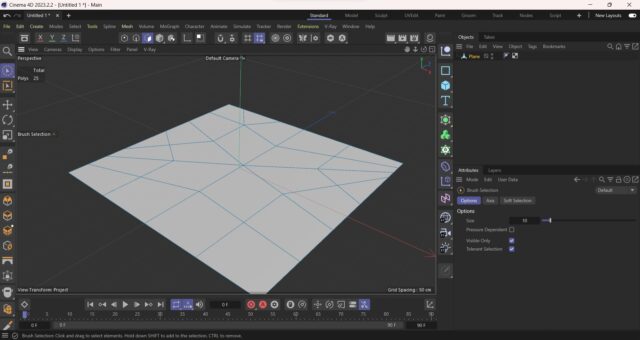
  • Hello, make sure that your plane has enough polygon count in order for your displacement map to work correctly. Try increasing the plane width and height segments and let me know if that solved your issue. if your plane is not square and/or has weird polygon distribution (like my image), the displacement map might not work correctly.

  • George Charoupas

    July 9, 2023 at 9:55 pm in reply to: several plugins missing

    Hello,

    Maxon introduced the “Magic Bullet Looks” plugin in Cinema 4D R25. What it does, is it allows its users to collor correct /adjust their renders. So lets say you have a scene which took 2 hours to render and you just realised that you wanted the lighting to be warmer or the scene to be darker/brighter. With Magic Bullet Looks you don’t have to rerender your scene or load your final image into Photoshop. You can do this and more inside Cinema 4D directly.

    So the message you are seeing is mostly harmless.

    How can you avoid this message:

    1) Open Cinema 4D and load your scene.

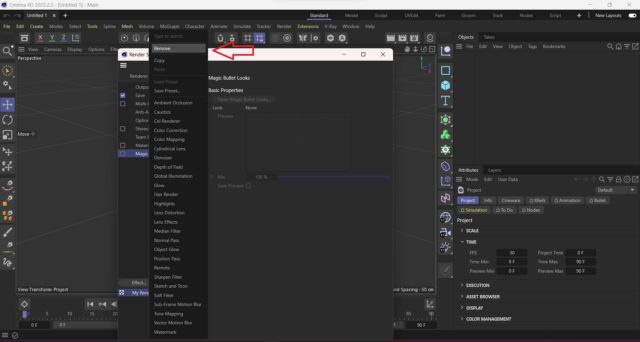
    2) Open render settings. (Ctrl+B for windows, ⌘ + B for Mac)

    3) On the left list there is a “Magic Bullet Looks” entry.

    4) Right click on that and select remove. You can also select it and press the “Delete” button on the keyboard.

    Now if you save the scene, you should be good.

  • George Charoupas

    July 6, 2023 at 10:15 pm in reply to: Animate shuffling Dynamic dominoes

    Also, maybe sharing your c4d file can help us understand what you are doing.

  • George Charoupas

    July 6, 2023 at 3:46 am in reply to: Need help converting a C4D file

    Hello, I have just converted them all in .c4d files (2023 version).

    https://we.tl/t-Mespoq4p78

    Please verify that they work for you as well.

  • George Charoupas

    July 5, 2023 at 2:03 pm in reply to: Need help converting a C4D file

    I have sent you an email. Check also your spam folder, just in case.

  • George Charoupas

    July 5, 2023 at 3:47 am in reply to: Need help converting a C4D file

    I get the message

    “The transfer you requested has been deleted.”

    Can you reupload it, or chose another file service (like wetransfer)?

  • George Charoupas

    July 4, 2023 at 6:38 pm in reply to: Need help converting a C4D file

    Can you post your file here? I will be happy to convert it for you.

  • Hello, Can you tell us which version of Cinema 4D are you using? In my version (2023), a polygon selection does not cover the material. It kind of changes its color. What I did to replicate your issue:

    1) I created a cube

    2) I created a random material

    3) I applied the material to the cube with frontal projection

    4) I edited the cube

    5) I selected a polygon and selected the knife.

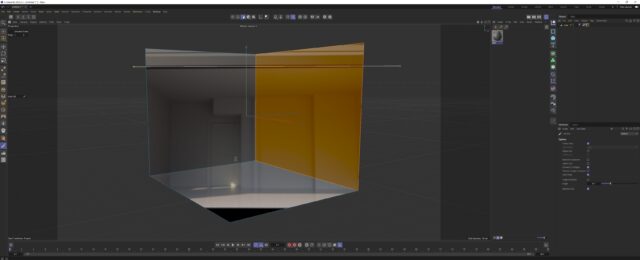
    As you can see in my attached image, I can clearly see the material. If you do something else, please let me know.

Page 9 of 9

We use anonymous cookies to give you the best experience we can.
Our Privacy policy | GDPR Policy