Creative Communities of the World Forums

The peer to peer support community for media production professionals.

Activity Forums Maxon Cinema 4D Is there any way to disable the polygon face highlight when using the cut tools?

  • Is there any way to disable the polygon face highlight when using the cut tools?

    Posted by Xavier Bonet on July 3, 2023 at 7:07 pm

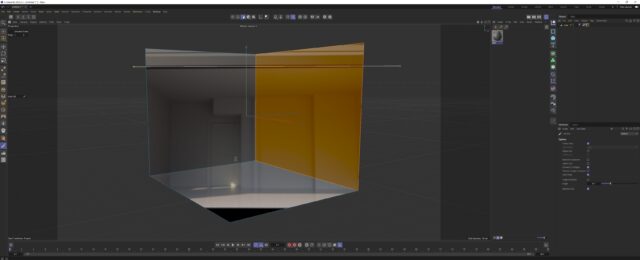
    Often, when I’m using a cutting tool, trying to guide myself with the actual material of an object (say when you have a room projection and you’re trying to cut out edges) the face selection absolutely ruions my day because it completely covers up the material and I can’t see where I need to cut. I’ve tried everything in order to find a way of disabling it and I’ve had no success. It wouldn’t surprise me that Maxon hasn’t thought about it (as, to my mind, there’s a lot of C4D’s mo that’s counterproductive), but here’s hoping someone has figured out how to do it.

    This is a behaviour of which I really don’t quite understand the reason. I’ve never found an instance where it’s been useful, so it’s only been annoying when it “covers” my material. Maybe I’m wrong and someone could enlighten me on why it’s important to have this function.

    Kouraib Abdmalek
    replied 2 years, 10 months ago
    3 Members · 2 Replies
  • 2 Replies
  • George Charoupas

    July 4, 2023 at 6:37 pm

    Hello, Can you tell us which version of Cinema 4D are you using? In my version (2023), a polygon selection does not cover the material. It kind of changes its color. What I did to replicate your issue:

    1) I created a cube

    2) I created a random material

    3) I applied the material to the cube with frontal projection

    4) I edited the cube

    5) I selected a polygon and selected the knife.

    As you can see in my attached image, I can clearly see the material. If you do something else, please let me know.

  • Kouraib Abdmalek

    July 29, 2023 at 10:32 am

    Hi Xavier,

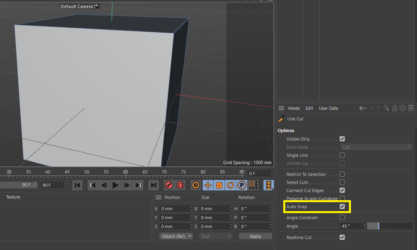
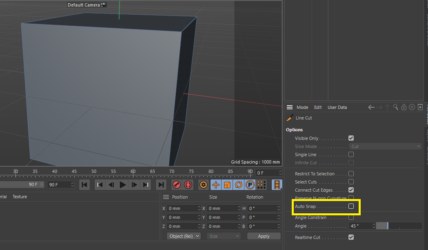
    To disable the polygon face highlight when using the cut tools, just disable the “Auto Snap” like in the screenshots below, sorry for the late reply.

    thanks

We use anonymous cookies to give you the best experience we can.
Our Privacy policy | GDPR Policy