

Activity › Forums › Maxon Cinema 4D › Material Alpha Bug – Displacement Terrain Issue
-
Material Alpha Bug – Displacement Terrain Issue
Posted by Andy Corleone on July 10, 2023 at 3:03 pmHello, I created a plane, them created a material with a displacement map (using a terrain elevation map of a country) and an Alpha to cut the country’s borders (shape file). for some reason the edges of the alpha create some weird artifacts, i used the same materials in blender, it doesn’t show any problem (so the textures are aligned). Maybe I’m doing something wrong in Cinema 4D. please advise me
 Kouraib Abdmalek replied 3 years, 2 months ago 4 Members · 16 Replies
 -
16 Replies


-

Kouraib Abdmalek
July 10, 2023 at 6:49 pmHi Andy,
I think the problem is in the height values. Click on Displacement, then lower the height value. If you are using a material for one of the rendering engines, then also click on Displacement and change the min level and max level values to be close to each other so that the displacement level decreases.
I hope this is useful to you
Thanks
-

Andy Corleone
July 10, 2023 at 8:20 pmHi Thanks for you reply, When I lower the heigh value the problem still showing but at a lower intensity. I think my heigh value is OK so the mountain look at a real life heigh (Do you know what I meant?) The problem is something else. Not sure what
-

George Charoupas
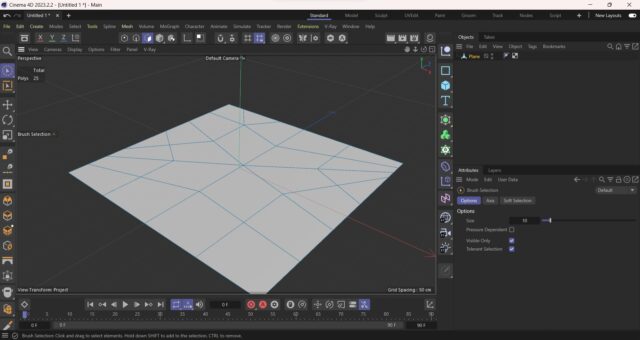
July 10, 2023 at 8:47 pmHello, make sure that your plane has enough polygon count in order for your displacement map to work correctly. Try increasing the plane width and height segments and let me know if that solved your issue. if your plane is not square and/or has weird polygon distribution (like my image), the displacement map might not work correctly.
-
Andy Corleone
July 10, 2023 at 9:21 pmHi Georgios. thanks for you reply. As you may know The Plane have a Max of 1000 Segments. My Image Displacement Elevation image have a resolution of 9600×9500 Pixels. So I have to add a “Sud Polygon Displacement” Level 2 or 4 Makes no diference. Still Showing the error.
One Interesting thing is: If instead I add a Displacer Deformer the issue is not showing but because of the Limit in the segments the result of the final render is at a very low quality compare with the Map and Sub Polygon Displacement.
-
Kouraib Abdmalek
July 11, 2023 at 9:32 amHi Andy,
Can you post your file here or send it via email to let me check? please attach the textures too.
thanks
-
Kouraib Abdmalek
July 11, 2023 at 10:53 amPlease check the file on your email and let me know if this works for you
-
Andy Corleone
July 11, 2023 at 11:00 amYes looks Great. What you did to fix it? I can see a new UVW tag but not sure about the workflow. Thanks so much, cheers

Reply to this Discussion! Login or Sign Up