Forum Replies Created

Page 8 of 9
  • George Charoupas

    July 22, 2023 at 8:54 pm in reply to: Help creating a material

    Hello Michael,

    I can do both Physical and V-Ray. What do you prefer?

  • George Charoupas

    July 22, 2023 at 7:10 pm in reply to: Help creating a material

    All his message contains <div> for some reason. Anyway if you dont copy that from the link, it works. Try
    https://we.tl/t-3hRNz36fgx

  • Hello, Is this what you were looking for?

    The animation is preserved.

  • George Charoupas

    July 20, 2023 at 9:28 pm in reply to: Noisy reflective surfaces

    I am happy that this solved your issue.

    Changing the specular to GGX directly will a give a different result than adding an extra layer. The downside is that you have very limited options, especially if you want to create a complicate material. Also its super suggested to change the layer fresnel.

    If you want to start creating “hyper-realistic” materials (you actually need to go away from the standard or physical render engine), you will need to switch to physical render engine and use PBR materials. PBR materials uses the same attributes as in the real world. In real life the colors we see is what the object reflects. Thats how the pbr materials work. You dont use the color channel and instead, you define the color by the diffuse tab inside the reflection channel. If in the future you consider working more on Cinema 4D, creating correct materials (with imperfections) will set you apart from the other Cinema 4D artists.

    Also changing the render engine to Physical and using the sampler to adaptive with medium sampling quality should instantly improve your result (without changing anything else). You don’t have to adjust anything else (they are the same as the Standard, apart from the Anti-Aliasing.

  • George Charoupas

    July 20, 2023 at 7:11 pm in reply to: Noisy reflective surfaces

    Hello,
    It would be nice to know which renderer you are using.
    Anyway, for Standard renderer:
    To fix your noisy reflections you actually need to adjust your materials.
    1) Open your reflective material
    2) In the reflectance option
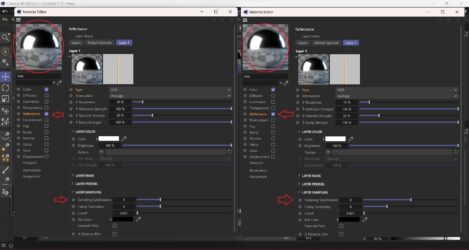
    3A) If you are adding a new layer with GGX, Beckmann, Phong or Ward type, go below in the “layer sampling” and increase the “Sampling Subdivisions” from 4 to 6 or more.
    3B) If you are changing your Default Specular Layer to one of the above Type (not recommended) you need to do the same thing.
    4) If you have more than one layer with a reflective type, you need to do this to all these layers.

    Suggestion:
    A) Dont use as type the “Reflection (legacy)” option.
    B) Find the sweet spot in which the noise is acceptable on the reflective surfaces and use that. Increasing the “Sampling Subdivisions” will affect the render time.
    Check in image 1 the differences between the “Sampling Subdivisions”.

    For Physical renderer:
    **Switch to this renderer if you are using standard.**
    In this renderer the “Sampling Subdivisions” option in the materials is disabled.
    1) If you are using Progressive Sampler, you will need to wait more time.
    2) If you are using Adaptive Sample, you will need to increase the “Sampling Quality”
    All these options will affect the render time.
    Physical Renderer is slower than Standard, but gives better results.

    I hope these solved your issue.

  • George Charoupas

    July 16, 2023 at 3:21 am in reply to: Normal map material issue.

    Happy to help Brie

  • George Charoupas

    July 15, 2023 at 8:12 pm in reply to: Normal map material issue.

    Hello again,

    I am happy that worked for you. If I understand “denser” correctly,

    1) Have you UV unwrapped your model?

    2) If you can’t or don’t know how to do that, you can change the projection to “Cubic” and decrease the Length U & V to your liking. You might need to try multiple values to get your desired result.

    3) Alternatively you can go into “Texture Mode” with Cubic Projection and scale down the material preview to your liking. It will have a similar effect with the 2nd method.

    If your model is too roundy, you can try other projection modes. The perfect way will be to create a UVW Map.

    I hope that helped.

  • George Charoupas

    July 14, 2023 at 8:47 pm in reply to: Normal map material issue.

    Hello,

    In V-Ray in order for the normal maps to work properly, you need to do these two things.

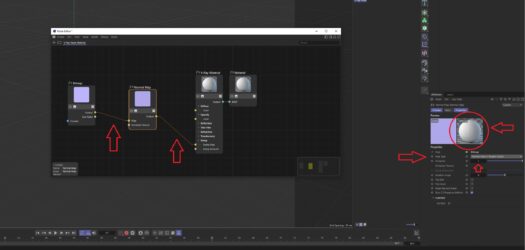
    1) When you load the normal map into the node editor, you will need to change the “Transfer Function” to “Linear” (check 1.jpg)

    2) Now, Press the “+” on the node editor and from the color add a “Normal Map” node. (check 2.jpg)

    3) Lastly, you will have to connect the output from the bitmap to the map from the normal map and the output from the normal map to the bump map of the material. In the “Normal Map” node change the Map Type to “Normal Map in Tangent Space” and now it should render correctly. You can see in the Material preview how the material looks like. Please note that in order to increase or decrease the bump effect you will have to adjust the multiplier. Nothing else. (check 3.jpg)

    Hope this solves your issue.

  • George Charoupas

    July 13, 2023 at 8:08 pm in reply to: Cinema 4D

    Hello, I will try to answer your questions from my perspective and as I understand them.

    2. The answer is very subjective. Depends to many factors like a) How much you like 3D? b) How many hours per week are you willing to spend on learning Cinema 4D, c)How familiar are you with similar programs? It can be some weeks. It is purely trying and learning new things everyday (if possible).

    3. Seeing several courses may guide you to the right direction. After that is basically you, trying the things you learned from the courses. Since Cinema 4D is a platform with so many capabilities, I would suggest (if you are completely knew) to see some courses for very beginners, in order to get familiar with the basic principles of the software and after that to watch courses according to your liking. Stick with courses with high rating and you will be good.

    4. After learning a new thing try to use it on your own. So lets say you watched a course about modeling a sofa. After that try to create a different sofa using what you learned. Some times there might be new challenges, try googling them. You are not alone. Someone might have faced the same issue. Remember, getting better requires a lot of practice. No matter how many courses and tutorials you watch, if you dont practice yourself, you wont be able to get better.

    5. Most of the time begginers are afraid to try new things. Experiment and you will see a great results. Also try to learn other software as well. Photoshop is very essential. Also knowing other 3D software (like blender or 3Ds Max) can be very beneficial.

    I hope my answer finds you well.

Page 8 of 9

We use anonymous cookies to give you the best experience we can.
Our Privacy policy | GDPR Policy