

Activity › Forums › Maxon Cinema 4D › Noisy reflective surfaces
-
Noisy reflective surfaces
Posted by Anastasia Koulina on July 20, 2023 at 6:26 pmHello,
I have created an architectural scene 3DS Max and I imported it in Cinema 4D. This is one of cases where my client wants a Cinema 4D file. Most of the times I am creating the models in 3DS Max, in which I feel more confident and I move them to Cinema 4D, just for materials and rendering. My issue is kind of weird. I am rendering a scene. I have added global illumination and most of the times I am using Irradiance Cache for both methods and I have never got any issues with this. Although I have samples on “High” and record density on “Medium”, I get noise on the reflective surfaces. My scene is a kitchen and has a white reflective material, so it looks very weird. Any recommendations are appreciated.
Anastasia Koulina replied 3 years, 2 months ago 3 Members · 8 Replies -
8 Replies
-

Kouraib Abdmalek
July 20, 2023 at 7:04 pmHi Anastasia,
I suggest that you to dissolve useful edges on the surfaces that cause you problems, and if this surfaces are little and have a simple shape, then it is better to replace them with new shapes that you create in cinema 4D, maybe you need just some cubes
Hope this helps!
-

George Charoupas
July 20, 2023 at 7:11 pmHello,
It would be nice to know which renderer you are using.
Anyway, for Standard renderer:
To fix your noisy reflections you actually need to adjust your materials.
1) Open your reflective material
2) In the reflectance option
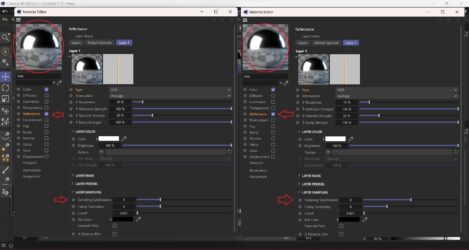
3A) If you are adding a new layer with GGX, Beckmann, Phong or Ward type, go below in the “layer sampling” and increase the “Sampling Subdivisions” from 4 to 6 or more.
3B) If you are changing your Default Specular Layer to one of the above Type (not recommended) you need to do the same thing.
4) If you have more than one layer with a reflective type, you need to do this to all these layers.Suggestion:
A) Dont use as type the “Reflection (legacy)” option.
B) Find the sweet spot in which the noise is acceptable on the reflective surfaces and use that. Increasing the “Sampling Subdivisions” will affect the render time.
Check in image 1 the differences between the “Sampling Subdivisions”.For Physical renderer:
**Switch to this renderer if you are using standard.**
In this renderer the “Sampling Subdivisions” option in the materials is disabled.
1) If you are using Progressive Sampler, you will need to wait more time.
2) If you are using Adaptive Sample, you will need to increase the “Sampling Quality”
All these options will affect the render time.
Physical Renderer is slower than Standard, but gives better results.I hope these solved your issue.
-
Kouraib Abdmalek
July 20, 2023 at 7:50 pmI mean to dissolve the unused edges, Otherwise, you can post your file here or send via email and I will fix it by myself.
Thanks!
-

Anastasia Koulina
July 20, 2023 at 8:11 pmThank you for you fast responce.
My objects which have issues when rendering are mostly cubes with beveled edges. Nothing too fancy. If I remove the reflectiveness on the material, it renders good.
-
Kouraib Abdmalek
July 20, 2023 at 8:45 pmYou are welcome, you can also replace this objects with others that you create in the cinema 4D then apply your materials, I often do that when I’m having problems with rendering objects that I’m importing from 3d max.
-
Anastasia Koulina
July 20, 2023 at 8:46 pmGeorgios thank you also for you fast responce.
I forgot to say I am using the standard renderer.
I did some tests with your suggestion and it almost eliminates the issue. I just have to increase it to 9 to look good. The render slowed dramatically, but it doesn’t matter. Thanks for that.
One more question, you said that changing the Specular Layer to GGX is not recommended. Why? I am just doing this for almost all my materials.
Does it makes the rendering slower?
I will start using the physical renderer. I just don’t use Cinema 4D too much and I am kind in a hurry to deliver the file, so I will probably tinker with it after.
-
George Charoupas
July 20, 2023 at 9:28 pmI am happy that this solved your issue.
Changing the specular to GGX directly will a give a different result than adding an extra layer. The downside is that you have very limited options, especially if you want to create a complicate material. Also its super suggested to change the layer fresnel.
If you want to start creating “hyper-realistic” materials (you actually need to go away from the standard or physical render engine), you will need to switch to physical render engine and use PBR materials. PBR materials uses the same attributes as in the real world. In real life the colors we see is what the object reflects. Thats how the pbr materials work. You dont use the color channel and instead, you define the color by the diffuse tab inside the reflection channel. If in the future you consider working more on Cinema 4D, creating correct materials (with imperfections) will set you apart from the other Cinema 4D artists.
Also changing the render engine to Physical and using the sampler to adaptive with medium sampling quality should instantly improve your result (without changing anything else). You don’t have to adjust anything else (they are the same as the Standard, apart from the Anti-Aliasing.
-
Anastasia Koulina
July 20, 2023 at 10:13 pmI will have to dedicate more time in Cinema 4D. Thanks for your information. Thanks again to all for your fast answers.
P.S. I tryied the Physical as your suggestion and I noticed some improvement, especially in some cloth materials. I will consider switching and learning more for it in the future.
Reply to this Discussion! Login or Sign Up