

Activity › Forums › Maxon Cinema 4D › make and texture HIGHWAYs in cinema 4d.
-
make and texture HIGHWAYs in cinema 4d.
Posted by Mauricio Barrientos on August 6, 2023 at 9:33 pmwhat is the best way to make streets (roads) in cinema and texture them PROPERLY, I already saw tutorials on youtube, but he. The problem, more than anything, is the texture of the streets after having the street built.
In other words, what is the most effective way to texture the streets made in cinema?
Kouraib Abdmalek replied 3 years, 1 month ago 3 Members · 4 Replies -
4 Replies
-

Kouraib Abdmalek
August 7, 2023 at 9:16 amHi Mauricio,
Streets and roads are like other projects. The method of selecting materials and textures varies according to the purpose that the designer aspires to. If he wants a realistic rendering, he uses textures taken from real things. If he wants an ideal or imaginary rendering, he uses textures designed in Photoshop or other programs in some cartoon scenes only colored textures, so please let us know through a picture or something else what kind of street you want to apply textures to
thanks!
-

George Charoupas
August 7, 2023 at 7:57 pmHello Mauricio,
I think you should first define what you mean texture “PROPERLY”.
Texturing can be done properly with many ways, yet the result can be different in all of them.
It doesn’t matter if its a highway or a road or a building. The process is similar in all of these.
So if you want to be an advanced material creator, you will first need some things.
1) Learn how to properly UV unwrap your model
2) You will have to know Photoshop or Gimp or similar.
3) You will have to understand how materials work and behave in real life.
Great materials have imperfections and they dont have a visible repeatition.
So either you will create your own materials by taking photos of the real objects, which is not simple and then you will have to create/add normal maps and reflections or you will add already made perfect materials and you will add imperfections on them. Both ways are different but can achieve great results. -

Mauricio Barrientos
August 16, 2023 at 10:37 pmsorry delay , and sorry more for not explain …
i am making a game , a low poly game, but road has to be fluid
for tires and speed…..
-
Kouraib Abdmalek
August 17, 2023 at 11:04 amHi Mauricio,
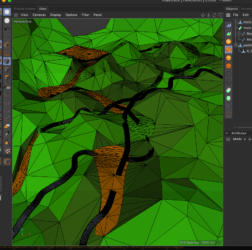
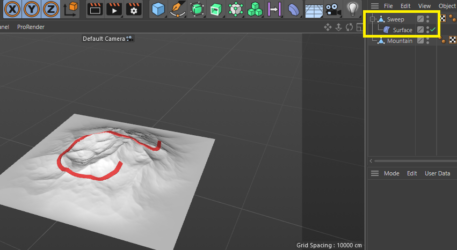
If you are still asking about the best way to apply materials to a road like the one you mentioned, you can easily apply materials and textures to the road then use “surface” feature to make projection of the road on the terrain, like in the screenshots below.
thanks!

Reply to this Discussion! Login or Sign Up