Francois Pénzes
 2
COW Coins
2
COW Coins
Forum Replies Created
-

Hi Maciek
First, Please stop calling it Sony Vegas. Sony SOLD Vegas to Magix. The last version they made was Vegas 13 and that was 5 years ago.
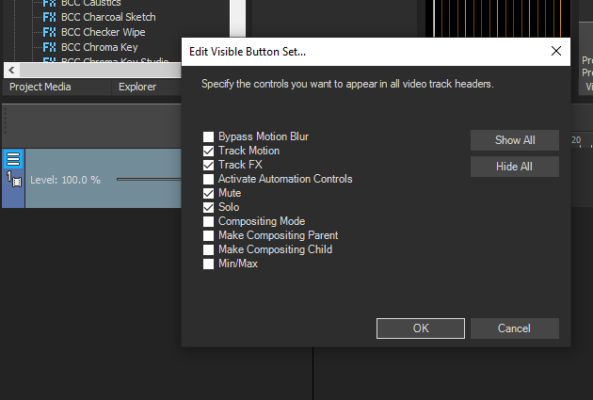
Now on to your question. There is a menu in each of the tracks at the far left, click left once on the 3 little lines. A menu will appear. Click on Edit Visible Button Set… and then choose Track FX.
In my opinion, it is much better to use Track FX instead of Event FX. When you choose the Track FX, it will add it to ALL clips added on that track. When editing, I found that adding clips on separate tracks makes it easier to work on tweaking each one to your liking. It also helps a lot if you name each of your tracks. This way, you can find everything faster. You may be able to remember where everything is in the moment, but if you have to stop for a couple of days and return to it, you may not remember where everything was and which track was what.
Cheers !

-
Hi Bob
There’s no harm in learning how to use a new software. If anything, another perspective on editing will only make you a better editor. I mainly use Vegas but I also use Hitfilm, After Effects and Premiere (in that order) depending on what I need to do. Now, it all depends on if you’re going to do the work remotely or in house. Sometimes it’s a collaborative endeavor. I sometimes do work with Vegas for someone who uses Premiere. Vegas gives me the option of saving the files in .PRPROJ or .XML depending on what you want to send. There are a couple of tutorials on Youtube regarding the different processes.
Hope it helps . Cheers !
-
Francois Pénzes
July 13, 2021 at 6:31 pm in reply to: Will Upgrading From Vegas 13 to 18 Increase Render Speed?Hi Todd
Vegas 13 was released in the first quarter of 2014. Although much has improved software wise since, if you’re still using the same computer configuration, you won’t see a major difference in rendering time. You may even see slower rendering time with the latest version if you computer is to ”old”. Also, rendering time is highly dependent on CPU, GPU, Memory, Bus speed and hard drive type. (reading and rendering on the same drive is not a good idea). What will work great for someone else may not for you. Your rendered file choice will greatly affect render time. I found that getting the absolute best computer configuration is more akin to alchemy than pure science. 😉
Cheers !
-
Hi Alex
Where did you add your TimeCode ? On a separate track or on the same track as the clip ?
Usually, when you drop the TimeCode from FX in a clip (or an Empty Event), it will default to the length of the clip. Your best bet is to add the Timeode FX to an Empty Event and make the empty event the length needed. Keep it on top as Track #1. This way, you can mute or activate the FX as needed and will remain inside your .VEG file for future use and/or reference.
Cheers !
-
Hi Ralph
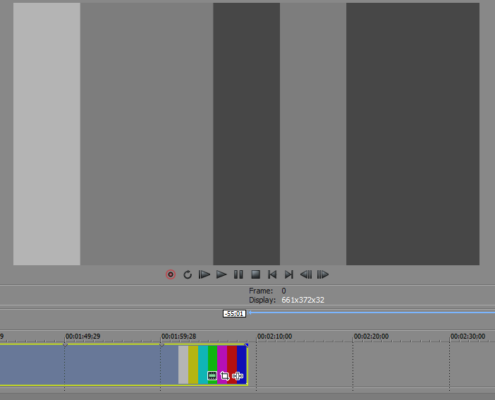
@Richard Swain got me to take a second look at your timeline. Like he said, the original clip added to your time line is B&W. As an example, I added the B&W effect to the timeline below and as you can see, only the preview window is B&W. The clip in the timeline still has colour. Yours doesn’t.
Cheers !
-
Hi Scott
I don’t believe that it’s a missing font problem. I does look like the Vegas software is not reading some of the instructions regarding Capital letters in some areas. Something must have gone awry when you did the install. Sometimes the best approach is to re-install (after making sure that as much of it is un-installed and removed including whats in the registry). Turn off your anti-virus and all other programs during the installation
Cheers !
-
Hi Ralph
Check you FX chains (both). You may have inadvertently added the Black & White effect to your timeline. It’s right under Bézier Masking in the FX chain selection.
Cheers !
-
Hi Christina
Trial version will not let you render if it’s more than 1 min 59 sec. Here’s a crazy option for you, render your project in chunks of less than 2 minutes and then re-assemble them in one of the free video software available out there.
Once everything is done and you’ve recovered from the birthday party, take your time and pick one of the many Vegas options that will suit your needs; Vegas Pro, Movie Studio, etc…
Cheers !
-
Hi Diogo
As Steve said, the ignite Pro plugin from FXHome works great. Once you install Hitfilm, the plugin will be available in Vegas also.
From what I can see by one of your pics, the one with the green BG, you are standing way to close to your screen, hence the dark spot around you. If the camera sees a shadow, for sure you will have a harder time to key it out. In order to work best, the green (or blue) BG has to be evenly lit. Preferably, the BG will have a different lighting source than your subject. Also add a top of the head back lighting in order to better define your subject from the BG (but don’t go too harsh).
Do a couple of test runs with your environment a go with what works best.
Cheers !
-
Hi Jeff and Richard
I have tried a couple of times to find out from Magix what it would take hardware wise in order to be able to get the optimum performance out of Vegas. What manufacturer parts or combo works best. Better yet, forget naming specific manufacturers, let us know what are the best mobo specs, RAM, CPU, etc… I’m sure they’ve tested the living daylights out of it hardware wise. A lot of us make a living using Vegas and would be be more than happy to know so as to better our productivity and not having to guess when it’s time to upgrade our hardware. At what point is it overkill and you’re only spending good money for nothing. Alas, it seems it would be easier to get the nuclear launch codes from Russia AND the U.S.A. than a proper answer from Magix. I guess they don’t want to ruffle any feathers with the various hardware makers. Lets hope some day they have a change of heart…
Cheers !