

-
Sony Vegas help with preview page
Posted by Ralph Richardson on June 29, 2021 at 12:44 amHello I need help with my Sony Vegas setting, so my videos after rendering are coming out gray any help to switch cause I’ve done everything nothing seem to work any suggestions
Francois Pénzes replied 5 years, 2 months ago 4 Members · 9 Replies -
9 Replies
-

Richard Swain
June 29, 2021 at 3:41 amHi Ralph,
Before rendering, in the preview window is the video in color? A photo of your timeline would be helpful. Also what version of Vegas are you using?
-

Ralph Richardson
June 29, 2021 at 10:34 amHey Richard, no the preview page doesn’t show color and I will provide a photo later on today l. I’m using Sony Vegas pro 17. The video part when editing is all grey, I have a window 10 computer by the way
-

Francois Pénzes
June 29, 2021 at 11:28 amHi Ralph
Check you FX chains (both). You may have inadvertently added the Black & White effect to your timeline. It’s right under Bézier Masking in the FX chain selection.
Cheers !
-
Ralph Richardson
June 29, 2021 at 11:33 amHey Francois, when I downloaded Sony Vegas pro 17 I didn’t touch anything but slide a video in and that was it and it came out grey, I will show more pictures to you today
-

Edward Troxel
June 29, 2021 at 7:27 pmThere is no such thing as “Sony Vegas Pro 17”. There is VEGAS Pro 17 by Magix, though. Sony sold VEGAS at version 13 over 5 years ago.
-
Edward Troxel
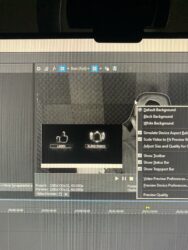
June 29, 2021 at 7:30 pmYou would likely need to upload the VEG file somewhere for someone to load to see where the black and white is coming from. From the one screenshot I see, the “Split Screen” mode is turned on in the preview.
-
Ralph Richardson
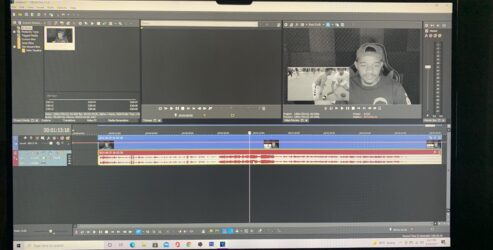
June 29, 2021 at 8:24 pmHere is a full screen photo, it’s all grey and I’m trying to get color back cause with they grey it looks horrible
-
Richard Swain
June 30, 2021 at 1:50 amIt looks to me like your original video clip is black and white – not color. The timeline video doesn’t show the result of any filter you have added, although, in this case it doesn’t look like you have any filters applied. You can try play with the Vegas Color Corrector and maybe enhance the contrast some. Also the lighting in the background (behind the pip on the left) could have been better. What was the original video – film or tape?
-
Francois Pénzes
July 3, 2021 at 6:30 pmHi Ralph
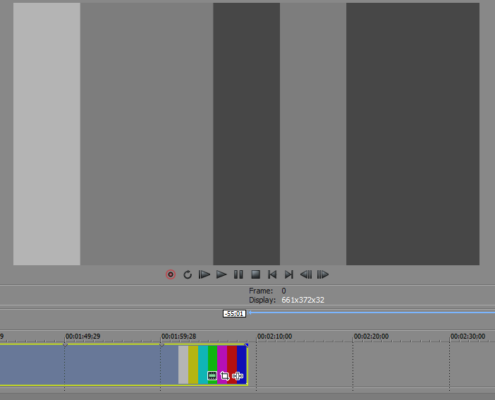
@Richard Swain got me to take a second look at your timeline. Like he said, the original clip added to your time line is B&W. As an example, I added the B&W effect to the timeline below and as you can see, only the preview window is B&W. The clip in the timeline still has colour. Yours doesn’t.
Cheers !

Reply to this Discussion! Login or Sign Up