Francois Pénzes
 1
COW Coin
1
COW Coin
Forum Replies Created
-

Francois Pénzes
June 5, 2021 at 5:40 pm in reply to: [Vegas Pro 14] Need to re-create the audio sounds of a pilot and PA Announcer.You can get a bunch of different BG sound and noise at: https://freesound.org/search/?q=static.
Be carefull not to make your BG to loud. It’s a common mistake.
Cheers !
-
Francois Pénzes
June 5, 2021 at 5:05 am in reply to: [Vegas Pro 14] Need to re-create the audio sounds of a pilot and PA Announcer.Hi Seth
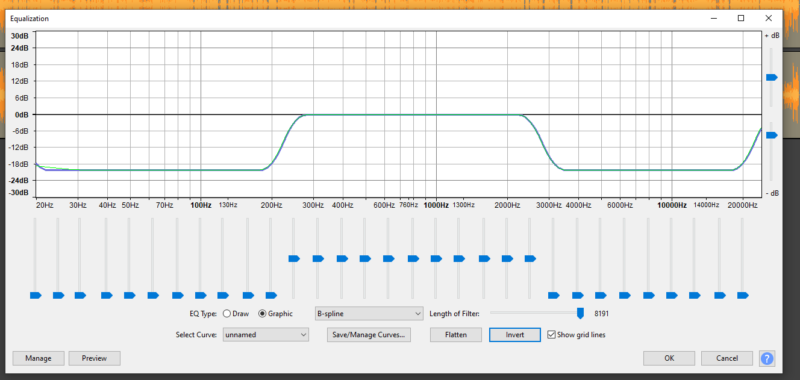
Try the Equalizer effect in the Freeware Dark Audacity, for the pilot effect, start by cutting all the frequencies below 200 Hz and the ones above 3000 Hz. From there, adjust to your liking.
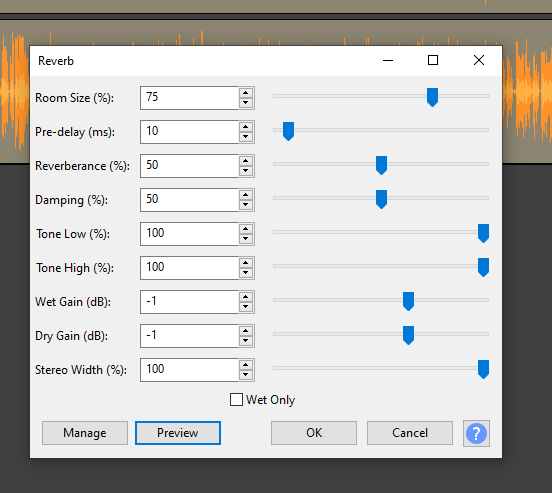
For the airport announcement, use the reverb effect as illustrated and adjust to your liking.
Cheers!

-
Hi Krzysztof
I don’t believe that you are doing something wrong. I had the same kind of problem and so did a friend of mine when it came to rendering. My educated guess is that somehow, the Vegas software doesn’t like some of the way that certain computers will physically deal with memory. I’ve move on to a different computer, and so did my friend, and we don’t have that problem anymore. The way I found worked with the problem was that before rendering, I would make sure I had saved everything and then shut down and restarted the computer. ( Not just a re-start but a full shutdown for at least 15 seconds) Just make sure that your first step after opening Vegas is rendering. Hope it works for you.
Cheers !
-
Found the solution. For anyone interested, see page 68 of the manual. Would have been easier if Canon had included a picto in the manual. ? Cheers !
-
Hi John
Without having much details, check your shutter speed. here’s a link to a pretty decent tutorial.
Hope it helps.
Cheers !
https://www.youtube.com/watch?v=9-Jum6TrC1o
Some contents or functionalities here are not available due to your cookie preferences!This happens because the functionality/content marked as “Google Youtube” uses cookies that you choosed to keep disabled. In order to view this content or use this functionality, please enable cookies: click here to open your cookie preferences.
-
What version of Vegas are you using so I can use the right one for screen shots ?
-
Francois Pénzes
May 8, 2021 at 12:32 pm in reply to: The best way to keep your footage for the futureHi Jen
From everything I’ve read so far the main issue is more one of physical medium than format. Now, cloud is nice but will that particular supplier still be in business down the road ? If you choose to go the way of a physical container for your archives, keep in mind that even the best/highest quality DVD/BR has a finite life span. They tend to start showing data degradation after 5 years or so, especially the re-writable ones. There are optical disk archival disk reader/recorder available but prices right now are kinda steep. Sony has one out there for 9000.00$ and a 5.5TB write once disk goes for around 180.00$.
I’ll leave you with a couple of links to some reading if you are interested.
Cheers !
-
Francois Pénzes
April 25, 2021 at 7:51 pm in reply to: Putting a marker on video event (not on timeline) to mark specific time.Me again. Found this link on Cow: (there are others if you do a query)
https://www.vegascreativesoftware.info/us/forum/lock-markers-is-this-possible–68440/
-
Francois Pénzes
April 25, 2021 at 7:42 pm in reply to: Putting a marker on video event (not on timeline) to mark specific time.Hi Joseph
The only way I know of (unless they’ve changed it in V18) would be to add the markers in Trimmer and then drop the clip(s) into the time line(s). Markers added in trimmer will stay attached to the clip even if you move it around.
Cheers !
-
Hi John
Deadline for registration was January 15. That may be the reason why you didn’t get a response if you registered later.
This is the generic email that was sent after registration:
Greetings from VEGAS Creative Software,
We have been overwhelmed with the response from our call for new beta testers. We thank you very much for applying.
Our team will be evaluating the applications over the next several weeks. We will be keeping the application period open until the middle of January.
The VEGAS team will be selecting new testers based on several criteria including experience, usage, and system specifications. We are looking to add some diversity in our program so we will be looking to add novice users and lower end system along with professional users and high-end machines. However, we do have a limited number of slots available for new beta testers, so not everyone who has applied will be able to join the team.
We intend to contact everyone who has been selected to join the team by the middle of February. At this point, we will require those who have been selected to sign a non-disclosure agreement and to create an account on the VEGAS User Forum (if you do not already have one).
Again, thank you very much for applying. Have a wonderful holiday season and a fantastic New Year!
Best regards,
Derek
Hope it answered your question.
Cheers !