Forum Replies Created

Page 5 of 75
  • Hi Charles

    Your best bet is to put both cameras side by side and record on both under the same conditions. Make sure you have the same settings on both and once you’ve done that, you will be the best judge of the final results. Many times I have seen different end results from cameras of the same make and model. You will be the best judge by looking at the footage.

    Cheers !

  • Francois Pénzes

    January 11, 2021 at 9:24 pm in reply to: Need help motion tracking a mask. (Bezier Mask)

    Hi Randen

    Here’s a link to a video tutorial on tracking from the Vegas Pro guys. Take note that automated Bezier Tracking started with Version 16. Prior to V16, you had to do it frame by frame…

    https://www.youtube.com/watch?v=Xz_PJUQAbp4&ab_channel=VEGASPro

    Cheers !

    Some contents or functionalities here are not available due to your cookie preferences!

    This happens because the functionality/content marked as “Google Youtube” uses cookies that you choosed to keep disabled. In order to view this content or use this functionality, please enable cookies: click here to open your cookie preferences.

  • Francois Pénzes

    December 19, 2020 at 2:05 am in reply to: Cant open an MP4 file from a Canon R6

    Hi Rob

    Ignore my previous post. It’s the variable FRAME rate that Vegas doesn’t like. Sorry mate. ( I think my cold medicine is finally having an effect…)

  • Francois Pénzes

    December 18, 2020 at 10:37 pm in reply to: Cant open an MP4 file from a Canon R6

    Hi Rob

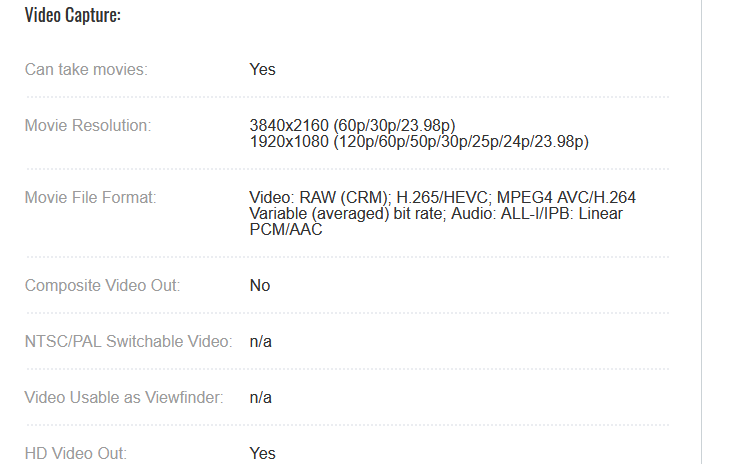
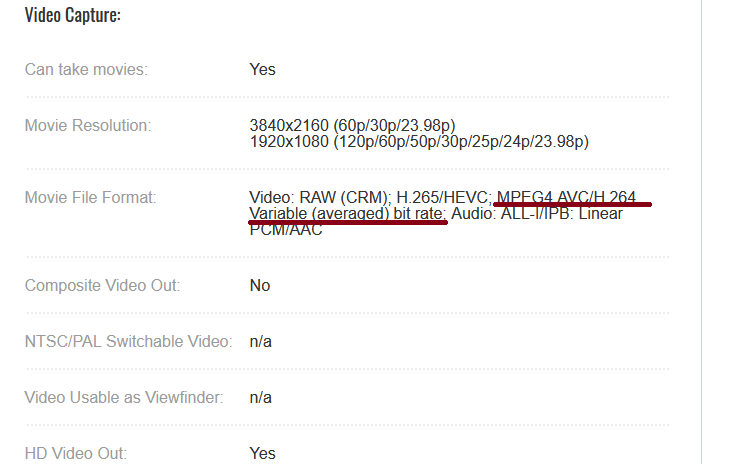
    I just checked the specs for the R6. I’m confident that your problem lies with the file having a variable bit rate (see pic taken from Canon web site) Vegas doesn’t like variable bit rate. If possible, use constant bit rate when recording. As TOM mentioned, re-coding the file with a constant bit rate should do the trick.

  • P.S.: Would this work for you ? Flashing red light and running counter.

    Think I got it here: https://www.videvo.net/stock-video-footage/camcorder%20overlay/

  • Hi Rob

    Downloaded a free package of viewfinder overlays last month. Unfortunately, I can remember where (wait ’till you get to be my age…) Send me an email address where I can send you a link to a wetransfer where you can download what I have.

    Cheers !

  • Francois Pénzes

    December 16, 2020 at 9:07 pm in reply to: How to fix “jumping” video frame?

    Hi Sergey

    The reason I was asking about your Vegas version is that V14 came with ProDad Mercalli V4 that would have had the stabilizing feature (without loosing too much of the frame). I’m sure that you have tried the stabilizing feature included in the Vegas FX list an found that it works great but got rid of a lot of the frame. However, there is another way of stabilizing your video at no cost by using the free version of Hitfilm. The fun part is that it integrates perfectly with Vegas. However, it won’t be a one button operation. You will have to go thru the motion tracking feature. If that is not your cup of tea, your other options are to purchase the proper plug-ins. I’ve downloaded your video and found that the material posted on Youtube came most likely from a VHS recording. The ”jumping” that you’re seeing is from a bad control track that has decayed or has been damaged. Bare in mind that whatever stabilizer you’ll be using, it will be very CPU intensive.

  • Francois Pénzes

    December 6, 2020 at 12:21 pm in reply to: How to fix “jumping” video frame?

    Hi Sergey

    What version of Vegas Pro are you using ?

  • Francois Pénzes

    November 15, 2020 at 3:17 am in reply to: High framerate video problem

    Hi Antti

    I was hoping to replicate your problem. What software (including settings) was used to record game-play ?

  • Francois Pénzes

    November 12, 2020 at 3:07 pm in reply to: High framerate video problem

    Hi Antti

    Clip from the original 600 fps. It can be rejected clip, doesn’t even have to be in focus. As long as it was shot the same way, with the same camera, etc…

Page 5 of 75

We use anonymous cookies to give you the best experience we can.
Our Privacy policy | GDPR Policy