Forum Replies Created

Page 2 of 27
  • Andy Kiernan

    April 25, 2024 at 10:41 am in reply to: Looking for an effect that will unfold like a book

    maybe you can precomp the image and mask it in half, move anchor point to centre, duplicate, invert mask (now you have two layers making up the whole image), then make both 3d layers and you can rotate both in opposite directions to ‘fold’ it up (with a camera in relevant position)

  • Hi again Josh!

    For this kind of very specific texture, I probably wouldnt use a content aware fill type deal.

    I would track the area, make a PSR null and attach a still frame (a frame painted in PS), the mask in where needed. Then use a levels effect if there are any lighting changes.

    This will work for a camera that isnt moving too much though (as in large movements), if it is, then multiple tracks and frames will be needed I think.

  • Hi Josh,

    Could you explain abit more what youre trying to achieve? Like, what you are wanting to paint out?

    If you are using Mocha AE, which is a great tracker, its worth fiddling with what is getting recorded during the track. If there isnt so much parallax in the shot, unticking the perspective can help. Sometimes just having transform is best, give it some tests. Once tracked you can use the quick stabalize button to check the track too, it keeps the tracked area still, so if you see it wobbling there you know another go is needed

    If the shutter speed was low and theres a lot of Mblur, not much you can do about that, except to match by eye.

    AEs 3D tracker is sometimes great, not always, but looking at your image, there seems to be a fair few good areas of features.

    if the track is slipping, maybe boost the contract on the clip and precomp, also use a touch of blur in the precomp if theres any noise as this can cause a wobbly track

    Personally when I get something i need solid and isnt working well in AE, I use PF Track, its brilliant (although really expensive, maybe they have a month sub or something).

  • Andy Kiernan

    March 21, 2024 at 4:34 pm in reply to: Lost all my materials in the manager

    it looks like an icon associated with uv/painting/bodypaint. Have you tried resetting your workspace?

  • Andy Kiernan

    February 29, 2024 at 12:18 pm in reply to: Clothes, cloths, piles…

    Thanks Kouraib.

    Good suggestion for the initial pile.

    I played further, managed to make a simple pile, made editable and then put into fracture object to allow me to use mograph. I then used spline effector and others so get me somewhere. I think this gives me some flexability for art direction, as i know the director will want to fiddle!

    To reduce intersections i am using a push apart effector.

    I am still hoping to add some kind of cloth motion to the elements, but when i re add cloth tag it doesnt work as i would have hoped. I guess i will have to use the mix animation tab but not entirely sure what settings would be best.

    I very much appreciate your reply.

    Thanks

    AK

  • Andy Kiernan

    February 27, 2024 at 12:11 pm in reply to: Green Screen Keying Problem

    sometimes there’s only so far you can take it ( its what i find anyway!) For what’s left, i would suggest using RotoBrush3 on it, this will give you a fairly decent mask with a bit of work. Then use as another layer or matte or whatever. Id suggest rendering out the RotoBrushed layer to a mov and reimporting as the effect can get in the way sometimes!

  • I guess im missing a part of the set up as I cant replicate, Ive attached an ae file for how i did what I think youre doing, let me know how it differs.

  • Andy Kiernan

    February 27, 2024 at 10:20 am in reply to: Offset Paths Changes Direction of Trim Path.

    Hi Tom, I cant seem to replicate this, an AE shape with offset paths and trim paths trims anti clockwise, as does an illustrator file i imported and converted to shape, so i guess im missing something. Are you able to share the troublesome Ai file? or ae file. Or some screenshots of settings and what not

  • Andy Kiernan

    February 23, 2024 at 9:23 am in reply to: Displacer-Deformer with Node-Material ?!

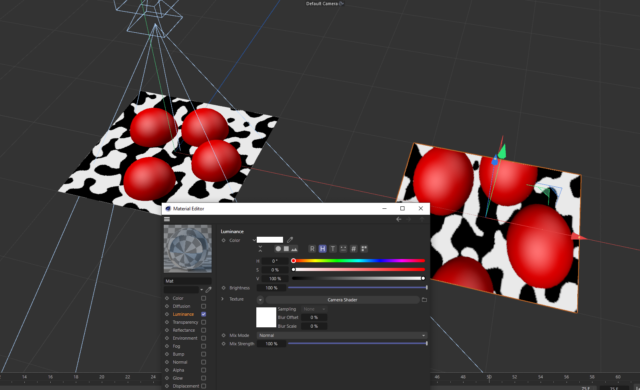
    my idea was to use the mograph camera shader (it uses the view of a cam as a texture), unfortunately when piped into displacer, it dont work, it moves all points up and down rather than respecting the greyscale image, i dont know why yet!

    But maybe a start?! Sorry I cant help more.

  • Andy Kiernan

    February 22, 2024 at 1:45 pm in reply to: Hair flickers in Octane

    yer a project file may be helpful. Or screenshots of your hierarchy. I cant replicate your issue.

    The geometry, is the vertex count consistent? does the geo deform? I just wonder if the geo is causing the hairs to regrow every frame or something. In the hair object guides section, there is an auto Update toggle, try with that off? It may not have anything to do with it though!

    If you swap to standard renderer do you get a similar issue (to see if we can discount octane being the issue)

Page 2 of 27

We use anonymous cookies to give you the best experience we can.
Our Privacy policy | GDPR Policy