Creative Communities of the World Forums

The peer to peer support community for media production professionals.

Activity Forums Adobe After Effects How to get a “rock solid” track on a shaky shot??? (PART ONE)

  • How to get a “rock solid” track on a shaky shot??? (PART ONE)

    Posted by Josh Mannis on April 5, 2024 at 11:15 pm

    Hey gang,

    Dr. Stupid over here needs some tracking / remove / clean plate advice.

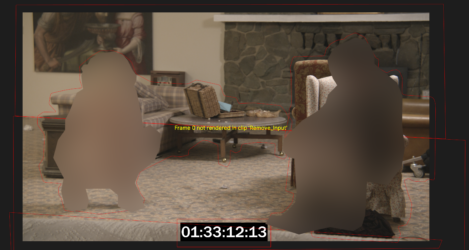
    I’m getting a lot better with tracking, but my clean plates are still sliding around. I’m attaching a screenshot to let you see what all I’m dealing with in this shot. The piece is shot in sort of a verite style, so the camera moves around a bit.

    I tracked the wall and floor separately, but I’m wondering if I need the entirety of each, or if I should be focusing on particular areas?

    With the grid turned on, things seem solid, but the pattern of the rug is REALLY hard to get lined up. So, how does one verify that the track is rock solid before going through the whole process and rendering and so on?

    Eternally thankful in advance!

    -Josh

    After Effects 2024

    3 GHz 10-Core Intel Xeon WRadeon Pro Vega 64 16 GB28 GB 2666 MHz DDR4
    Josh Mannis replied 2 years ago 4 Members · 5 Replies
  • 5 Replies
  • Andy Kiernan

    April 7, 2024 at 5:07 pm

    Hi Josh,

    Could you explain abit more what youre trying to achieve? Like, what you are wanting to paint out?

    If you are using Mocha AE, which is a great tracker, its worth fiddling with what is getting recorded during the track. If there isnt so much parallax in the shot, unticking the perspective can help. Sometimes just having transform is best, give it some tests. Once tracked you can use the quick stabalize button to check the track too, it keeps the tracked area still, so if you see it wobbling there you know another go is needed

    If the shutter speed was low and theres a lot of Mblur, not much you can do about that, except to match by eye.

    AEs 3D tracker is sometimes great, not always, but looking at your image, there seems to be a fair few good areas of features.

    if the track is slipping, maybe boost the contract on the clip and precomp, also use a touch of blur in the precomp if theres any noise as this can cause a wobbly track

    Personally when I get something i need solid and isnt working well in AE, I use PF Track, its brilliant (although really expensive, maybe they have a month sub or something).

  • Josh Mannis

    April 22, 2024 at 8:58 pm

    Thanks Andy! Unticking the perspective did it. I also was tracking a wall unnecessarily which might have been confusing the situation…

  • Brie Clayton

    April 22, 2024 at 9:38 pm

    Thank you for solving this issue, Andy!

  • Eric Santiago

    April 23, 2024 at 1:22 pm

    Just to add to Andy’s tips, you can do whatever it takes to your tracking source to get the software to track. Just remember to duplicate (if using pre-comp) the layer and hide it, then do a switch before final render.

    I’ve done this many times only to forget to shut-off helpers e.g. contrast, edges, etc… in the final VFX plate and have my colleagues have a laugh 😛

  • Josh Mannis

    April 25, 2024 at 11:17 pm

    Getting mocked at work is an important part of the process!

We use anonymous cookies to give you the best experience we can.
Our Privacy policy | GDPR Policy
