Forum Replies Created

Page 1 of 3
  • Pablo Rivasplata

    February 26, 2026 at 4:37 pm in reply to: Add keywords to a project upon creation

    Yes, you can do it. Select your new Project > Click on the small Key icon below the main menu bar > enter your keywords in the window that opens upon your click.

    Hope this helps,

    Pablo

  • Pablo Rivasplata

    October 29, 2025 at 6:00 pm in reply to: Missing Magnetic Mask mattes

    Hi Craig,

    You may get your project back by restoring a FCP Library Back-up

    Hope this helps.

    Pablo

  • If you asked your vendor, then you already have an answer. I suggest you try lenofx.com for very efficient and costumizable plug-ins.

    Pablo

  • Pablo Rivasplata

    June 15, 2023 at 1:19 am in reply to: 24p / 23.98 sync problem?

    You may try selecting your audio and video tracks in the Browser, then go to the Menu Bar > CLIP > Synchronize Clips.

    Really hope this solves the issue.

    Pablo

  • Pablo Rivasplata

    May 4, 2022 at 2:35 pm in reply to: Resize quality

    Also, it will help us give a better answer if you tell us what version of FCPX, processor and Mac OS you are using.

  • Hi Jenn,

    You can select all subtitles and make the changes you want at once.

    Hope this helps.

  • Pablo Rivasplata

    September 19, 2021 at 4:24 pm in reply to: audio synchronization problem

    Hi Francesco,

    You can change the frame rate of your audio files in Apple Compressor.

    Hope this helps,

    Pablo

  • Pablo Rivasplata

    July 28, 2021 at 12:50 am in reply to: Sneaky Changes in FCP 10.5.4

    Hi David,

    Yes, what a bad idea to have a pointer with two points. To be consistent, Apple should use the blade image for the ‘Blade” edit option. Otherwise, they must rename it “Scissors”.

    There is a “Provide final cut pro feedback” inside Final Cut’s first menu. I will do that.

    Cheers!

    Pablo

  • Pablo Rivasplata

    May 10, 2021 at 3:41 pm in reply to: Digitize VHS using FCPX

    Hi Bill,

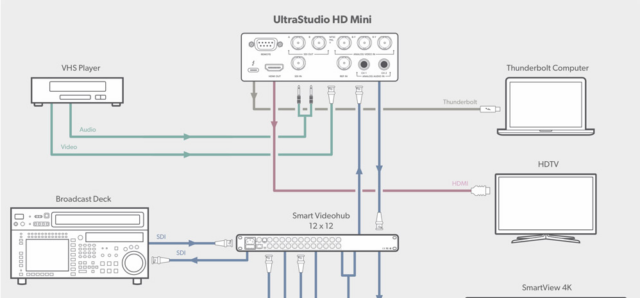
    I’m possitive that you can capture composite video directly with your UltraStudio HD Mini. The “Y” component input is the one that accepts the composite video signal. If you have RCA cables, then you should get an RCA to SDI adapter and 2 RCA to 1/4″ audio adapters as well.

    See the attached graphic from the blackmagic website.

  • Pablo Rivasplata

    May 8, 2021 at 2:58 am in reply to: Digitize VHS using FCPX

    I guess all you need to do is connect your VHS Player to your UltraStudio HD Mini using the breakout box cable analog connectors that come with it. Then use Blackmagic Desktop Video to capture your videos and then import them into FCP.

    Hope this helps,

    Pablo

Page 1 of 3

We use anonymous cookies to give you the best experience we can.
Our Privacy policy | GDPR Policy