Creative Communities of the World Forums

The peer to peer support community for media production professionals.

Activity Forums Apple Final Cut Pro Resize quality

  • Resize quality

    Posted by Frank Valtellina on May 4, 2022 at 11:02 am

    When I export a FCPX project 1920×1080 that contain clips 4K, the file mp4 or ProRes is a little bit blurry and not well define. The same result if I send project rendering to Compressor. If I make the same thing with Motion 5 the quality is better and the image is more clear and sharp. Has anyone noticed this? I invite you to take a test.

    Frank Valtellina replied 3 years, 10 months ago 4 Members · 5 Replies
  • 5 Replies
  • Jeremy Garchow

    May 4, 2022 at 12:51 pm

    What settings are you using in each application?

  • Pablo Rivasplata

    May 4, 2022 at 2:35 pm

    Also, it will help us give a better answer if you tell us what version of FCPX, processor and Mac OS you are using.

  • Frank Valtellina

    May 4, 2022 at 3:40 pm

    I did the same test with both Imac Pro and Mac Book Pro M1 Max and I got the same result. I am using FCPX 10.6.2 the project is 1920×1080, the file in the timeline is ProRes 4K I export an mp4 or a ProRes in 1920×1080 and the image is as if it were not very detailed

  • Jacqueline Bazinet

    May 9, 2022 at 7:20 pm

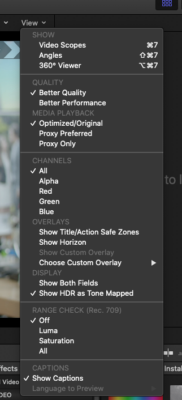
    Check your timeline viewer settings before you export. They should be on “Better Quality” and “Optimize/Original” media playback

  • Frank Valtellina

    June 23, 2022 at 7:21 am

    Hi Jacqueline, Better Quality or Better Performance only affect the viewer and have no effect on the export. Weird… if you put the 4K clip in a 4K timeline and export at 1080 is better than if you put the 4k clip in a 1080 timeline and export in 1080.

We use anonymous cookies to give you the best experience we can.
Our Privacy policy | GDPR Policy