Forum Replies Created

Page 9 of 91
  • Neil Sadwelkar

    October 8, 2021 at 7:44 am in reply to: Recover an LTFS Volume

    Do you know what software was used to write this LTO, or was it drag & drop?

    And, in what software are you doing this restore? Or is it drag & drop?

  • Neil Sadwelkar

    September 30, 2021 at 12:07 pm in reply to: New DIT friendly storage and LTO devices from GoSymply
  • Neil Sadwelkar

    September 9, 2021 at 4:02 am in reply to: LTO cartridge taking long time to erase new/old media

    The Atto H1280 works fine with Bru, Toyota, and Canister. And it works with a MBP via a Sonnet Echo Express SEL. I have the exact same config and have written many petabytes of data using Bru, Yoyotta and Canister. They are all rock solid.

    With LTO-7 and 8, the write or restore speed I see, is completely dependent on the drives I read from. So, for example, if I backup a client’s data off a Lacie Rugged or a Seagate slim portable drive, then it gets backed up at a steady 90-110 MB/sec. If I backup off SSD or 4 or 8-bay RAID, then I can backup to LTO at as high as 300 MB/sec. 1 TB gets written to LTO-8 in under an hour. Same for restore from LTO-8 to RAID.

    It looks like you are not using any purpose built software too write your LTOs but you’re doing a drag-drop or copy-paste from hard drive to LTO tapes with the free HPE Storeopen LTFS software.

    Way back in Jan, Martin of Toyota offered to let you use a trial version of Yoyotta and create logs for them to troubleshoot? Did you try that? Or have you tried, with your config, to write to LTO tape using software like Yoyotta, or Canister, or Bru or any other software apart from Storeopen?

    My feeling is that you have a combination of issues from software, and from old or partially working LTO drives. And since you’re doing this sporadically, and changing things around from system to system, drive to drive, to find a solution, you’re going around in circles.

  • Neil Sadwelkar

    September 6, 2021 at 7:12 am in reply to: Software for IBM LTO6 for LTFS

    To write LTFS, free software or command line software is not generally a reliable way to make backups. There is little or no verification, and the way data gets written, often takes longer, and is sometimes laborious to restore back from tape when it needs to be restored.

    There are many paid softwares with different levels of features and complexity that enable reliable and easy writing to LTO LTFS. Most also have a trial version so you can try before committing.

    From my experience, I would recommend Canister from Hedge. It costs $299 and is perpetual. After the first year, additional years are optional and $99 per year. There is also myLTO at the same price, and Yoyotta ID LTFS ($497), Archiware and others at higher price, and more features than Canister.

  • I think the incompatibility has something to do with your hardware along with MacOS.

    I am typing this on a 15″ Late 2016 MacBook Pro running MacOS 10.14.6. And there’s Resolve 17.3 installed and running on this system. I also have Resolve Studio App Store version 17.3 and it runs fine on this system.

    Before 17.3, this MacBook Pro had Resolve 17.2.2, and before that 17.1.x.

    I have a feeling that if you’ve installed Resolve 17.0.x beta, then you may have to uninstall it and then install the shipping version. Bear in mind that uninstalling Resolve also uninstalls the database. So please backup database before uninstalling.

  • Neil Sadwelkar

    August 28, 2021 at 5:16 am in reply to: LTO – MLogic / Yoyotta, error 2 problem

    I have used Yoyotta for over 3 years, using it to backup over a Petabyte of data. And I haven’t encountered this error.

    I’m not using an mLogic drive. I have three drives. LTO6, LTO7 and LTO8. All three are connected via SAS to an external Thunderbolt PCIe box with an Atto SAS card inside it. I’m using three different Sonnet boxes, 2 different Atto SAS cards, and have run Yoyotta on a 15″ 2015 MBP, upgraded that to a 2017 15″ MBP, and now on an Intel Mac mini.

    So, the point is, Yoyotta has worked on a variety of configs and this error didn’t show up. And it looks like you too have changed things a bit but your error won’t go away. I think the common factor in your setup seems to be the mLogic LTO drive. Have you asked their support?

    Is it an option for you to borrow a machine that’s not mLogic, from someone else and check?

  • Neil Sadwelkar

    July 18, 2021 at 9:59 am in reply to: OWC LTO Discontinued?

    Bru PE was, or course discontinued even when Tolis existed. They replaced with with Argest.

    After a long hibernation, Argest is now available at OWC here…

    https://software.owcdigital.com/argest/backup/

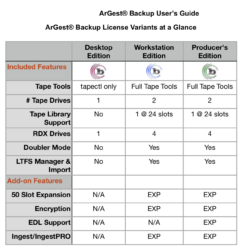
    The three versions cost $169, or $349, or $549 depending which features you need.

    A table in the Argest manual describes the differences

    Then old Bru PE can still be downloaded from the Tolis site. It works for free for restore. And if you have a license, then the downloadable version still works.

  • If you have a working Bru PE, it will continue to work and read and write Bru tapes. I have 2 and they work.

  • Neil Sadwelkar

    June 10, 2021 at 5:25 am in reply to: Which is faster, TB3 (USB-C) or SAS?

    When you connect to the 8-bay QNAP NAS over TB3, you are actually connecting over 10GigE so the speed you’re seeing, 800-900 MB/sec, is fine.

    But even if you had a new TB3 RAID, like a G-Speed Shuttle XL or an Areca 8050, inside this there’s a TB3-PCIe adapter connected to a SAS RAID card which runs the RAID. The SAS RAID card is usually an Areca or an Atto.

    Which is precisely what you’ve been doing with your Atto R680 and Enhance E8 – SAS RAID card connected to a SAS JBOD.

    Are you using your R680 inside a TB3-PCIe box like a Sonnet?

    For the future, your E8 is going to run just fine, there aren’t too many parts inside that could fail. There’s just a power supply and some SAS-SATA cables. There are many SAS JBOD boxes that could replace your E8.

    To replace your R680, as far as I can tell, Atto doesn’t have a SAS RAID card any more, only HBAs. They do have a PowerCenter Pro software that ships with new cards, but that’s limited to RAID 0, 1, 10.

    So, you could look at an Areca Arc-1226-8x or Arc-1883x which are SAS RAID adapters.

    Both have 2x SFF-2644 ports, so you’ll need 2x SFF-8644 to SFF-8088 Cables to hook up the Areca to your E8. To replace the E8, whenever that happens, there’s the Areca ARC-4038, an 8-bay JBOD.

  • Santanu,

    Have you checked with Backblaze whether unlimited is really unlimited, as in, 40 TB is fine? Or maybe there’s some limit on a per day or per week/month basis. Or maybe they permit only ‘local’ files on your PC/Mac to be backed up, and do not NAS or external drives.

    Apart from this, you may run into one or both of the following.

    Backblaze deletes anything that’s not on your system for 30 days. And, they delete anything backed up off an external drive if that drive is not present when backing up.

    Two, there is probably a throttle on upload speeds further down the line. Or maybe for <font face=”inherit”>download speeds. So, getting back your data may be very slow. I </font>was<font face=”inherit”> reading the experience of a poster who wanted to </font>backup<font face=”inherit”> 64 TB to BB. After a year, he managed 29 TB. So he gave up. And he claims to have a 100 Mbps up and down line.</font>

    But if neither of these are true, then $60 per year is a good deal.

    Or, as Paul suggested, getting bare drives, and a dock, and treating drives like ‘cassettes’ that you pop into the dock and copy data to and from the drives is a viable option too. Its way faster than LTO, and will cost less than LTO. Consider the data safe for about 3-5 years, and be prepared to migrate some or all of it to new drives after that time passes. In any case, by 2025-26 or so, a 50 TB drive will cost as much as a 16 TB drive costs these days. So the number of drives you need will also shrink.

    Take a look at Seagate Backup Expansion drives of 16TB available on Amazon India for about Rs 25,000. Inside this there’s a Seagate Exos enterprise drive which you can consider safe for at least 5 years. With these 16TB drives, even over USB3, you’ll able to backup 40TB in 60-90 hours. If you get Hedge, you could also make two backups at the same time at the same speed if your source is fast enough.

Page 9 of 91

We use anonymous cookies to give you the best experience we can.
Our Privacy policy | GDPR Policy