Forum Replies Created

Page 16 of 36
  • Hector Vera

    April 1, 2024 at 3:43 pm in reply to: Transform Edits Not Moving Smoothly

    Perhaps if you are able to show like a video clip on whats going on, I can analyze it better and see whats going on. How many keyframes you have in your animation? There could be some missing in between that seems to cause it to transform as smoothy as you wish. Hope to hear back from you soon and maybe I can understand it better with a video clip! Best of luck.

    Perhaps this resource I found can help you a bit figure what you could be missing there: https://www.storyblocks.com/resources/tutorials/transform-effects

  • Hector Vera

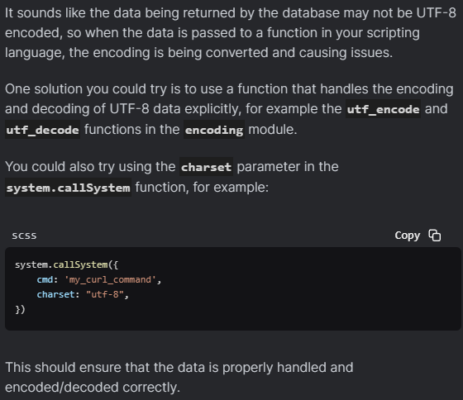
    March 27, 2024 at 2:35 pm in reply to: Problems with encoding while fetching data

    Here is an answer I found for your solution, hopefully this will help you. Check image attachment for the answer! 🙂

  • Hector Vera

    March 27, 2024 at 2:31 pm in reply to: BodyMovin Importing Problems

    There could be something wrong with the files itself thats not allowing itself to be imported to After Effects. I found this tutorial to see if this is another way you have not tried yet to export your Lottiefiles to Adobe After Effects. Here is the video: https://www.youtube.com/watch?v=SfaohlYjkqk

    Hopefully it helps! 🙂

    Some contents or functionalities here are not available due to your cookie preferences!

    This happens because the functionality/content marked as “Google Youtube” uses cookies that you choosed to keep disabled. In order to view this content or use this functionality, please enable cookies: click here to open your cookie preferences.

  • Hector Vera

    March 18, 2024 at 11:20 pm in reply to: Sony EX1 and Zoom H4 and H6 losing sync

    Sometimes you may need to convert the original file format of what your Sony EX1 and Zoom H4 uses to a format that is fully supported by Premiere Pro or Sony Vegas. So if you do that, you shouldn’t have to cut clips to 30 minutes or less. Some cameras just does not record in a format that works automatically on some video editing programs unless you install a codec for it and thats not always guaranteed! Hope this helps and best of luck!

  • Hector Vera

    March 18, 2024 at 11:11 pm in reply to: GPU / HVEC crashing?

    That is strange and shouldn’t be doing that. If it happens again, I advise that you check the cause of the error. Sometimes when that happens to me, it sometimes can be a specific file on your computer’s file directory that can be causing it to crash when rendering. Once I found the file causing it and its deleted, often than not, it will be fully working again. Hope it helps and you can find the cause of your issue soon as well!

  • Basically you use the Razor Tool option on the timeline and then you click on the clips you wish to be cut. Then you can remove the gaps after applying the cut tools on both ends of the gap that you then want to right click and remove.

    Here I found more information explaining step by step on how to do so: https://helpx.adobe.com/premiere-pro/using/split-or-cut-clips.html

    You can also add dissolve transistions after you cut the clips to stick them together so they can fade from one clip to the next. Here is a tutorial for that too: https://helpx.adobe.com/premiere-pro/using/transition-overview-applying-transitions.html

    Best of luck and hope it helps!

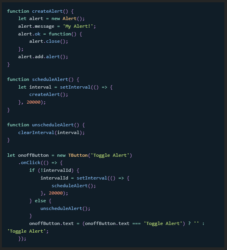
  • Was able to generate this answer using an AI Tool called Character.ai, hope this helps in some ways:

    Yes, this is possible! You can use setInterval() to schedule a code block to run after a specified amount of time, and clearInterval() to stop it from running. Here’s some sample code that implements this functionality:

    (Picture of the code as an attachment.)


  • Hector Vera

    February 21, 2024 at 6:42 pm in reply to: Urgent Question?? About 3d text animation & smoke effect

    So I am guessing you want the moving text to zoom out from the smoke and you want the smoke to react to the moving text right? Perhaps applying some blur from the both sides of the text as it pops out can create that atmosphere with the smoke.

    Maybe this video I found can give you some insight on what you are looking for: https://www.youtube.com/watch?v=ODk7h_8jvUA Hope it helps!

    Some contents or functionalities here are not available due to your cookie preferences!

    This happens because the functionality/content marked as “Google Youtube” uses cookies that you choosed to keep disabled. In order to view this content or use this functionality, please enable cookies: click here to open your cookie preferences.

  • Hector Vera

    February 19, 2024 at 4:56 pm in reply to: Premiere and MacOS Sonoma-is it working? (update)

    I do not own a Mac myself so I cannot say from experience but if the company itself is forcing you to switch into that, I would suggest checking some of these YouTube videos so you can have an idea on how the Sonoma interface works and reviews upon it as well: https://www.youtube.com/results?search_query=Sonoma+14.3

    They may or may not have changed some layouts of how you used to work in the previous version of Premiere Pro, so its good to have an idea and be prepared for the changes before you are forced to migrate to it so you can be ready to work on it quickly. Best of luck!

  • Hector Vera

    February 19, 2024 at 4:52 pm in reply to: Premiere CS5 and Kona LHi problem

    It could be the wrong drivers that you have installed. Did you restarted your computer after installing the plugin and then reopening Premiere Pro to see if this plugin is properly installed?

    Make sure you download the plugin from the official website of AJA here and be sure its EXACTLY compatible with your version of Adobe Premiere Pro: https://www.aja.com/support

    Hope it helps and best of luck!

Page 16 of 36

We use anonymous cookies to give you the best experience we can.
Our Privacy policy | GDPR Policy