Creative Communities of the World Forums

The peer to peer support community for media production professionals.

Activity Forums Adobe After Effects Expressions Help, I don’t know if this is even possible (alert message every “x” seconds)

  • Help, I don’t know if this is even possible (alert message every “x” seconds)

    Posted by Vincenzo Imbimbo on February 20, 2024 at 10:22 am

    Hi, i want to create an After Effects Script UI with a button that toggles on/off, when you press it a notification (alert()) pops up every 20 seconds with a message, you can click “ok” to close that pop up and every 20 seconds the same pop up will appear, if you press the on/off button again the pop up stops opening, is this even possible? I tried using the intervalId but nothing happens, this is a little piece of the code:

    onoffButton.onClick = function() {
            // Check if the interval is already running
            if (intervalId) {
                // If it is, clear the interval and reset the intervalId
                clearInterval(intervalId);
                intervalId = null;
                onoffButton.text = "On"; // Change the button text back to "On"
            } else {
                // If not running, start the interval
                intervalId = setInterval(function() {
                    // Show an alert every 20 seconds
                    alert("my alert");
                }, 20000); // 20000 milliseconds = 20 seconds
                onoffButton.text = "Off"; // Change the button text to "Off"
            }
        };

    Yoan Boisjoli replied 2 years, 4 months ago 3 Members · 2 Replies
  • 2 Replies
  • Hector Vera

    February 22, 2024 at 5:09 pm

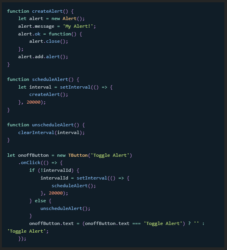
    Was able to generate this answer using an AI Tool called Character.ai, hope this helps in some ways:

    Yes, this is possible! You can use setInterval() to schedule a code block to run after a specified amount of time, and clearInterval() to stop it from running. Here’s some sample code that implements this functionality:

    (Picture of the code as an attachment.)


  • Yoan Boisjoli

    March 7, 2024 at 12:32 pm

    Here’s an improved version of your script that ensures the functionality you’re seeking. This script checks if the interval is already running and toggles it accordingly. Additionally, I’ve added comments for clarity:

    // Define a variable to hold the interval ID outside of your button click handler to maintain its scope

    var intervalId = null;

    onoffButton.onClick = function() {

    // Check if the interval is already running

    if (intervalId) {

    // If it is, clear the interval to stop the alerts and reset the intervalId

    clearInterval(intervalId);

    intervalId = null;

    onoffButton.text = “On”; // Change the button text back to “On”

    } else {

    // If not running, start the interval to show alerts every 20 seconds

    intervalId = setInterval(function() {

    alert(“my alert”); // Show the alert

    }, 20000); // 20000 milliseconds = 20 seconds

    onoffButton.text = “Off”; // Change the button text to “Off”

    }

    };

    Make sure you have declared onoffButton properly as part of your Script UI, and it’s within the same scope as intervalId to ensure they can interact as expected. If you’re still encountering issues, verify the following:

    1. Script UI Context: Ensure your Script UI setup (including the button creation and event listener attachment) is done correctly and that the script is running in an appropriate context where UI elements are active and can interact with user input.

    2. Global Scope: The intervalId must be accessible within the scope of the onClick function. If it’s not declared at a higher level (outside of any function or conditional block), the onClick function might not be able to access or modify its value.

    3. Testing Environment: Test your script in a fresh After Effects environment to ensure that no other scripts or conditions are interfering with its execution.

    If everything is set up correctly and you’re still facing issues, consider simplifying your test (e.g., reducing the interval time to see immediate effects) and make sure your After Effects version supports the JavaScript features you’re using. Adobe has been updating their JavaScript engine in recent versions, so ensuring compatibility is always a good step.

We use anonymous cookies to give you the best experience we can.
Our Privacy policy | GDPR Policy