Forum Replies Created

Page 18 of 51
  • Kouraib Abdmalek

    January 28, 2025 at 12:31 pm in reply to: Pyro emitter ignores squash and stretch?

    Hi Blake,

    Sorry I couldn’t understand the problem exactly, hope you could attach a screen recording or the source file so we can get a better idea of ​​the problem.

  • You may have to bake the scene using Bake Objects (with all the properties checked) in the Dope sheet to keyframes all the data in each frame and then convert the scene throught Blender.

  • Kouraib Abdmalek

    January 28, 2025 at 12:19 pm in reply to: Sliders and user data

    Hi Richard,

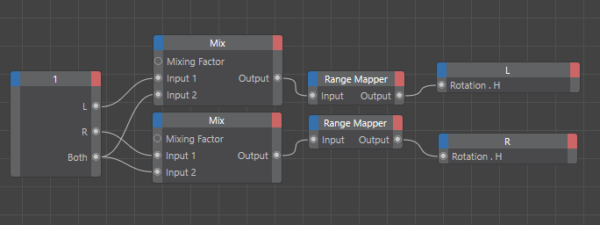
    You could use the Mix node in Xpresso as in the example in the attached pictures, and you could also use the Pose Morph tag to control more than one object through one slider as in the screen record below. You will find on YouTube a tutorial explaining the capabilities of this tag.

    I hope this is helpful.

  • You are most welcome, Mauricio! always happy to help you.

  • Kouraib Abdmalek

    January 25, 2025 at 10:38 am in reply to: Dynamesh Retopology complete inside Cinema4D ?

    Moving from your program to other programs to accomplish some tasks more easily, I do not think it is a problem and we as users do not have to look at it as such, because each 3D design program has a specific field that developers focus on to attract a specific segment of users, so it is not expected that another program can excel it in this because it is a secondary field in the other program. This like if we complaining about our inability to modify an image on the C4D ore Blender with the same smoothness as in Photoshop. This is just an opinion, I hope it is useful to you.

  • Hi Mauricio,

    Although Maxon talks on their YouTube channel about improving export to USD in recent versions, but it seems that users’ problems with this are not over yet. I suggest that you bake as Alembic and then link the exported file with the Alembic file if you find that the animation is not included in the target program, or you could (as is the case with many users) go to another program to export smoothly such as Blender or Maya. I hope this will help you.

  • Kouraib Abdmalek

    January 23, 2025 at 10:36 am in reply to: Exporting nulls within a cloner from C4D to Ae

    In my version, when I click on Bake as Alembic, it asks me to select Alembic save path. Instead, an Alembic export settings window appears in your version, there is a Save icon. You may have to enter and specify the path. If you find the path specified before, you could respecify it to an empty file on the desktop and try again. let me know if that works with you.

  • Kouraib Abdmalek

    January 22, 2025 at 9:42 am in reply to: Exporting nulls within a cloner from C4D to Ae

    You’re welcome, Matt! I’m happy to help you, I assume you’re using Effector with the Cloner but in any case you can bake the objects within the Cloner by baking as Alembic and then Bake Objects, I’ve put a screen recording below that explains the method, I hope it’s useful to you.

  • Kouraib Abdmalek

    January 19, 2025 at 9:07 am in reply to: Exporting nulls within a cloner from C4D to Ae

    Hi Matt,

    The hypothesis you stated at the end might be correct, I’m not sure that After Effects only looks at keyframes but it seems like it reads the keyframes better, so you could Bake Objects for all parameters so that you have keyframes for all parameters in every frame I think this will make After Effects read the scene data correctly, this is a relatively old method like you see in the tutorial below and I don’t know maybe there are other methods better especially with the recent updates related to facilitating the exchange between C4D and AE.

    I hope this is helpful to you.

    https://www.youtube.com/watch?v=Poc-uJPm2F0

    Some contents or functionalities here are not available due to your cookie preferences!

    This happens because the functionality/content marked as “Google Youtube” uses cookies that you choosed to keep disabled. In order to view this content or use this functionality, please enable cookies: click here to open your cookie preferences.

  • Kouraib Abdmalek

    January 7, 2025 at 9:45 am in reply to: Voronoi within Voronoi Caching…

    Of course, caching Voronoi is easy, but the problem occurs because there are other tools in the scene that may affect the caching, such as the SubDivision Surface tool. This happened to some of users and the problem was overcome by changing the settings, there are also those who overcame the problem by baking as alembic. You could also post your file here so we can check it for you.

Page 18 of 51

We use anonymous cookies to give you the best experience we can.
Our Privacy policy | GDPR Policy