Creative Communities of the World Forums

The peer to peer support community for media production professionals.

Activity Forums Maxon Cinema 4D Dynamesh Retopology complete inside Cinema4D ?

  • Dynamesh Retopology complete inside Cinema4D ?

    Posted by Mauricio Barrientos on September 22, 2024 at 10:23 pm

    Hello, I would like to know if there is a way to perform retopology directly within Cinema 4D.

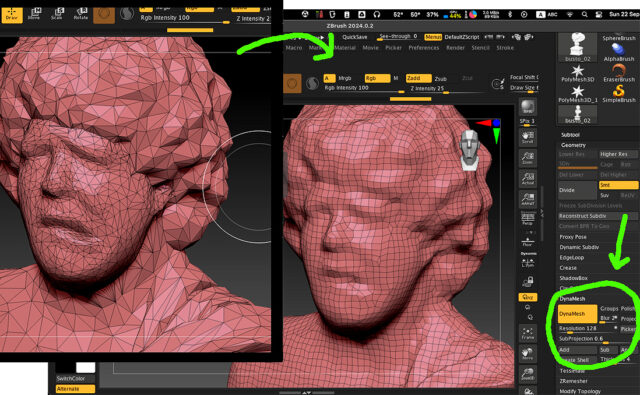
    In my case, I primarily work in Cinema 4D rather than ZBrush, but when I need to adjust the polygon count of an object, either increasing or decreasing its density, I usually export the model to ZBrush. There, I apply Dynamesh and/or ZRemesher to create a new mesh, and then I reimport it into Cinema 4D to continue working.

    However, I would like to know if it is possible to carry out this entire process within Cinema 4D, without needing to export the object. I am not referring to simple subdivisions, but to generating a completely new topology while maintaining the original shape of the object, similar to the example I’ve attached.

    Is this possible in Cinema 4D?

    Kouraib Abdmalek
    replied 1 year, 4 months ago
    2 Members · 2 Replies
  • 2 Replies
  • Mauricio Barrientos

    January 24, 2025 at 1:38 pm

    😞

  • Kouraib Abdmalek

    January 25, 2025 at 10:38 am

    Moving from your program to other programs to accomplish some tasks more easily, I do not think it is a problem and we as users do not have to look at it as such, because each 3D design program has a specific field that developers focus on to attract a specific segment of users, so it is not expected that another program can excel it in this because it is a secondary field in the other program. This like if we complaining about our inability to modify an image on the C4D ore Blender with the same smoothness as in Photoshop. This is just an opinion, I hope it is useful to you.

We use anonymous cookies to give you the best experience we can.
Our Privacy policy | GDPR Policy