Creative Communities of the World Forums

The peer to peer support community for media production professionals.

Activity Forums Maxon Cinema 4D Pyro emitter ignores squash and stretch?

  • Pyro emitter ignores squash and stretch?

    Posted by Blake Goulette on January 27, 2025 at 4:30 pm

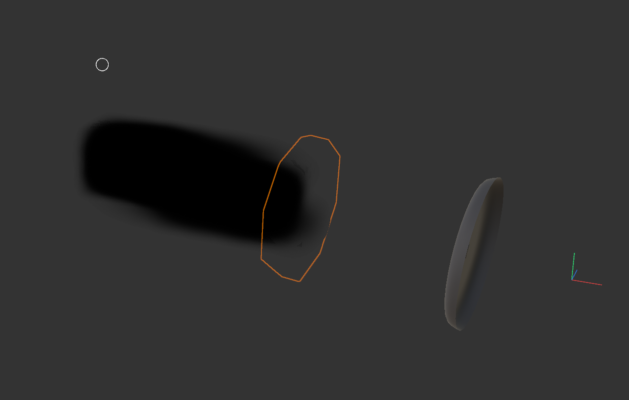
    Hello all. I have a collection of meshes and stuff (grouped) to which I’ve applied a Squash and Stretch object. One of the items within that group is a pyro emitter. When I preview my animation, the squash and stretch works, the pyro sim works, but the pyro emitter seems “stuck” on the non-squashed/stretched geometry. What’s the right way to have the emitter take into account the effects of the squash/stretch object? I’ll include some screenshots of what’s happening now: the orange outline is the original location of the emitter object (actually a vertex map); the lighter gray mesh is the stretched location; the black cloud is the result of the pyro sim (to this frame). Thanks for any help/advice. I am still learning C4D and have a long way to go!

    Kouraib Abdmalek
    replied 1 year, 3 months ago
    2 Members · 3 Replies
  • 3 Replies
  • Kouraib Abdmalek

    January 28, 2025 at 12:31 pm

    Hi Blake,

    Sorry I couldn’t understand the problem exactly, hope you could attach a screen recording or the source file so we can get a better idea of ​​the problem.

  • Blake Goulette

    January 28, 2025 at 3:04 pm

    Hi Kouraib, thanks for responding. I came here to post what seemed to work for me (which most C4D users might have already known!)

    I created an experimental file and got things working. When comparing the two, I noticed I had objects stacked in a different order, and some things grouped that I hadn’t grouped in the original. After adjusting my original scene, the Pyro emission occurs where the squashed object appears, so it’s working now! (I’m in the process of trying to shut down to clear enough VRAM to continue testing, so I can’t provide any screenshots right now). Thanks again for responding!

  • Kouraib Abdmalek

    January 29, 2025 at 9:04 am

    You are most welcome, Blake! thank you for sharing with us what you have found. When you have the opportunity, please share with us screenshots (with the Objects manager) that illustrate the problem and how to solve it so that anyone who may encounter the same problem can benefit.

We use anonymous cookies to give you the best experience we can.
Our Privacy policy | GDPR Policy