Forum Replies Created

Page 3 of 46
  • Jim Scott

    September 9, 2021 at 2:02 am in reply to: Quick question regarding camera along spline

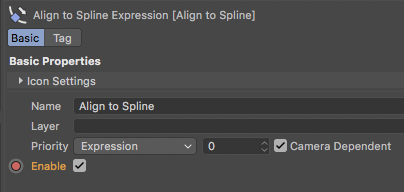
    Keyframe the “Enable” setting for the Align to Spline tag. Check it on in the beginning so that the camera will follow the spline, and then at the point you want to freely animate the camera make another keyframe with the check removed.

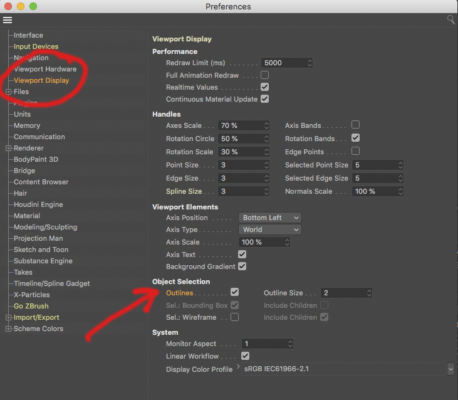
  • I think what you want is in Preferences > Viewport Display — Object Selection and enabling “Outlines.” If that’s not it, please upload a screenshot.

  • Jim Scott

    September 5, 2021 at 9:02 pm in reply to: Noise Shader with non-animating noise

    Glad to help. Some things you might want to play around with are adding noise to a light, or possibly creating an overlay that doesn’t turn with the object. Just some thoughts — I’ve never tried to do this before so I may play around with it myself. And if you’re lucky a brighter mind will chime in.

    Good luck with your project. I will write back if I come up with anything.

  • Jim Scott

    September 5, 2021 at 8:27 pm in reply to: Noise Shader with non-animating noise

    Thanks for sharing the file. You didn’t have the Luminance channel settings with your original post, but now I see that you are using a cel texture with “Use Bump” enabled, and that is what is causing the fizzing effect. The render settings aren’t an issue.

    If you want that grainy shadow look to remain still when the object turns you’ll need to get rid of the bump in the material and try to get it with lights and shadows, which could be an interesting endeavor itself. As long as the bump is there, when the object turns the light will catch the changing texture and cause the fizzing. What is the look that you’re going for?

  • Jim Scott

    September 5, 2021 at 5:44 am in reply to: Noise Shader with non-animating noise

    Hi Shaun,

    Since the animation speed and movement settings are both 0 the noise isn’t animating or moving. If it was you would see the “fizzing” effect even when the object wasn’t turning. What I think is happening is the bump texture catching the light along the edge as the object turns. I can’t duplicate it with a standard material and renderer with your bump channel settings and a default luminance channel so I’m guessing your render settings are also involved. Could you post the project file?

  • Jim Scott

    September 1, 2021 at 11:45 pm in reply to: .Obj export file size

    OK, thanks for the follow-up.

  • Jim Scott

    September 1, 2021 at 11:29 pm in reply to: .Obj export file size

    Are you saying that the project file itself goes from 24 mb to 4 gb after you export the obj sequence? The folder containing that sequence of obj files could be 4 gb if the individual obj is sufficiently large enough, but I don’t know why the project file would increase. If that’s what’s happening, could you walk through the steps you’re taking for the export?

  • Jim Scott

    August 21, 2021 at 9:29 pm in reply to: Voronoi fracture on 2 polygroups

    Did it work?

  • Jim Scott

    August 18, 2021 at 7:33 pm in reply to: Voronoi fracture on 2 polygroups

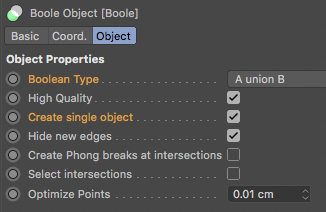
    If I am understanding you correctly, try placing the two in a boole set to A union B and select “Create single object,” and make the boole a child of the Voronoi Fracture. If I’m NOT understanding you correctly, this will cause the annihilation of all matter in the universe, so be careful.

  • Jim Scott

    August 17, 2021 at 11:02 pm in reply to: Using the attractor object to ‘unshatter’ glass

    If you are thinking of using an attractor to pull the broken pieces back together — to “unshatter the glass” — the problem is that when a transparent material is used the edges of those pieces will always be visible, which is why the tutorial used the technique mentioned in my previous comment.

Page 3 of 46

We use anonymous cookies to give you the best experience we can.
Our Privacy policy | GDPR Policy