

Activity › Forums › Maxon Cinema 4D › Quick question regarding camera along spline
-
Quick question regarding camera along spline
Posted by Pierre Tessier on September 9, 2021 at 1:26 amI would like to animate a camera along a spline and then turn it off and continue animating the camera freely, without the spline. Any idea how to do this ?
Jim Scott replied 5 years ago 3 Members · 3 Replies -
3 Replies
-

Jim Scott
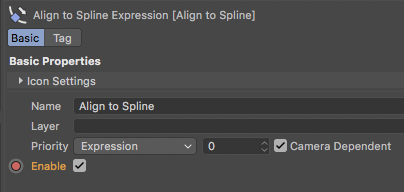
September 9, 2021 at 2:02 amKeyframe the “Enable” setting for the Align to Spline tag. Check it on in the beginning so that the camera will follow the spline, and then at the point you want to freely animate the camera make another keyframe with the check removed.

-

Steve Bentley
September 19, 2021 at 5:34 amYou can also nest your spline in a null. (Or even two nulls nested to prevent gimbal lock or keep one of the camera’s axis true to its cardinal rotation options) and then have that outer null follow the spline with an align to spline tag. Then at any time you can animate the camera to look away from the spline path without worrying about disturbing the way the null is “aimed”.
This is also good because if that was a real camera you would “lead” the spline. When riding a roller coaster you don’t look at where the car is facing (tangent to the track) you look at what is coming up, giving a sense of anticipation. A real cameraman would do this naturally so doing it in the animation makes the camera move look more real.
If you need to automate this” leading the spline” idea, you can put another null on the spline ahead of the camera rig and have the camera look at that null that is moving either at the same speed or at a speed you animate to control exactly where the camera is looking.
For extra realism, when the camera descends, (and it’s nested inside a null as I suggest above), you can have the camera float a little as it would when suddenly descending – the camera can come away from the spline a little even though the null is still locked to it. And you don’t need to worry about which direction to float in because “up” will always be perpendicular to the spline at that point and you just have to move the camera with it’s Y axis.
Reply to this Discussion! Login or Sign Up