Forum Replies Created

Page 38 of 112
  • Graham Quince

    July 28, 2021 at 9:35 am in reply to: Font size and leading expression

    Looks like the styles need to be on the same line. Try this:

    var x = effect("font-size")("Slider").value;

    var y = effect("line-space")("Slider").value;

    var myfontsize = 50;

    var myleading = 100;

    if ( x != 2 ) {

    myfontsize = 100;

    }

    if ( y != 1 ) {

    myleading = 50;

    }

    style.setFontSize(myfontsize).setLeading(myleading);


  • Graham Quince

    July 23, 2021 at 2:07 pm in reply to: Camera follow and auto rotate motion path?

    I’ve had similar issues and I think it’s to do with how you created your path. The null and camera are 3D objects, but the path is resolutely, will-not-change 2D. This messes up 3D orientation. Copying and pasting a path as a keyframe works fine to 2D, but not here.

    So, there’s a couple of things you can try:

    1) Unparent the camera, copy the position values to it and move them slightly down the timeline. This will get the camera following the null object around. Then use the pick whip to link the camera’s POI to the null’s position. This will get the camera looking ahead on the track the whole time and turning as it views the nul.

    2) recreate the tracks movement for the null using position keyframes without copying and pasting. These will be definitely 3D instead of a 2D convert.

    Bonus option 3) I’ve just finished a tutorial on exactly this sort of thing. Come back here at 5pm on Friday 30th to see how tousle expressions to add in a couple of extra options. 😉

  • Take a look at CC Ball Action and/or scatter. I think either can do this.

  • Graham Quince

    July 23, 2021 at 1:56 pm in reply to: Dynamic Link Server not rendering from AE

    I find most render problems with AE and AME are down to GPUs. I know the idea of using the extra ram is appealing, but it just seems to create more problems for users than it solves. About 2 years ago I switched to software rendering only and haven’t had any issues since.

  • Graham Quince

    July 23, 2021 at 1:54 pm in reply to: Adding some FX shots to a short film

    In all three cases I think the mochaAE tool is the best option here as it’s a planar tracking tool which should get you tracking data you can use with the corner pin effect. I know you’ve tried Mocha, but it’s worth sticking with it. I made a basics tutorial about how to use it, which might help: https://youtu.be/c3TybpIQ_ik

    (Maybe the mask tracking for shot 1, but I’d try MochaAE first)

    For the glow, you probably want to use the glow effect twice. Once with a large radius, but very faint, and then again with a tiny radius, but stronger. Don’t have either effect at full opacity.

    For the woman to be partially lit, I’d suggest use a heavily feathered mask to cut her out, and then adding a glow effect to that to highlight the areas you want lit.

    Some contents or functionalities here are not available due to your cookie preferences!

    This happens because the functionality/content marked as “Google Youtube” uses cookies that you choosed to keep disabled. In order to view this content or use this functionality, please enable cookies: click here to open your cookie preferences.

  • Graham Quince

    July 23, 2021 at 1:42 pm in reply to: Text Alignment/Formatting

    Oh no, CSS has invaded AE! ?

    Are there any settings in the character and paragraph windows that could explain this? Maybe the line height or leading values are set to negative numbers?

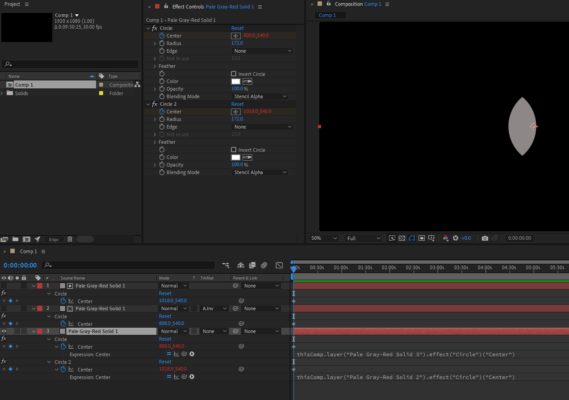
  • I think the simplest option here is to duplicate both circle effects onto your third image and use pickwhips to link their positions.

    You’ll only need to animate the original circles and the third image’s effects will follow it. Having both on stencil alpha should give you the overlap you’re after.

  • Oh I see the issue. Yeah, I think you might be stuck there – although, instead of directly selecting the environments from within Element, you can locate them on your computer and import them into AE. This would give you options for switching more easily as you could use the select, hold ALT and replace method.

  • Graham Quince

    July 10, 2021 at 8:56 am in reply to: Lower Bitrate gives me same file size

    I’ve found this – especially noticeable with animated gifs, where often you have a size limit.

    I think AME always renders the best option for lossless (speculating here) and often lossless can be below the target value.

  • Coiuld you link the environment controls of 2 of the layers to the first element effect using pickwhips? Then you only need to adjust one.

    Alternatively, could you use the Groups option in Element and animate from the groups, that way you only need one element layer.

Page 38 of 112

We use anonymous cookies to give you the best experience we can.
Our Privacy policy | GDPR Policy