Creative Communities of the World Forums

The peer to peer support community for media production professionals.

Activity Forums Adobe After Effects Changing picture in overlapping area of two pictures

  • Changing picture in overlapping area of two pictures

    Posted by Jeesoo Park on July 12, 2021 at 6:31 pm

    I am working on a project using After Effect.

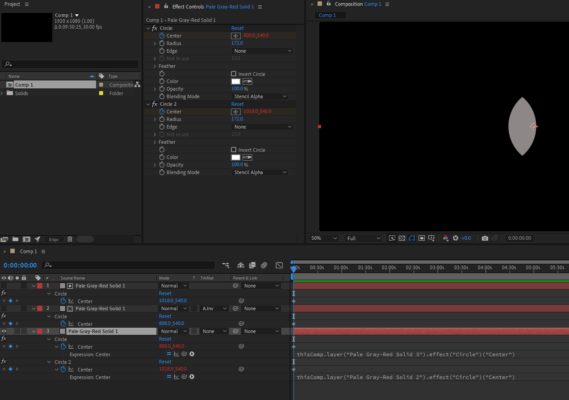
    I was planning to move two circle-shaped pictures (which I have used circle and stencil alpha to make into circle shapes) and change the overlapped area into another picture while they are moving. I am not sure how to capture the overlapping area and change it into another picture, so plz help me!

    Graham Quince replied 5 years, 2 months ago 2 Members · 1 Reply
  • 1 Reply
  • Graham Quince

    July 14, 2021 at 2:06 pm

    I think the simplest option here is to duplicate both circle effects onto your third image and use pickwhips to link their positions.

    You’ll only need to animate the original circles and the third image’s effects will follow it. Having both on stencil alpha should give you the overlap you’re after.

We use anonymous cookies to give you the best experience we can.
Our Privacy policy | GDPR Policy