

VanityFilter 3.1.5 adds project files and adjustable protection around lips, brows and ears

Sputnik Digital Effects is putting 3.1.5 forward as the public release of its offline Windows skin retouching app, licensed once for $29.95 with no subscription
Sputnik Digital Effects has released VanityFilter 3.1.5, the version the company is marking as VanityFilter’s public release. It is a Windows desktop application that smooths skin in recorded video, and 3.1.5 adds saved project files along with finer control over where a skin treatment stops. It is available now at vanityfilter.com for a one-time $29.95.

VanityFilter runs before the edit. An editor drops in one clip or a batch, sets the treatment, and exports a retouched file that enters Premiere Pro, Resolve or any other NLE as ordinary footage. Nothing renders on the timeline, and there is no per-shot mask to draw or tracker to correct when a subject turns their head. The app handles up to five faces per clip, including faces in profile, and can export the skin mask as a matte for compositing.
The footage stays on the machine. VanityFilter processes video offline, with no account and no upload, and its license activates offline as well. The installer runs roughly 800 MB because the neural network models and codecs are bundled with it, so nothing downloads on first run.
New .vain project files restore loaded clips, treatment settings, trim points, export options and preview position, so a test can be closed and reopened later without rebuilding it. Projects link to their source videos instead of embedding them, and VanityFilter asks the editor to locate a file that has moved. The Windows installer associates .vain files with the app, so a project opens from File Explorer with a double click.
The Mask shape panel gains a Lip margin and an Eyebrow margin, which set how much surrounding skin is protected alongside each feature. That matters when the default boundary leaves fine lines above the upper lip untreated. The lips, mouth and eyebrow hair stay protected at every setting. A separate Feature feathering control governs the transition around those areas without changing the feathering of the whole face mask.
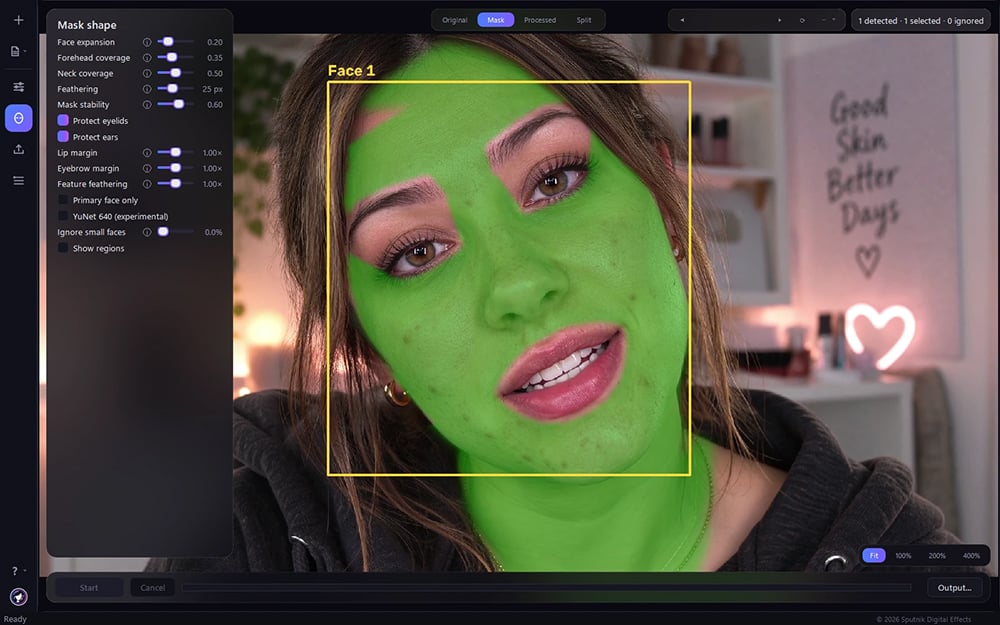
Ear protection, now switchable per clip and on by default, follows head turns more closely than it did in 3.0, where the far side ear guard could sit on a visible cheek and leave a wedge of skin untouched.
Face selection is easier to verify. Ignored detections appear with gray boxes and an Ignored label, and the preview reports detected, selected and ignored counts separately. That helps in interview footage, where a framed photograph on a wall can register as a face. The Ignore small faces threshold now displays as a percentage of frame height.
“The middle of a cheek is the easy part,” said Erran Yearty, CEO of Sputnik Digital Effects. “Anyone who has done this by hand knows what it feels like to get the smoothing right and then watch the lip edge go soft. Most of what we did in 3.1.5 was give people a dial for that, and somewhere to save the session once they have found the setting they want.”
Export in 3.1.5 overlaps more of its processing stages across CPU cores while still writing frames in order. How much that helps depends on the footage, the enabled effects and the hardware, and Sputnik is not quoting a fixed speedup. A separate YuNet 640 option, off by default and labeled experimental, lowers the fallback face detector’s input width from 960 to 640 pixels. It can change which faces are found, and export tests produced mixed timing results, so the company suggests trying it on a representative section first. It does not affect export resolution.
VanityFilter has a complete Latin American Spanish interface covering all 179 interface strings, and the installer includes a Spanish PDF manual alongside the English one. The app imports MP4, MOV, AVI and MKV, and exports H.264 MP4, with optional NVIDIA hardware encoding, or ProRes 422 HQ MOV. Source audio is preserved and re-encoded for the output format. Five presets and sixteen sliders re-render live, with four user slots for saved settings.
Pricing and availability
VanityFilter 3.1.5 is available now at https://www.vanityfilter.com/download.
Full license: $29.95, one time, no subscription. One user, two machines, activated offline.
30-day demo license: $9.95. The full application for 30 days, with clean unwatermarked exports.
Both carry a 7-Day Installation Guarantee. If Sputnik cannot get the software running on a buyer’s machine, and the buyer makes contact within seven calendar days of purchase, the purchase price is refunded in full to the original payment method.
System requirements
Windows 10 build 1809 or later, or Windows 11, 64-bit. An NVIDIA GPU is optional and used for H.264 hardware encoding. About 800 MB of disk space. No internet connection required.
Enjoying the news? Sign up for the Creative COW Newsletter!
Sign up for the Creative COW newsletter and get weekly updates on industry news, forum highlights, jobs, inspirational tutorials, tips, burning questions, and more! Receive bulletins from the largest, longest-running community dedicated to supporting professionals working in film, video, and audio.
Enter your email address, and your first and last name below!


Responses