Forum Replies Created

Page 13 of 112
  • Sorry you’ve been stuck for a week with no answer. I’ve done my best to recreate the settings and cannot get anywhere.

    If you could post your project I’d be happy to take a look. If you’re not comfortable sharing online, I don’t think we can PM here, but I have a contact form https://shiveringcactus.net/vfx-clinic you can use and we can swap emails.

  • Graham Quince

    June 2, 2023 at 8:49 am in reply to: After Effects Laptop Purchase Help Needed

    Does it have to be a laptop? AE tends to be resource hungry and can warm up a laptop. I’ve had a few shutdown due to overheating when the ventilation underneath wasn’t perfect.

    I also spent a couple of years with a graphics card that really struggled. If it had been a desktop, it would have been an easy upgrade.

    That being said, a 1Tb SSD isn’t bad, but two separate hard drives would be better. Your programs will take up a lot of space, leaving not a lot of room for cache and project files.

    32Gb will probably be the minimum spec in a couple of years (currently it is the reccomended) and again, laptops are hard to upgrade.

    I’m surprised its Windows 10 and not 11.

    When looking for an After Effects PC, you should:

    • think about RAM, CPU and graphics card in that order – the more RAM you have the better
    • Ideally have 3 hard drives – two can be external. One for Programs, one for files and one for media cache (this one will age quicker with repeated wiping and clearing)
  • Graham Quince

    May 27, 2023 at 1:18 pm in reply to: strange extra masks between keyframes

    How are you generating the masks? I think what’s happening is you’re using auto-trace or similar and each mask is then acting as if it’s brand new and has it’s own origin points. When animating together, you’re getting the points not lining up as you’d expect, so they are flipping the mask shapes.

    If that’s the case, you need to right-click on a common point for each mask keyframe and choose: Mask Shape & Path > Set First Vertex.

    I made a video a while back about morphing masks:

    https://youtu.be/l8WIkD1jA2o

    Some contents or functionalities here are not available due to your cookie preferences!

    This happens because the functionality/content marked as “Google Youtube” uses cookies that you choosed to keep disabled. In order to view this content or use this functionality, please enable cookies: click here to open your cookie preferences.

  • Graham Quince

    May 27, 2023 at 1:11 pm in reply to: How to do that?

    If I remember correctly, this effect is often done in camera, shooting at a slower frame rate to create the blurring lines when played back at normal speed. Take a look at the echo effect, I think that might help.

  • Graham Quince

    May 27, 2023 at 1:10 pm in reply to: Looping tunnel video effect

    [Edited because I posted on the wrong question]

    I think this was done simply by animating shape layers to scale down. The scaling has that look of exponential collapse, as opposed to when you move layers further away.

  • There’s a LOT of layers and keyframes there. I’ll never truly understand AE’s relationship to a computer’s RAM, CPU and GPU, but that many layers each with their own keyframes will cause a slow down. Maybe not as much as you’re seeing, but try a test comp with only one layer and see if the problem recurs.

    You could also check to see if you’re project is software only or if you’re set to use one of your GPUs. (File>Project Settings)

  • Graham Quince

    May 20, 2023 at 1:16 pm in reply to: Keyframe camera link focus layer on timeline

    I think you’re asking can you switch between cameras in your animation. If that’s the case, then yes, you can. Make sure the comp window is set to active camera and use the in- and out-points of the camera layers to determine when they are the active camera.

  • Graham Quince

    May 14, 2023 at 10:07 am in reply to: Please Help Me make a BBC News globe

    Forum wouldn’t let me add a file and an image in the same post:

  • Graham Quince

    May 14, 2023 at 10:06 am in reply to: Please Help Me make a BBC News globe

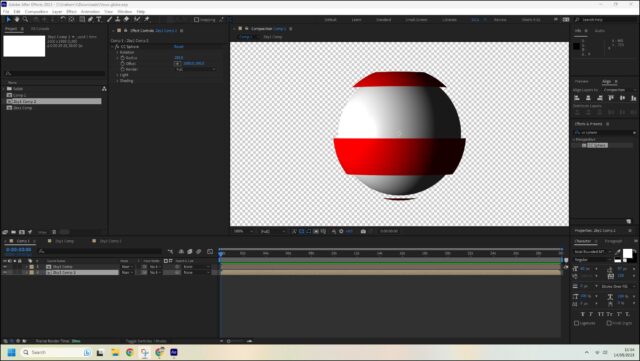
    Let’s start simple.

    • Create a 2:1 comp.
    • Add a comp-sized solid, but then use masks to create bands in this solid.
    • Create a new comp (main comp) and add in your first comp.
    • Now apply CC Sphere
    • Set the Render setting in the effect to Outside
    • Create a second 2:1 comp, add a solid to this
    • Add this comp to the main comp and add CC Sphere, but this time, reduce the radius

    There’s an awful lot more work to do, with a lot of detail needed, but that should get you started.

  • Graham Quince

    May 14, 2023 at 9:57 am in reply to: Missing Unmult effect

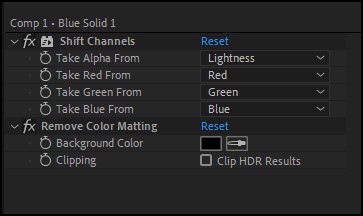
    You can recreate Unmult using a couple of included effects,

    Shift Channels set to take Alpha from Lightness

    Remove Background Matting set to black.

    There’s a preset in Effects & Presets for this (I think, unless I made / imported it a long time ago)

Page 13 of 112

We use anonymous cookies to give you the best experience we can.
Our Privacy policy | GDPR Policy