Forum Replies Created

Page 12 of 112
  • Graham Quince

    July 9, 2023 at 9:42 am in reply to: Animation of the road

    Expand your road’s shape path on the timeline until you can see a stopwatch. Set a keyframe then move forwards a little and change the shape of the road so that it looks like the far curves are now much closer and set a new keyframe. Repeat.

    Or

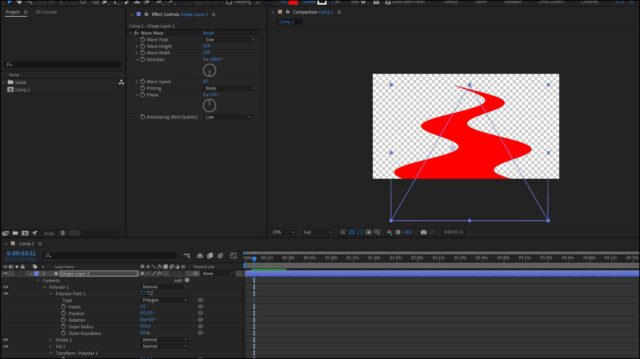
    Create a triangle, apply the Wave Warp effect and set the direction to -180, you’ll get the appearance of a winding road animating towards the camera.

  • Graham Quince

    July 9, 2023 at 9:34 am in reply to: Isometric tire rotation

    Can you try a displacement map effect, which will use another layer as the displacement. You could then limit the movement to just the tires, probably by using the offset effect and you should get a hazy displacement that looks a little like rotation.

    Failing that, the liquify effect might also work.

  • Graham Quince

    July 9, 2023 at 9:32 am in reply to: Crash Course Karaoke Effect

    I’ve literally just finished rendering a tutorial on how to do this (but seeing as it will weeks before publishing)

    • With your text layer selected, expand it until you can see the tiny animate menu
    • Select Fil Color > RGB
    • All you text now changes to this colour (which you can change)
    • Expand Range Selector
    • Expand Advanced
    • Change the Unit to Index
    • Change Based On to Words
    • Set End to 1
    • And then keyframe the offset property to move which word is highlighted.

  • Graham Quince

    June 24, 2023 at 12:59 pm in reply to: Pen Tool Stroke offset and align to each other

    Instead of duplicating, could you use a Repeater, I think that might solve the problem for you.

    If not, if you could post a screenshot of the whole of AE, it might be easier to spot the issue.

  • Graham Quince

    June 24, 2023 at 12:57 pm in reply to: Number animation from CVS

    I’m guessing its not your expression, so I’m going to feel free to critise it for poor style choice for variables names 😜

    But the top line _column looks like its the variable you want to change.

    Personally, I think the safest option here is to add a slider (hit ENTER and rename it to “Column Slider” to your layer and then use this version of the expression:

    var column = praeInt(effect("Column Slider")("Slider"));

    var row = time*30;

    var sliderValue = footage(“Stats.csv”).dataValue([column,row])

    Then you can set the column to 0, 1, 2 etc…

  • Graham Quince

    June 18, 2023 at 9:48 am in reply to: Audio Problem, .5 Second Lag on Playback

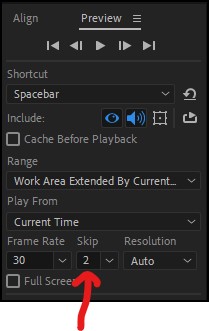
    Try changing your preview settings to skip some frames. This made a huge difference for me when assembling animations.

  • Graham Quince

    June 18, 2023 at 9:46 am in reply to: An issue with the AE puppet tool

    I think we need to see some screenshots, but to be honest, it sounds like what you’re getting is what I’d expect to see. The puppet tool distorts the image and with lots of anchor points it’s probably what’s creating the mesh warp. It might be simpler to add an eye lid as a separate layer and animate just that.

  • Graham Quince

    June 12, 2023 at 7:29 am in reply to: PLEASE HELP!!!

    Try rendering out as an image sequence. That will show you where the render fails, allowing you to fix the comp and has the benefit that you don’t need to rerender that part. Once you have the sequence drop it back into AE or AME to convert to a single video, which will be much quicker.

  • Graham Quince

    June 11, 2023 at 1:17 pm in reply to: Chromatic abberation effect

    I think I got pretty close with a gradient ramp and colour burn transfer mode

  • Graham Quince

    June 11, 2023 at 1:07 pm in reply to: I Need Some BBC News After Effects Templates

    Take a look at this tutorial. Mads is right of course, but this guy gets pretty close:

    https://www.youtube.com/watch?v=jL2fsQB9J-g

    Some contents or functionalities here are not available due to your cookie preferences!

    This happens because the functionality/content marked as “Google Youtube” uses cookies that you choosed to keep disabled. In order to view this content or use this functionality, please enable cookies: click here to open your cookie preferences.

Page 12 of 112

We use anonymous cookies to give you the best experience we can.
Our Privacy policy | GDPR Policy