Forum Replies Created

Page 14 of 112
  • That’s a nice implementation of MoGrt and Essential Graphics.

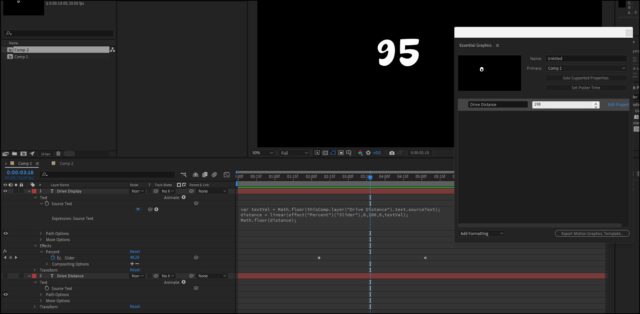
    I’ve found with Essential Graphics that any expressions you try to run on text get “broken”, but you can get around this by using a second text layer.

    I don’t know what expression you used, but this is one I went with to test out before posting:

    var textVal = Math.floor(thisComp.layer("Drive Distance").text.sourceText);

    distance = linear(effect("Percent")("Slider"),0,100,0,textVal);

    Math.floor(distance);

    The layer: Drive Display has the expression and slider on it, but it’s final value is populated from the text on the Drive Distance layer, which is the text used in Essential Graphics.

  • Graham Quince

    April 23, 2023 at 10:29 am in reply to: Looking for a way to animate a dynamic web

    I know Shahid has already replied, but in case it helps, I made a tutorial covering this look a while back:

    https://youtu.be/9nnfp2eL_cw

    There’s a project file if you get stuck.

    Some contents or functionalities here are not available due to your cookie preferences!

    This happens because the functionality/content marked as “Google Youtube” uses cookies that you choosed to keep disabled. In order to view this content or use this functionality, please enable cookies: click here to open your cookie preferences.

  • Graham Quince

    April 20, 2023 at 3:01 pm in reply to: After Effects with AI

    Depends what you mean by AI, I suppose. These days I take it to mean image generation, but I think you’re actually referring to tools like Content Aware Fill.

    • I think some intuitive tools like drawing a shape and then having that shape formed by smoke would be brilliant.
    • Easier morphing now that we have face tracking. 3D head tracking would be good too. In fact, 3D body tracking.
    • Anything around landscape generation and water simulation.
    • Extending an image would be good. I’m always wishing I had a bit more of a background plate. Especially after you’ve stablized an image.
    • Camera tracking is great, but imagine if AE could also automatically create lights from a 3D tracked scene.
  • Graham Quince

    April 20, 2023 at 2:54 pm in reply to: After Effects Optical frames (0) problems

    My guess is you’ve not installed After Effects and Video Copilot on your primary hard drive. I didn’t and had all sorts of issues with Video Copilot’s stuff. Their installer makes it easy if you stick to the C: drive, but does seem to get screwed up if you don’t.

    If I’m wrong and reinstalling doesn’t work, contact the help on Video Copilot. They have always responded to me promptly and been very helpful.

  • Graham Quince

    April 20, 2023 at 2:50 pm in reply to: How to do that?

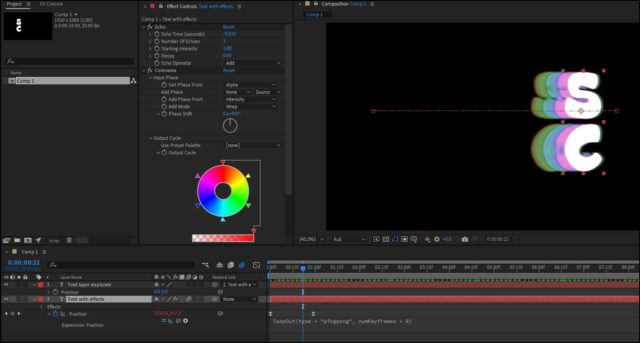
    With a bit of tweaking I think you can get there with a combination of the Echo effect and Colorama with the input phase changed to Alpha

  • Graham Quince

    April 20, 2023 at 2:44 pm in reply to: Gather a glowing stars in space to shape a moon

    Try this:

    Use a shape emitter in Particular to emit the stars from a moon shape

    Then convert this layer into a precomp and use Time Remapping to reverse it. The stars will flow into the moon shape.

  • Graham Quince

    April 7, 2023 at 1:40 pm in reply to: Adobe Stock Templates

    That’s interesting, I would have assumed Adobe Stock and you’ve already mentioned the next two places I could think of.

    I’ve not used either or motionarray, but it keeps appearing in ads: https://motionarray.com/

  • Try switching to software render only in File > Project Settings.

    I don’t know for certain, but both Red Giant and Boris have plugins which use your graphics card and maybe previewing at full is enough to crash AE with the competition for resources.

  • Graham Quince

    April 7, 2023 at 1:29 pm in reply to: 3d text follows 3d path

    Is your text meant to be orbitting the globe like the Universal logo, or literally just “stuck” to the motion path?

    If it’s the former, take a look as CC Sphere (precomp your text) and then animate the sphere radius which will help it appear to flatten out.

    If it’s the latter, make the text a 3d layer and use the parent controls to link it directly to your null layer.

  • Graham Quince

    April 7, 2023 at 1:25 pm in reply to: How to create this weather map effect

    To get those colours, take a look at Colorama, I used it in a similar fashion at 2:30 into my doppler weather radar video:

    https://youtu.be/3l71RR3_DIo?t=146

    To work, you only use a gradient between black and white and your second shape should use a transfer mode so that the colours blend together. Place Colorama on an adjustment layer and it should get you the effect you’re after.

    Some contents or functionalities here are not available due to your cookie preferences!

    This happens because the functionality/content marked as “Google Youtube” uses cookies that you choosed to keep disabled. In order to view this content or use this functionality, please enable cookies: click here to open your cookie preferences.

Page 14 of 112

We use anonymous cookies to give you the best experience we can.
Our Privacy policy | GDPR Policy