Forum Replies Created

Page 15 of 112
  • Graham Quince

    March 23, 2023 at 8:09 pm in reply to: Text Presets – Lights and Optical

    That’s a very odd preset – I’m trying to work out what it would be used for.

    The Hide Last Character animator looks like it is there so you can wipe the letters on by animating the Start property.

    I think the Stroke is being applied in the Text preset, rather than use whatever stroke the text is. I haven’t seen the flickering you’ve mentioned though.

    Office Lights appears to be working the same for me as in the preview. I noticed in your project file, that it looks like both comps had the Silhouette preset applied as Office lights comes with a couple of sliders.

  • Graham Quince

    March 23, 2023 at 7:53 pm in reply to: After Effects 3d flat backgound and soft shadow

    There’s a couple of ways I can think of

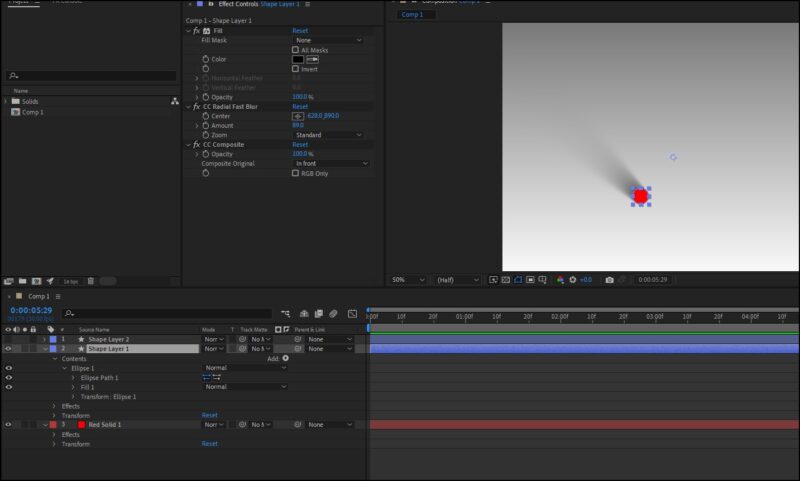
    Method 1 involves Fill (to turn the pin black), CC Radial Blur (to make a blurry shadow shape) and CC Composite (to restore the original on top of the other effects)

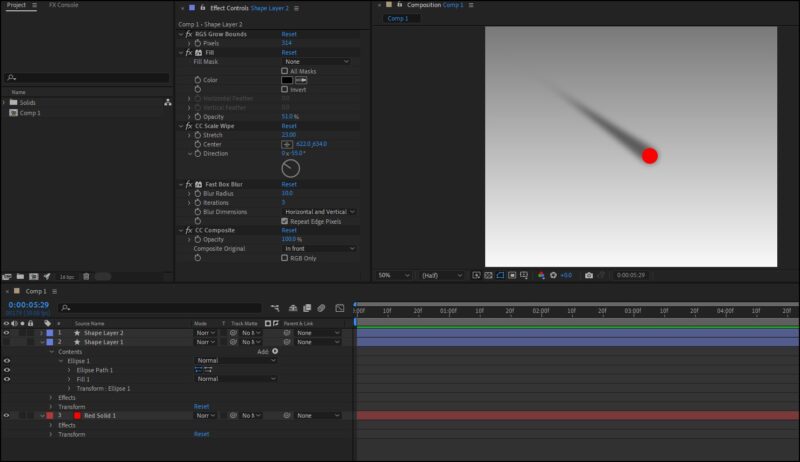
    Method 2 uses Red Giant’s free Grow Bounds (so that the blurring won’t be limited to the shape’s boundary), Fill (as before), CC Scale Wipe (gives a better shadow when positioned right), Fast Box blur to soften the shape) and CC Composite (as before)

  • Graham Quince

    March 15, 2023 at 3:03 pm in reply to: Keylighting Problem

    Getting a good key is an art form in itself. Did you know there’s a preset for keying? Search for “keylight + ” and this gets pretty good results. If you’re getting semi-transparent images, you’ll probably need to change the keylight view settings to screen matte, and then use a levels effect to strengthen the whites and blacks. Then you can use this layer as a luma matte for a duplicate of your footage without any effects.

    If that all sounds too complicated, I think this video is a pretty good starter: https://www.youtube.com/watch?v=4kfFggpdpis

    Some contents or functionalities here are not available due to your cookie preferences!

    This happens because the functionality/content marked as “Google Youtube” uses cookies that you choosed to keep disabled. In order to view this content or use this functionality, please enable cookies: click here to open your cookie preferences.

  • Graham Quince

    March 15, 2023 at 2:56 pm in reply to: Render quality issues with graphics

    I take it you’re rendering out using Match Source – High Bitrate for the H.264 video? I take it the ProRes QT version looks like the preview in Premiere?

    Have you tried rendering directly from After Effects – in the last release Adobe reintroduced H.264 rendering from the render queue.

  • Graham Quince

    March 15, 2023 at 2:52 pm in reply to: Double stroke on open path in After Effects

    Do you want the lines to cross over, like in the image with the S or not, like the second image?

    Second image option – I’d suggest a second layer/shape underneath a white shape. The underneath layer to have a single thick stroke, then just keyframe it.

    Lines crossing option, I’d be tempted to use two shapes and offset, one for each side.

  • Graham Quince

    March 12, 2023 at 12:10 pm in reply to: Prohibit time remapping from changing motionblur

    Hmm, that’s a good one. I think you may be forced to not use motion blur, then apply CC Motion Blur to the precomp or render out the footage and time remap that.

  • Graham Quince

    March 12, 2023 at 12:03 pm in reply to: After Effects Not Much Faster on New Workstation

    I’ve had a similar disappointment, but I did come to realise that my set up (which is pretty similar to yours) is a lot more stable. I upgraded from a 5-year-old computer which was struggling to output a video. While using AE I’ve not “felt the improvement”, but I don’t think I’ve had a single failed render in the last 10 months.

    So I guess that’s where a more powerful computer makes the difference.

  • Graham Quince

    February 25, 2023 at 11:19 am in reply to: Transition/ easing into a parented position

    It sounds a little like the challenge I faced when I wanted to create an eclipse with a lens flare appearing at the edges.

    https://youtu.be/d2NsHJOR-to

    But if not, then take a look at the ease() expression.

    You’ll need a controlling variable, maybe just a slider, then it’s

    ease(MySlider,0,100,squarePosition,ParentPostion)

    This will ease the square from it’s starting position to the parent’s position over the slider’s keyframed from 0 to 100. There’d be a lot of fiddling to get it right, but I think that’s what you’re after.

    Some contents or functionalities here are not available due to your cookie preferences!

    This happens because the functionality/content marked as “Google Youtube” uses cookies that you choosed to keep disabled. In order to view this content or use this functionality, please enable cookies: click here to open your cookie preferences.

  • Graham Quince

    February 22, 2023 at 1:45 pm in reply to: BBC News Graphics help

    I love that tutorial. Matt Smart really nailed the look.

    Just to elaborate on Andy’s bit about the text, I made a tutorial a couple of years back showing how to link 3D text to geographic coordinates, if that’s any help:

    https://youtu.be/ckpnfHp3Yb8

    Some contents or functionalities here are not available due to your cookie preferences!

    This happens because the functionality/content marked as “Google Youtube” uses cookies that you choosed to keep disabled. In order to view this content or use this functionality, please enable cookies: click here to open your cookie preferences.

  • Graham Quince

    February 11, 2023 at 10:43 am in reply to: Increase/Decrease Value with Keys

    Key up and key down functions can be notorious difficult to capture once, quite often they’ll record double presses. If it is consistently doubling, maybe the simplest approach is to add 0.5 each time instead of 1.

Page 15 of 112

We use anonymous cookies to give you the best experience we can.
Our Privacy policy | GDPR Policy