Forum Replies Created

Page 16 of 112
  • Graham Quince

    February 11, 2023 at 10:40 am in reply to: Effect request

    Hmm, I think it has a look of CC Lens. Although you’d need to play with the position and convergence to match it exactly.

  • Graham Quince

    February 8, 2023 at 4:13 pm in reply to: How get “cymatics” render like Chladni Plate

    I think I would use a shape layer with a path on it. I’d then keyframe the path to change shape.

    Then I’d use either CC Ball Action or Scatterize to make the paths look like sand.

  • Graham Quince

    January 28, 2023 at 10:00 am in reply to: Scripting : How to use setSettings on OutputModule

    I see no one has replied, the Expressions forum might be a better place to ask this. I’m afraid I don’t know the answer, but I did stumble across this document the other day, which might also help:

    https://buildmedia.readthedocs.org/media/pdf/after-effects-scripting-guide/latest/after-effects-scripting-guide.pdf

  • Graham Quince

    January 28, 2023 at 9:57 am in reply to: 3D text with gold texture added

    I got around this using a precomp. That allowed me to have the 3D text, but then add a texture over the top using a track matte. The colours and lighting need to be strong on the sides for the definition to show up, but it works.

    I made a video showing how to do this:

    https://youtu.be/XjspaQuQ76I

    Some contents or functionalities here are not available due to your cookie preferences!

    This happens because the functionality/content marked as “Google Youtube” uses cookies that you choosed to keep disabled. In order to view this content or use this functionality, please enable cookies: click here to open your cookie preferences.

  • Graham Quince

    January 15, 2023 at 10:53 am in reply to: Composition-specific render hang

    Thanks for coming back and sharing the solution, you never know when someone else will get stuck on the same problem.

    In my experience when everything appears right and it’s still hanging, I’d check Task Manager and see if part of AE has crashed. That part is generally something to do with the GPU.

  • Graham Quince

    January 15, 2023 at 10:48 am in reply to: How to create this light ray effect

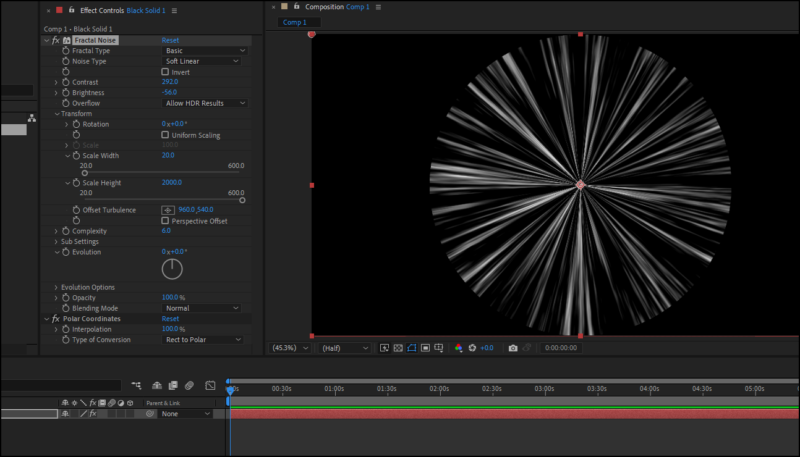
    I think you could do something using Fractal Noise with the transform scales set to non-uniform (height super large and width really low) and then apply a Polar Coordinates effects, you could create a “disco ball” of light rays.

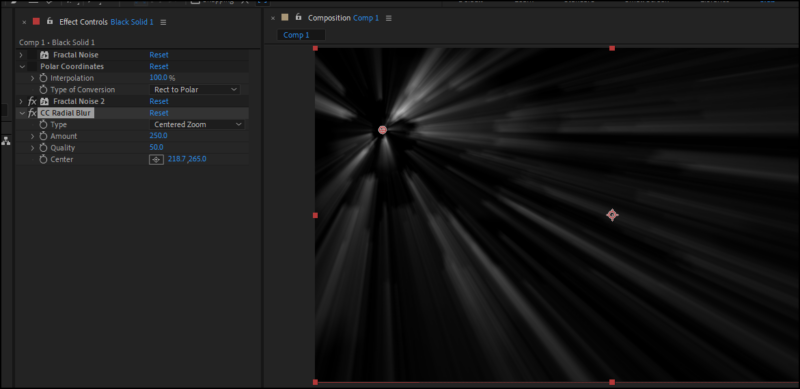
    Alternatively, if you used a fractal noise with just a change to the brightness and constrast and then added CC Radial Blur, you’ll have more control over the placement.

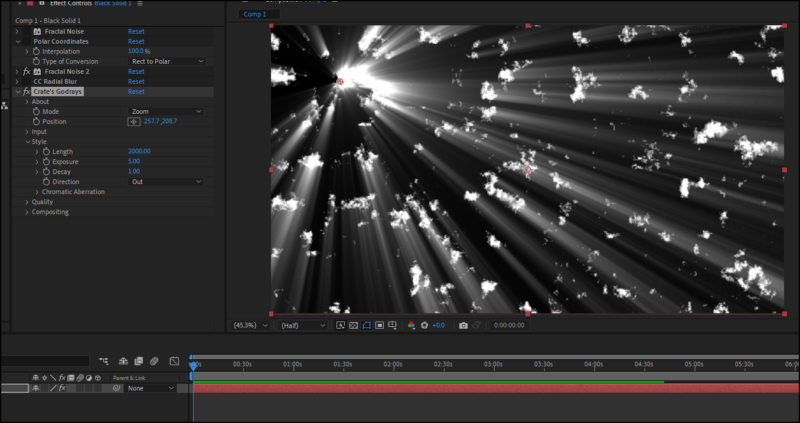
    Finally you could download the free plugin Godrays from ProductionCrate.

    If you need to “mask off” specific areas, you’ll need to either precompose the noise, adding the mask in the precomp or use a circle effect before the radial blur / godrays and set to Stencil Alpha

  • Graham Quince

    January 8, 2023 at 2:28 pm in reply to: Scaleable Exponential Scale?

    I think you could probably use a slider which powers an expression on the scale, in a way that the slider is the mutiplier, something like:

    value*time*slider

    When slider is 1, the objects are going at a rate connected to time, but when you increase the slider to 5, the objects scale up 5 times as quickly.

  • Because the puppet tool using the comp’s coordinates, I think the safest option would be to precompose the legs. That way you can reposition them. Alternatively, you’d need a toWorld expression to move the puppet values, but that could be quite time consuming to get right.

  • Graham Quince

    January 3, 2023 at 8:34 pm in reply to: update all label colors

    I imagine you’d need a script for that. As far as I know it’s not built-in.

  • Graham Quince

    January 3, 2023 at 8:33 pm in reply to: Guide Layer from project panel?

    Not that I’m aware of, but if you copy and paste your guide layer from one comp to another, it’ll stay as a guide layer.

    Have you considered using the built-in text safe area and adjusting the margins in Preferences > Grid & Guides?

Page 16 of 112

We use anonymous cookies to give you the best experience we can.
Our Privacy policy | GDPR Policy