Creative Communities of the World Forums

The peer to peer support community for media production professionals.

Activity Forums Adobe After Effects How to create this light ray effect

  • How to create this light ray effect

    Posted by Jon Simpson on January 14, 2023 at 4:39 pm

    My client wants me to duplicate the light rays coming down in this, with them animating like a spike ball in rotation, rays poking in and out, rainbow chromatic effect, etc. I have optical flares and trapcode/red giant but can’t find a way to do this. Does anybody have any suggestions? Thanks!

    Ayan Ansari replied 1 year, 9 months ago 3 Members · 1 Reply
  • 1 Reply
  • Graham Quince

    January 15, 2023 at 10:48 am

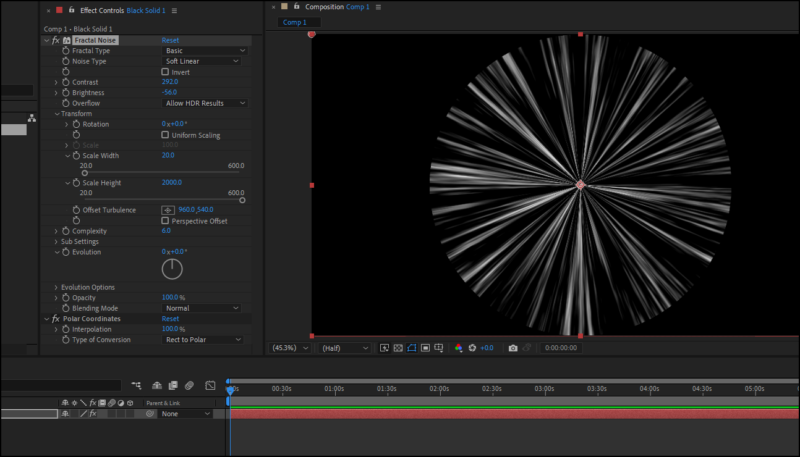
    I think you could do something using Fractal Noise with the transform scales set to non-uniform (height super large and width really low) and then apply a Polar Coordinates effects, you could create a “disco ball” of light rays.

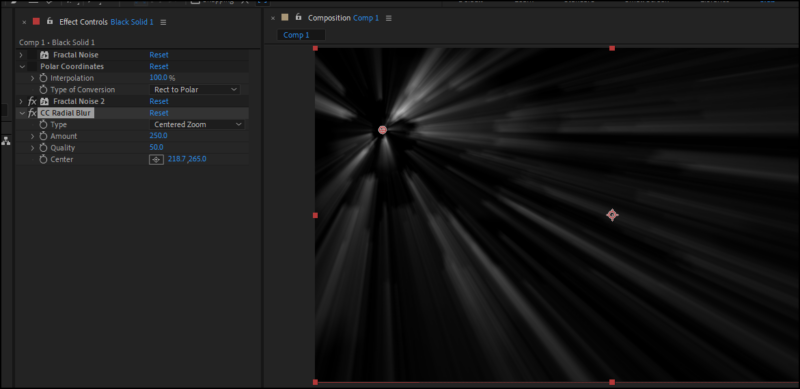
    Alternatively, if you used a fractal noise with just a change to the brightness and constrast and then added CC Radial Blur, you’ll have more control over the placement.

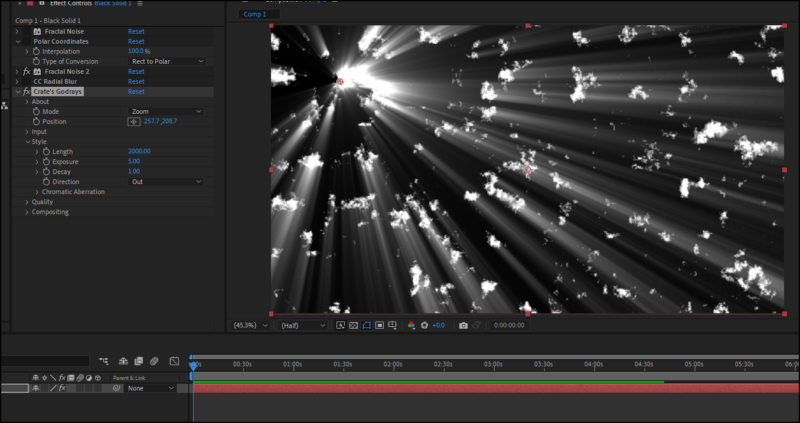
    Finally you could download the free plugin Godrays from ProductionCrate.

    If you need to “mask off” specific areas, you’ll need to either precompose the noise, adding the mask in the precomp or use a circle effect before the radial blur / godrays and set to Stencil Alpha

  • Ayan Ansari

    August 6, 2024 at 6:11 pm

    Can you please mail me the plugin on ansariayan809@gmail.com

We use anonymous cookies to give you the best experience we can.
Our Privacy policy | GDPR Policy