Forum Replies Created

Page 10 of 112
  • Graham Quince

    November 16, 2023 at 11:11 am in reply to: Cartoon Effect – plug in or Ai

    I’ve found the best approach to cartoonifying people is to animate a cartoon sketch of them (rather than trying to cartoon a whole video).

    There’s AI cartoon generators out there that can take an image and cartoon it (not sure if firefly now offers this). But what you get is a static image. Which if you then use to face tracking on your actors, you can translate their movements onto the cartoon.

    That’s the AE solo approach. If you have character animator, it does all that for you.

  • Graham Quince

    November 16, 2023 at 11:06 am in reply to: Procedural / Generative animation in aftereffects

    I think what you’re describing sounds like it could be solved using a Proximty expression.

    Check out this tutorial from Michael Tierney

    https://www.youtube.com/watch?v=eEEd-YuBHn0

  • You might be better off faking the candle flame – that way you have total control over it.

    I just quickly found this tutorial, there’s possibly better ones, but it is pretty good.

    https://www.youtube.com/watch?v=a17nhrchYi4

  • I’m not sure there is a good way to remove either of those microphones. You’ll create a lot of work for yourself and over the course of an hour anything you do will probably show up in a few frames -which will immediately distract the viewer. Imagine some blurring or arm warping just long enough to get the viewer’s attention. Content aware fill would be the tool to try, possibly with Photoshop’s generative AI to fill in the background. You might also be able to use the wire removal effect as well.

    If you are under pressure to hide the mic, I’d suggest disguising it with graphics or a CG prop. To be honest though, the staging of the whole scene suggests that viewers will understand this is an interview. If the director/producer says they care about how the set looks, they really should have thought of that before. Personally, just from the still, the blue product label on the screen in the background is more distracting.

  • Graham Quince

    October 24, 2023 at 1:05 pm in reply to: NVIDIA Eye Contact

    It might also be worth checking out the face tracking tools (they appear in the tracker when you draw a circular mask around the model’s head). These give you more position options – although it’s splitting hairs really as you still have a lot of manual work to do.

  • Graham Quince

    October 18, 2023 at 9:48 am in reply to: Video isn’t exporting properly

    I published a video a couple years back, talking through all the steps you can take to solve a render fail. Maybe it can help you:

    https://youtu.be/J7xhG1bNRVU

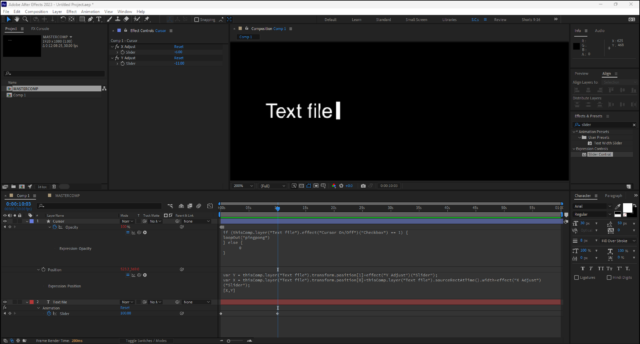
  • I managed to recreate your project and I can see the issue. I think I can see two solutions:

    #1 Duplicate your text layer and have the cursor on this one (and not on the other) then either use a strobe effect or keyframe the opacity to blink the duplicate on and off

    #2 Use a shape layer to make the cursor. And link its position to the text using this expression:

    var Y = thisComp.layer("Text file").transform.position[1]+effect("Y Adjust")("Slider");

    var X = thisComp.layer("Text file").transform.position[0]+thisComp.layer("Text file").sourceRectAtTime().width+effect("X Adjust")("Slider");

    [X,Y]

    I added a couple of sliders just to make it easy to properly align the cursor, but sourceRectAtTime does the hard work here.

    I used loopOut(“pingpong”) to control the opacity:

    if (thisComp.layer("Text file").effect("Cursor On/Off")("Checkbox") == 1) {

    loopOut("pingpong")

    } else {

    0

    }

  • Graham Quince

    September 30, 2023 at 2:50 pm in reply to: Roto Brush Not Working

    I’m so pleased you figured it out (I wasn’t sure from your description what was happening) and thank you for posting the solution too, for the next victim of brain farts.

  • Motion Island went to through the painstaking task of making galleries of gifs showing all the animation presets (and I think most of the effects), if that helps:

    https://blog.motionisland.com/after-effects-presets-text-animation/

    I know it’s not Bridge, but , at least you don’t have to use Bridge 😉

  • Graham Quince

    September 29, 2023 at 1:13 pm in reply to: Stroke my alpha channel!

    When I saw the question at the top of this thread, I was all ready to jump in with layer styles, but then I saw the dates. 2005 ! The cow really is an institution.

Page 10 of 112

We use anonymous cookies to give you the best experience we can.
Our Privacy policy | GDPR Policy