Creative Communities of the World Forums

The peer to peer support community for media production professionals.

Activity Forums Adobe After Effects Typewriter Blinking Cursor Console combined with parentText and parentStyle?

  • Typewriter Blinking Cursor Console combined with parentText and parentStyle?

    Posted by David O’dwyer on October 4, 2023 at 10:07 am

    Hi gang,

    I’m hitting my head against the desk here trying to figure out where I’m going wrong!

    I’ve basically got a master text layer whose SourceText properties are editable in an Essential Graphics template. I then have lots of pre-comped text layers which all use the parentText and parentStyle of that master layer so they all take the same font, style, size, and faux style as the master.

    This is the expression I’ve used on the Source Text of all those pre-comped text layers:

    var parentText = comp("MASTERCOMP").layer("MASTERTEXT")(2)(1);
    var parentStyle = comp("MASTERCOMP").layer("MASTERTEXT")(2)(1).style;
    parentStyle.setText( parentText )

    I’ve been asked to add a blinking cursor to the template, so I’ve tried simply adding Ae’s Typewriter Blinking Cursor Console preset to the layer, but it creates a conflict with the existing parent text and style expression I’ve been using. Any idea how I can allow the pre-comped text layers to take the font style of MASTERTEXT while also allowing it to receive the animation properties of the cursor preset? Here is what I have currently:

    var parentText = comp("MASTERCOMP").layer("MASTERTEXT")(2)(1);
    var parentStyle = comp("MASTERCOMP").layer("MASTERTEXT")(2)(1).style;
    parentStyle.setText( parentText )

    var t = text.sourceText;

    var l = t.length;

    var a = effect("Animation")(1);

    var b = effect("Cursor On/Off")(1);

    var c = ["|","_","—","<",">","«","»","^"];

    var d = effect("Cursor Shape")(1).value;

    var reveal = t.slice(0, l*linear(a,0,100,0,1));

    if(b == 0){

    reveal;

    } else {

    reveal + c[d-1];

    };

    Walter Soyka replied 2 years, 7 months ago 3 Members · 2 Replies
  • 2 Replies
  • Graham Quince

    October 4, 2023 at 1:04 pm

    I managed to recreate your project and I can see the issue. I think I can see two solutions:

    #1 Duplicate your text layer and have the cursor on this one (and not on the other) then either use a strobe effect or keyframe the opacity to blink the duplicate on and off

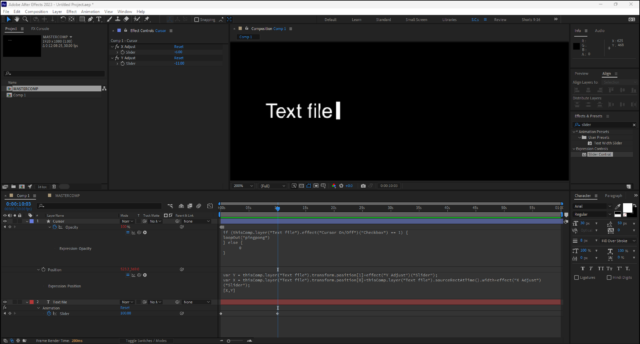
    #2 Use a shape layer to make the cursor. And link its position to the text using this expression:

    var Y = thisComp.layer("Text file").transform.position[1]+effect("Y Adjust")("Slider");

    var X = thisComp.layer("Text file").transform.position[0]+thisComp.layer("Text file").sourceRectAtTime().width+effect("X Adjust")("Slider");

    [X,Y]

    I added a couple of sliders just to make it easy to properly align the cursor, but sourceRectAtTime does the hard work here.

    I used loopOut(“pingpong”) to control the opacity:

    if (thisComp.layer("Text file").effect("Cursor On/Off")("Checkbox") == 1) {

    loopOut("pingpong")

    } else {

    0

    }

  • Walter Soyka

    October 6, 2023 at 6:13 pm

    You were really close with your original expression. You really just needed move your setText() call down from line 3 to the end of the expression, and use it to show reveal instead of parentText.

    I cleaned up the code a little bit — using meaningful variable names is good practice to help future you understand what past you wrote — and I rewrote the blink feature so the cursor stays steady while you’re typing and only blinks when you’re not.

    I’m here to teach, so please ask any questions you may have and I’ll do my best to answer.

    // get the parent text and style to follow

    var parentText = comp("MASTERCOMP").layer("MASTERTEXT")(2)(1);

    var parentStyle = comp("MASTERCOMP").layer("MASTERTEXT")(2)(1).style;

    var textLength = parentText.length;

    var cursorCharacter = ["|","_","—","<",">","«","»","^"];

    // get animation progress and cursor selector values from their respective Effects

    var animationProgress = effect("Animation")(1);

    var cursorCharacterIndex = effect("Cursor Shape")(1).value-1;

    // create a blinking cursor. It should be steady as long we're typing, then blink when we're not

    var textBlinkDuration = 1; // how long does a full text blink take?

    var textBlinkOffTime = 0.5; // how much of a text blink is OFF (versus ON)

    var currentlyTyping = animationProgress.speed > 0 ? 1 : 0;

    var cursorOnOrOff = currentlyTyping == 1

    ? 1

    : time % textBlinkDuration > textBlinkOffTime;

    // cut the text down according to the Animation slider from 0 to 100%

    var revealText = parentText.slice(0, textLength*linear(animationProgress,0,100,0,1));

    // add the cursor to the revealed text if it should be on right now

    if(cursorOnOrOff != 0){

    revealText += cursorCharacter[cursorCharacterIndex];

    }

    // reveal the processed text

    parentStyle.setText( revealText )

We use anonymous cookies to give you the best experience we can.
Our Privacy policy | GDPR Policy