Anthony Popolo
 45
COW Coins
45
COW Coins
 17
Premiere Pro Coins
17
Premiere Pro Coins
Forum Replies Created
-

UPDATE:
Just to recap, my camera had on board SSD errors (ruining my live performance recordings) using the following SSD cards in the JVC adapter caddy ($379):
– Transcend 1TB 830S SATA III M.2 Internal SSD ($220):
This was the only listed accessory at B&H for the JVC caddy when I bought it, so I figured that was the correct one. That was my first round. I had a few good recording sessions, then frequent errors.
– WDS100T3B0B ($260):
After looking at the JVC camera site for compatible SSDs for this camera (I know I should have done this first), the listing was for a WDS100T2B0B (note the “2” in part number). I found that this part is obsolete. I found and opted for the WDS100T3B0B (note the “3”), thinking it was just an updated version of the JVC approved card. This card produced more errors than the Transcend. Errors every 20 minutes on average. Useless.
– WDS100T2B0B (refurbished, $189)
This was the card JVC originally recommended, but it is no longer manufactured by Western Digital. I was able to find a “refurbished” one (not sure exactly what that means). Lo and behold this seems to work. I ran a series of tests where I just let the camera run (in ProRes 422 mode) until it hit the 4hr limit mark. I did this over and over until I logged about 60hrs for both 4k and 1080 each (about 120hrs total). Not a single recording error.
CONCLUSION:
While the fear factor in using the camera has definitely been reduced, I will probably not use it unless I have an available backup date for the event I’m filming. My confidence may return at some point.
It should be noted that JVC sells this camera which ONLY recommends an SSD card that is obsolete (at least in the 1TB size, I’m assuming true for 500GB and 2TB). I understand they can’t be immediately up to date on other manufacturers’ product changes, but as advertised, this camera does not appear to deliver using currently manufactured SSD cards.
-
Hi Marc,
Thanks for your help! I’ve got plenty of cameras for backup. Most of my shoots are multi-cam anyway, so I guess I shouldn’t complain that I have to set up a second one. In fact, this 4k camera will remain out of rotation until my confidence comes back to use it. Take care,
Anthony
-
Hi Mads,
Thanks for your input when I posted a few months ago suspecting the SD card issue. That issue was the “FAIL 1” I reported on this current post. I will consider that first failure as a SD card issue. It was that uncertainty that prompted me to try to go the SSD route. Once I got a look how good the footage is with the ProRes recording on the SSD, my plan was to use this camera exclusively recording to the SSD, and not using the SD card at all. But because of the SSD issues, which appear to be much more frequent, I am at a standstill. To answer your question about the camera running hot, I got no error message regarding temp. All the filming I have done is in climate controlled indoor theaters, never reaching over 75 degrees F (24 C). If the camera is getting too hot, it would have to be due to internal camera operation. Thanks again for your input!
Anthony
-
Hi Marc,
Thanks for your input. It’s funny, I had just watched your review earlier today BEFORE you posted! Well done. I was hoping to see something about the SSD that I overlooked.
To answer your question, yes the SDXC card is v90. I don’t have a JVC person that I work with (though I should after all the business I’ve given them). If you do have a tech contact that you can share, that would be great! I think I’ve exhausted all public info (even AI hasn’t helped)
Yeah, a backup camera seems to be the responsible and safest thing to do. I would have to have it set up and running concurrently, since I can’t afford the downtime needed to swap, so twice the setup and breakdown time. I guess I’ve lucked out with the dependability of my cams over the years.
I do like your idea of having an external recorder via SDI or HDMI, except my first failure mode (while recording to the SD card) resulted in a frozen video image, which even froze on my external monitor via SDI. That would, however, be a solution for the SSD error since the video and audio still outputted via SDI. I love the look of the ProRes recording to the SSD and I’d like to make that my primary configuration, and just forget about the SD card, so the external recorder is doable, except the SSD error happens so frequently, I would end up using the backup for every shoot, defeating the purpose of the SSD (ProRes).
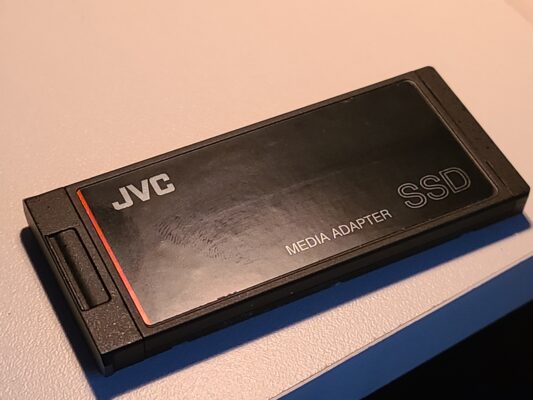
When you say the cam you had was with the JVC supplied SSD, you mean just the adapter that holds the SSD inside it, correct (see pic)? The actual SSD they recommend was a Western Digital. I couldn’t find any JVC branded SSD?
Thanks for the tip on the Canon XA50 (now XA70). I was all in on Canon in my Standard-Def days (XL1, XL2, GL1). I’m determined to make this JVC work as advertised. The problem is too major and occurs too often to be an occasional glitch that can be overlooked, especially for how much I’ve already invested in it!
I really appreciate if you could point me in the JVC tech direction. That might be my only salvation!
Thanks
Anthony

-
Anthony Popolo
December 14, 2025 at 8:28 pm in reply to: JVC GY-HC500U Freezed up while filming live eventWow. Thanks Mads. I always (falsely) assumed SD cards were all the same, but seeing that SanDisk has be specifically identified as having issues makes me rethink that. Thanks for that link.
I like the idea of recording to a backup at the same time like to an SSD and I will definitely look into doing that. In the interim, I will set my camera to record DUAL to both card slots. Hopefully, if something like this happens, it would only affect one card. Thanks.
-
Anthony Popolo
November 6, 2025 at 5:41 am in reply to: Why does audio sound different from Audition into Premiere Pro?Thank you! I seem to like to do thing the hard way. I appreciate the links. I will get on it.
-
Anthony Popolo
July 29, 2025 at 6:52 pm in reply to: Premiere Pro glitch, JVC glitch, or (most likely) User Error?Thanks Rob,
I didn’t know that option existed. The fewer clips the better! I will try that on my next shoot for sure.
Thanks
-
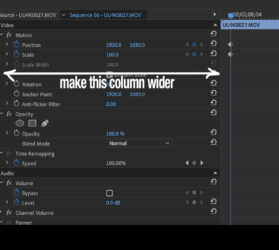
I’ve run into this. Make your column width wider in your effect control panel so have have more room to select the key frame. The computer thinks you are clicking in the numerical space. See pic
-
here’s the error msg.
-
Anthony Popolo
November 26, 2018 at 10:04 pm in reply to: Need a little guidance on IMAG switcher unit – Datavideo, Blackmagic, Roland?Thanks Steve!
All great info. I think going to the hardware based switcher is the biggest key (with the software based version, I was getting the big delay just capturing a single camera, before I adding anything else!) With a hardware switcher, I’ll try to minimize those few other frames. I’ll plan on native all the way through where I can.
>>>”So how many differing video outputs do you need? ”
I’m only having one program out needed to two projectors.
If the multiple outputs is the only difference between the 1200 and 2200, I may just need the 1200. Although…
>>>”The SE-1200 has 2x XLR in, no audio outputs.”
Apparently, the 2200 has 4 in, 2 out.
Thanks for your workflow setup. I’ve never used PlaybackPro, but will look into it. I was just planning on playing the video via my computer’s Quicktime player with enough leader and quick hands.
Thanks again,Anthony Popolo
Sunnyside Entertainment