Creative Communities of the World Forums

The peer to peer support community for media production professionals.

Activity Forums Adobe Premiere Pro Strange key frame anomaly

  • Strange key frame anomaly

    Posted by Cameron Ventura on July 27, 2025 at 10:16 am

    I’m working on a friend’s laptop with premiere pro version 25.3 build 84.

    In the effects control window, i’ve laid down to position key frames. But when I go to the forward and back arrows, to jump to one or the other key frames, what appears now is the pointer finger and two very small forward and back arrows. And when I click on it, I get a numerical value. I don’t need a numerical value. I just want to be able to snap to the first or last key frame. Does anyone know how to deactivate this (new) numerical feature?

    Anthony Popolo replied 10 months, 3 weeks ago 3 Members · 2 Replies
  • 2 Replies
  • Mads Nybo jørgensen

    July 27, 2025 at 11:09 am

    Hey Cameron,

    Not knowing your specifications, my initial thought is that your screen resolution on the laptop might not give you the full width of PPro?
    When using laptops, I always like to have a 24′ or 27′ monitor to work on, or a 16′ breakout screen for the master viewer or timeline.

    The other issue worth investigating, is that PPro v 25.3 just doesn’t work the way it should.
    It is in many ways a piece of junk, designed for you to use Adobe A.I. coins over that of stable functionality.
    It might be worth stepping back to version 25.0 or 25.1, your project should still open on those versions.

    Hope that this helps.

    Atb
    Mads

  • Anthony Popolo

    July 29, 2025 at 4:51 pm

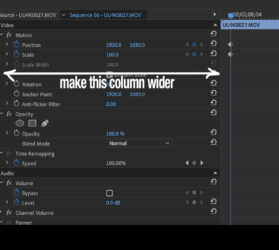
    I’ve run into this. Make your column width wider in your effect control panel so have have more room to select the key frame. The computer thinks you are clicking in the numerical space. See pic

We use anonymous cookies to give you the best experience we can.
Our Privacy policy | GDPR Policy