Creative Communities of the World Forums

The peer to peer support community for media production professionals.

Activity Forums JVC Cameras JVC GY-HM550U Fails (again…and again?)

  • JVC GY-HM550U Fails (again…and again?)

    Posted by Anthony Popolo on April 29, 2026 at 4:37 pm

    I’ve been using multiple JVC cams for the last 17 yrs and they have been very dependable – GY-HM600, GY-HM850, GY-HM700 (my workhorse, not a single record failure in 20yrs).
    I mostly film live stage events (performances, music, etc), so I rely on full operation the whole show. I can’t call “cut” if I have an issue. All filming is done indoors with climate controlled temperatures. With fully charged battery AND AC plugged in. Latest firmware installed.
    FAIL 1 (previously reported in this forum):
    Last year I decided to add a 4k cam to my inventory. I opted for the JVC GY-HC500U, since it would have a quick learning curve, was reasonably priced, and I relied on the dependability I’ve been used to.
    About my fifth shoot with the camera on a live event, recording 4k/30 onto SanDisk 128GB SDXC Extreme Pro, the camera froze (image, switches, everything). I had to power off/on, ruining the uninterrupted recording (along with my client’s unwavering trust in me).
    FAIL 2:
    Having done some research (some here at CC), I suspected the SD card may have been the culprit.
    For better dependability, I decided to add the internal SSD drive (Transcend 1TB 830S SATA III M.2 Internal SSD) with required JVC caddy JVC M.2 SSD Media Adapter Caddy for GY-HC500/550 (total cost: $580). This configuration allows recording UHD 10-bit ProRes HD/4k onto the SSD, which really does look amazing!
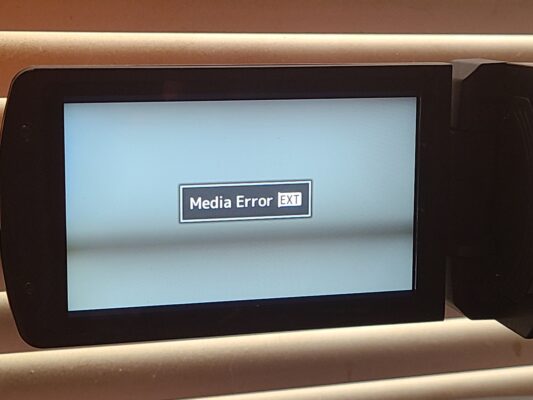
    A few gigs in using this configuration, I formatted the SSD as usual, and began filming a live 60 minute dance performance to the EXT SSD card (1080/30, still wary of 4k at this point). 10 minutes in, I got a “MEDIA ERROR EXT” pop up (see pic), with no other onscreen info, camera then went into standby mode, which was a different failure mode than the previous. I had to wait and restart recording (losing about 10 seconds). This happened 6 times within the hour! For a one-camera dance show, that’s a big problem (if you don’t believe me, google “dance mom stereotype” for more info).
    After the gig, I did some testing. Hit the record and let the camera record (up to 4 hrs, cam limit) at 1080/30. I first formatted the SSD in cam each time. I started a recording about 10 times, and only once did it make it to 4hrs. All the other times got the EXT error anywhere from 5 to 40 minutes in. Re-performed test at 4k. Same failure pattern.
    FAIL 3:
    Maybe incompatible SSD? I checked the JVC site for compatible SSDs. My previous Transcend was not listed. The recommendation was WDS100T2B0B (for 1TB), which, of course is no longer available. I did find a WDS100T3B0B (same WD SATA SSD M.2, just a “3” where there was a “2” in the part number). Another $260.
    Did same run test with similar failure results. The first run went the 4 hrs, but not once after that.
    Camera had the latest firmware installed (GY-HC500_V0300-0255.UPD) but I went ahead and re-installed it anyway.
    Re-test, same failures, except now it appears to be happening quicker: 10 errors averaging about 3 minutes each.
    Camera has 170 fan hrs, mostly in testing. Again, all in normal indoor ambient temperatures.
    Still suspecting SSD, I did find a “refurbished” WDS100T2B0B (original part number listed at JVC). I just ordered it. Another $199. Total investment in SSD thus far $1039, which is over 40% of what I paid for the camera!

    Will retest when I get new SSD, but I’m not optimistic.

    Any ideas?

    Anthony Popolo replied 6 days, 19 hours ago 3 Members · 7 Replies
  • 7 Replies
  • Marc Franklin

    April 29, 2026 at 10:03 pm

    Hi Anthony,

    I did a full review of the camera about 5 years ago when I was at Streaming Media Magazine. I did have some issues during the review. I did have at least one failure on a shoot, and I think another on a test. This was with the JVC supplied SSD. A JVC tech had to help me do a full factory reset of the camera. What is the rating of your SDXC cards? They come as V30, v60 and v90. Make sure they are V90. If you don’t have a JVC person that you are working with, I can try and look up who I worked with. You can see the review article and video here: https://www.streamingmedia.com/Producer/Articles/ReadArticle.aspx?ArticleID=148946&PageNum=1

    One thing that I do, even on a 1 camera shoot, is have a back up camera ready to go, if not running concurrently. You can also get a Blackmagic Design Video Assist, to make a back up recording from the SDI or HDMI out of the camera if the recording stops.

    My main camera right now is Canon’s XA50. I picked it up used for $1000. It also has a 1″ sensor and 4K 30p recording, can use V30 cards for the 4K 30p recording, but it does not have many of the advanced features that the JVC does. The Canon is also cleaner in low light. I hope this helps. Let me know if you have any more questions.

    Marc

  • Anthony Popolo

    April 30, 2026 at 1:50 am

    Hi Marc,

    Thanks for your input. It’s funny, I had just watched your review earlier today BEFORE you posted! Well done. I was hoping to see something about the SSD that I overlooked.

    To answer your question, yes the SDXC card is v90. I don’t have a JVC person that I work with (though I should after all the business I’ve given them). If you do have a tech contact that you can share, that would be great! I think I’ve exhausted all public info (even AI hasn’t helped)

    Yeah, a backup camera seems to be the responsible and safest thing to do. I would have to have it set up and running concurrently, since I can’t afford the downtime needed to swap, so twice the setup and breakdown time. I guess I’ve lucked out with the dependability of my cams over the years.

    I do like your idea of having an external recorder via SDI or HDMI, except my first failure mode (while recording to the SD card) resulted in a frozen video image, which even froze on my external monitor via SDI. That would, however, be a solution for the SSD error since the video and audio still outputted via SDI. I love the look of the ProRes recording to the SSD and I’d like to make that my primary configuration, and just forget about the SD card, so the external recorder is doable, except the SSD error happens so frequently, I would end up using the backup for every shoot, defeating the purpose of the SSD (ProRes).

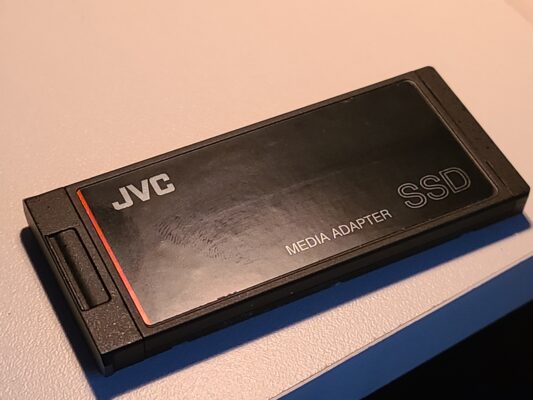
    When you say the cam you had was with the JVC supplied SSD, you mean just the adapter that holds the SSD inside it, correct (see pic)? The actual SSD they recommend was a Western Digital. I couldn’t find any JVC branded SSD?

    Thanks for the tip on the Canon XA50 (now XA70). I was all in on Canon in my Standard-Def days (XL1, XL2, GL1). I’m determined to make this JVC work as advertised. The problem is too major and occurs too often to be an occasional glitch that can be overlooked, especially for how much I’ve already invested in it!

    I really appreciate if you could point me in the JVC tech direction. That might be my only salvation!

    Thanks

    Anthony

  • Mads Nybo jørgensen

    April 30, 2026 at 8:28 am

    Hey Anthony,

    Marc has already given you excellent advice, and if he can find you an engineer, even better.

    My intial thought when I saw your post, was in part about whether the camera is running hot?

    The other is the “hidden” trouble that users have experienced in recent years with SanDisk Extreme Pro SD Cards that are causing Photo and Video file corruption.
    Initially it was thought to be only relvant to specific Sony cameras, but it is looking more widespread.

    There is plenty of posts across the web on this point.

    Most recent that I could find, without searching for too long, is from March:

    https://forums.sandisk.com/t/sandisk-extreme-pro-sd-cards-frequently-cause-file-corruption-resulting-in-defects-in-photos-and-videos/418468

    Some of the answers may be helpful to you.

    Atb
    Mads

  • Anthony Popolo

    April 30, 2026 at 5:16 pm

    Hi Mads,

    Thanks for your input when I posted a few months ago suspecting the SD card issue. That issue was the “FAIL 1” I reported on this current post. I will consider that first failure as a SD card issue. It was that uncertainty that prompted me to try to go the SSD route. Once I got a look how good the footage is with the ProRes recording on the SSD, my plan was to use this camera exclusively recording to the SSD, and not using the SD card at all. But because of the SSD issues, which appear to be much more frequent, I am at a standstill. To answer your question about the camera running hot, I got no error message regarding temp. All the filming I have done is in climate controlled indoor theaters, never reaching over 75 degrees F (24 C). If the camera is getting too hot, it would have to be due to internal camera operation. Thanks again for your input!

    Anthony

  • Marc Franklin

    April 30, 2026 at 6:23 pm

    Hi Anthony,
    It would seem that all my contacts from 5 years ago are no longer there. I found 1 press contact, but I got an auto reply that she was out of the office until Monday. Hopefully she can point us in the right direction.

    When I did the review, I believe they sent the SSD caddy with the SSD already in it, so I don’t remember if I knew what they gave me.

    If I get more info, I will pass it on. In the mean time I’d look for that back up camera.

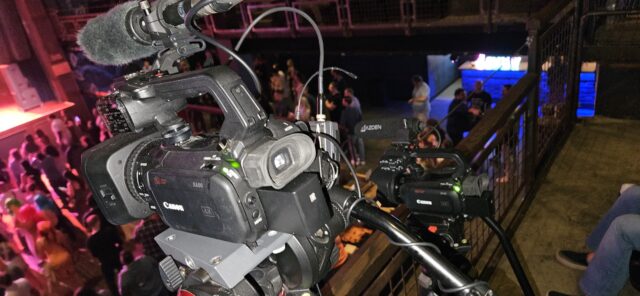
    This was my set up last night at the House of Blues in Anaheim, CA. Canon XA50 following the dance leader on stage, Canon XA40 on a static wide shot.

  • Anthony Popolo

    April 30, 2026 at 6:29 pm

    Hi Marc,

    Thanks for your help! I’ve got plenty of cameras for backup. Most of my shoots are multi-cam anyway, so I guess I shouldn’t complain that I have to set up a second one. In fact, this 4k camera will remain out of rotation until my confidence comes back to use it. Take care,

    Anthony

  • Anthony Popolo

    June 5, 2026 at 3:43 pm

    UPDATE:

    Just to recap, my camera had on board SSD errors (ruining my live performance recordings) using the following SSD cards in the JVC adapter caddy ($379):

    – Transcend 1TB 830S SATA III M.2 Internal SSD ($220):

    This was the only listed accessory at B&H for the JVC caddy when I bought it, so I figured that was the correct one. That was my first round. I had a few good recording sessions, then frequent errors.

    – WDS100T3B0B ($260):

    After looking at the JVC camera site for compatible SSDs for this camera (I know I should have done this first), the listing was for a WDS100T2B0B (note the “2” in part number). I found that this part is obsolete. I found and opted for the WDS100T3B0B (note the “3”), thinking it was just an updated version of the JVC approved card. This card produced more errors than the Transcend. Errors every 20 minutes on average. Useless.

    – WDS100T2B0B (refurbished, $189)

    This was the card JVC originally recommended, but it is no longer manufactured by Western Digital. I was able to find a “refurbished” one (not sure exactly what that means). Lo and behold this seems to work. I ran a series of tests where I just let the camera run (in ProRes 422 mode) until it hit the 4hr limit mark. I did this over and over until I logged about 60hrs for both 4k and 1080 each (about 120hrs total). Not a single recording error.

    CONCLUSION:

    While the fear factor in using the camera has definitely been reduced, I will probably not use it unless I have an available backup date for the event I’m filming. My confidence may return at some point.

    It should be noted that JVC sells this camera which ONLY recommends an SSD card that is obsolete (at least in the 1TB size, I’m assuming true for 500GB and 2TB). I understand they can’t be immediately up to date on other manufacturers’ product changes, but as advertised, this camera does not appear to deliver using currently manufactured SSD cards.

We use anonymous cookies to give you the best experience we can.
Our Privacy policy | GDPR Policy