Robert Müller
Forum Replies Created
-

Your positions are off. Your misaligned triangles are at position[0] (the x-value) 408 it seems. In the linked tutorial they are at 420. Mathematically this makes sense, since you shift the triangle by half the width of the square base. So base is 1080px, half 540, 960 (old x-position) -540 is 420. I guess you messed up while repostioining the anchorpoint, since its a little tricky in 3d space
-
Robert Müller
January 14, 2021 at 2:24 pm in reply to: Find out position of individual characters in text layerHi Filip, awesome expression set up you made there. Just out of curiosity, since I checked it out to learn a thing or two, I noticed that the expression sometimes does not work with certain fonts. I did not recognize a pattern, but the problem is always the same as that the coordinates pushed into the array are zero. As far as I understand the expression I did not find a reason for this, any idea why that is?
-
Robert Müller
January 10, 2021 at 3:19 am in reply to: Need help: After effects closes without error after importing a project from MacCollect means to gather all your footage (or resource files) and make a copy, so that you have on folder you can easily share. Its an option in After Effects.
Are you trying to open the file or importing it into an existing project? If the latter maybe you should open the file and convert it first.
Since its converting from an older version, did you save the new converted project file?
I would try installing older versions of AE via the CC app and try that.
-
Okay so you are talking about the basic concept of the ad here. This vclip was made with to shots on seperate, but similar looking sets. The cut was hidden when he went into the store and the camera zoomed in
-
Hi Joseph, this will do the trick:
max=500; //y value where you want your text to stop
y=value[1] - time * 29.97 * 3;
y<=max && (y=max);
[value[0], y]
-
I dont really understand what you mean by “where he goes out in his house and came in linearly”. He does go into a shop but what do you mean by linearly and what exactly are you trying to replicate?
-
Robert Müller
December 22, 2020 at 11:39 am in reply to: Need help to convert image to shape in After EffectsYou can create a new shape layer and copy and paste the mask paths into new paths, its as simple as that. You could also use this script, which is part of rd_scripts, a free collection of very useful scripts:
-
For this particular case you dont need to mess with the channels at all. As far as I can tell this example does not use the corresponding channels in a true fashion, because (for example) the red layer does not seem to have a background. The easiest way to achieve this
– Put both videos/images on top of one another
– Add a Levels or Curves effect to both of them but do nothing yet
– Add a Tritonus to both of them. Turn the Highlight s and Midtones on both layers to white and the shadows to Red and Cyan respectively
– Mess with the Levels/Curves until you see the details of the image you want to show
– Set the blend mode for the top layer to multiply
-
Okay, Im a step closer now. It seems that the problem was using a PBR material on my object, with regular materials the GI works just fine. So whats the workflow now to get PBR materials lit up by HDRI images, or is this simply not possible since luminance channel is not physically acurate?
-
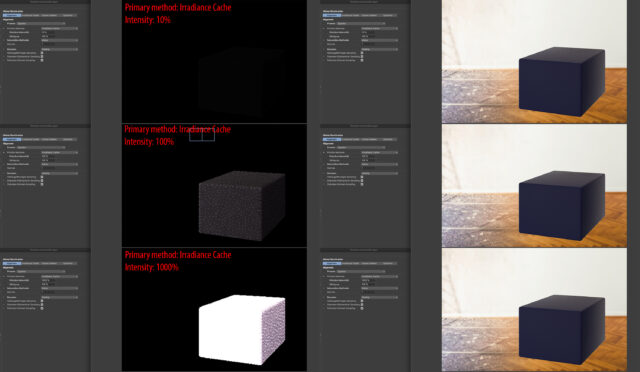
Okay even increasing the intensity in the GI settings does nothing, wtf is going on? Ive attached a screenshot to better illustrate what I mean