Robert Müller
Forum Replies Created
-

Robert Müller
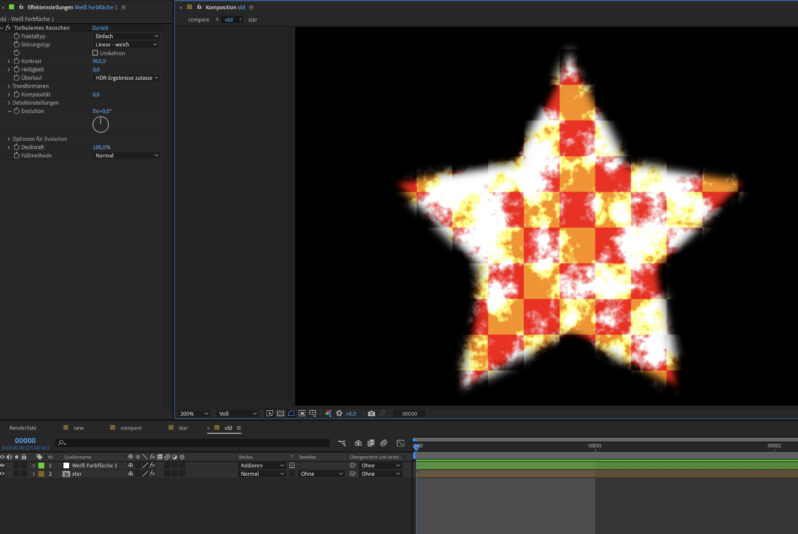
August 8, 2022 at 4:54 pm in reply to: “Add” Blending mode darkening edges unless BG layer existsHey, yeah this has been an issue for ever and seems to be a core problem for every compositing software I used (e.g. Nuke). We used to have this problem with 3D renderings, here is my workaround (I hope I remember everything right. Real footage might give you some problems but I cant try it out right now)
I usually go as follow:
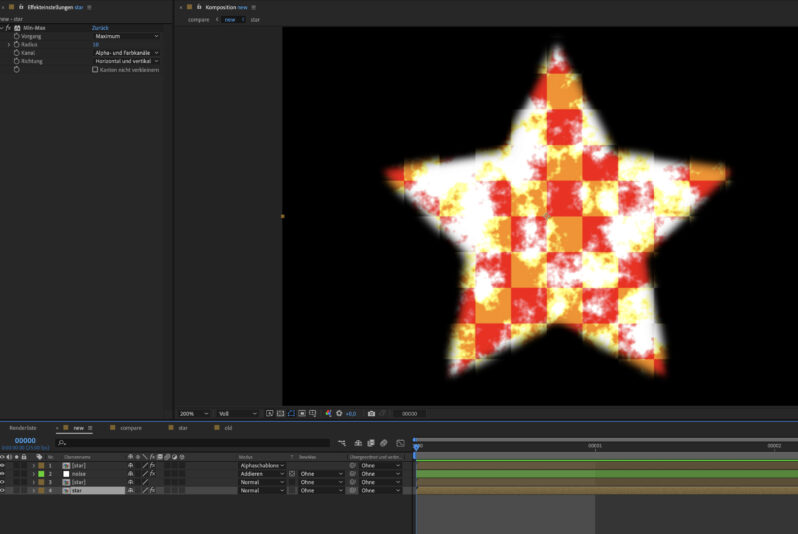
– precomposed the masked out/ keyed out footage, so you have one layer with no effects and masks, containing an alpha channel
– apply the min/max effect set to maximum and “RGB+Alpha”, you dont have to go wild. This is to “expand the edges a little.
– duplicate the layer and remove the effect (as I write this I realise, that you dont have to duplicate the original layer. A CC composite effect should work just fine)
– above this goes the footage you want to screen/add/ whatever
– on top of the stack goes another copy of the precomped footage with no effetcs, blending mode set to “Stencil alpha”
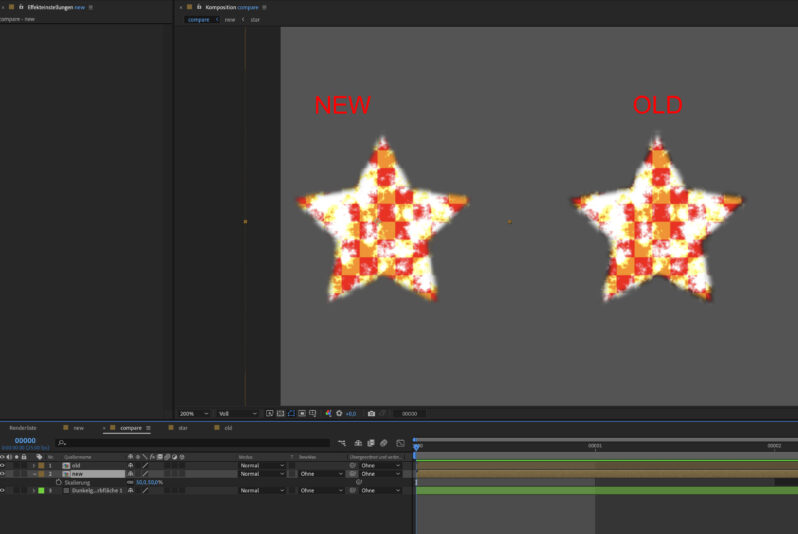
Ive attached screenshots (sorry for german UI) to visualize the order better and a comparsion to your “old” method
There a different ways to expand your footage a little bit, but this always worked for me. Hope I could help you out 🙂

-
Robert Müller
February 4, 2022 at 12:03 pm in reply to: Solution needed for odd combination: 3D,AI layers, Gradient FX and Cont.RasterizHi,
you could precompose the AI elements and change the size of those comps and the AI layers with continuously rasterization enabled. If you place them in your regular comp now AE should just handle them as big layers without the need to rasterize cont. those
-
The dot you mention is a switch to solo certain layers, that means all other layers are hiddeb except the ones with the dot. As you see in your video, the null layer at the top also has the dot present, so everything besides your null layer is hidden. Clicking on the dot of your null layer should fix your problem
-
Robert Müller
July 13, 2021 at 8:58 am in reply to: Randomly play different animations (is this possible?)Since it is for streaming I would look into a OBS plugin solution, this one I found after a quick google search:
https://github.com/UpDownLeftDie/obs-random-videos
Maybe you can find more in their community 🙂
-
Hi, so you want to let the time remapping happen when you click (set a keyframe to change the value) the checkbox right? Then you might need to use a for loop like this:
Im not really good at those loop things so this is not a perfect solution – like when you switch from off to on multiple times or you have 0 keyframes on your checkbox – but maybe someone else can help as well? 🙂
c=comp(“2.1a. Creator”).layer(“ICON_CTRL”).effect(“ICON_CTRL”)(“Checkbox”));
for(i=1;i<=c.numKeys;i++){
if (c.key(i).value== false) {
    0
} else {
    endT = framesToTime(40);
    linear(time,c.key(i).time,c.key(i).time+endT,0,endT);
};
} -
Yeaht thats the problem with auto orient, thats why you should use the expression I linked instead
-
Hi Ranveer, you could use the tangentOnPath function, like Dan discribed here:
https://creativecow.net/forums/thread/auto-orient-expression-to-use-for-path-layerae-don/
This might have some issues with a trim path end value of exactly 0, but you could add an if statement to set the value to something like 0.1 if the end is exactly at 0 🙂
Auto Orient expression to use for path layer? (Don’t need built in AE option)
-
Hi Paulo, the only solution I found is to use the position inside the Transform effect. If you still want the option of Motion Paths you could link the position value of the transform effect to the position of a null via expressions
-
This seems to be this scene from Harry Potter and the Half Blood Prince
https://www.youtube.com/watch?v=qVON4in0ZdA
This is not a simple clip to track. Since this is the finished result you have to fight the color correction and applied effects, a very dark scene and (judging by the source used in your screenshot) a good amount of compression. I would do it by hand and since the part where Hermione gets up is fairly short it should not take that long
Some contents or functionalities here are not available due to your cookie preferences!This happens because the functionality/content marked as “Google Youtube” uses cookies that you choosed to keep disabled. In order to view this content or use this functionality, please enable cookies: click here to open your cookie preferences.