Creative Communities of the World Forums

The peer to peer support community for media production professionals.

Activity Forums Adobe After Effects Mocha AE Track Not Tracking!

  • Mocha AE Track Not Tracking!

    Posted by Suzann Johns on March 22, 2021 at 7:32 am

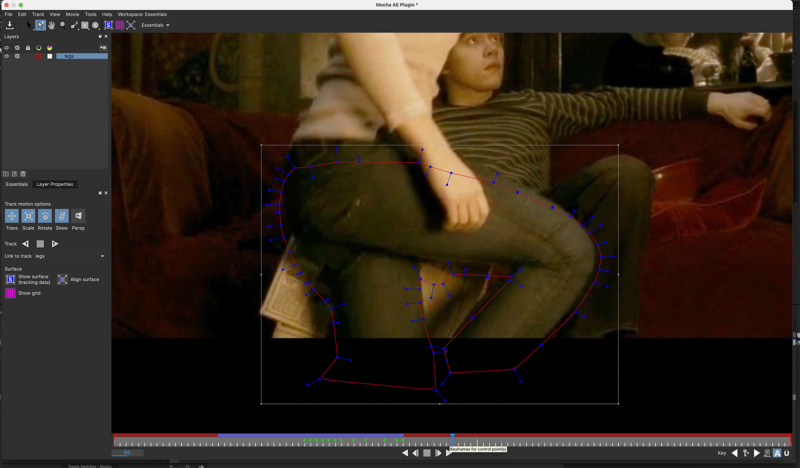
    I am trying to track a relatively simple clip, just needing to remove a girl getting off the floor. For some reason, when I click “Track” (either Forward or Backward), the Spline goes wonky after a few frames, although it keeps something similar to the shape, but it doesn’t move upward with the legs, which are what I’m currently tracking.

    I updated After Effects a few hours ago, and I’ve closed out of and reopened the program numerous times, started a new project and attempted again (I had the same issue), and nothing has worked.

    Yes, I technically could just realign/adjust the points manually, but that is not only extremely tedious, but horribly time consuming.

    I think these are the right images.

    The red spine becomes stretched and displaced when I try to track and it is infuriating!

    Suzann Johns replied 5 years, 1 month ago 4 Members · 9 Replies
  • 9 Replies
  • Tero Ahlfors

    March 22, 2021 at 9:31 am

    You are trying to track an area that’s way too big and complex for one shape. Usually one would track and then roto one piece at a time eg. the thigh and the leg would be separate shapes.

    “Yes, I technically could just realign/adjust the points manually, but that is not only extremely tedious, but horribly time consuming.”

    There’s no magic bullet for roto, there are just things that might save you some time and trouble.

  • Suzann Johns

    March 22, 2021 at 9:53 am

    I tried to track just the calf, but the same thing happened. As well, I also tried just the hair, and, again, the spline wouldn’t behave. I’ve attempted tracking the arm, the hand, the torso (each separately) and the spline always drifts and distorts. I don’t think it’s the size that’s he issue here – since I have tried tracking the hand, which is not large at all, and that went wonky, too.

  • Tero Ahlfors

    March 22, 2021 at 10:23 am

    Then you’d be better off rotoscoping by hand. Or paying someone else to do it.

  • Suzann Johns

    March 22, 2021 at 11:06 am

    That blows.

    I don’t know anyone who would do it for me…

    However, for some reason, it works better (not perfectly, mind you) if I duplicate the layer a million times, track one body part on each layer, then just have like 40 layers, each with a different body part.

    This is going to be hella aggravating.?

  • Tero Ahlfors

    March 22, 2021 at 11:17 am

    There are times when trackers just won’t work and you’d be better off doing it by hand instead of wasting the time trying to get it to track.

  • Tero Ahlfors

    March 22, 2021 at 11:59 am

    Also if you want to remove something you’ll need to have the background that’ll show up when you remove foreground objects. Do you have a background plate for this shot?

  • Robert Müller

    March 22, 2021 at 3:27 pm

    This seems to be this scene from Harry Potter and the Half Blood Prince

    https://www.youtube.com/watch?v=qVON4in0ZdA

    This is not a simple clip to track. Since this is the finished result you have to fight the color correction and applied effects, a very dark scene and (judging by the source used in your screenshot) a good amount of compression. I would do it by hand and since the part where Hermione gets up is fairly short it should not take that long

    Some contents or functionalities here are not available due to your cookie preferences!

    This happens because the functionality/content marked as “Google Youtube” uses cookies that you choosed to keep disabled. In order to view this content or use this functionality, please enable cookies: click here to open your cookie preferences.

  • Paul Carlin

    March 23, 2021 at 2:55 pm

    Try increasing the gamma/gain using a color correction temporarily to help the tracker track. Disable before rendering.

  • Suzann Johns

    March 24, 2021 at 7:45 am

    That’s exactly what I’m trying to track! Look at you, being a dork, too.

    I meant the motion was simple…either way, I’ve mostly gotten it figured out – I just need to track her upper body.

    Only problem now is that the effing matte is the only thing that’ll show up unless the zoom is at 25%, which is way too small to accomplish ANYTHING and I’ve tried adjusting my settings.

    grr…

We use anonymous cookies to give you the best experience we can.
Our Privacy policy | GDPR Policy