Red-rob Rothkopf
Forum Replies Created
-

Red-rob Rothkopf
October 9, 2021 at 7:33 pm in reply to: Vegas Pro 19 very low font size and controlsI imagine your laptop has a trackpad if you’re not using a mouse, which has equivalent features to a mouse (e.g. for scrolling, mouse-wheel, etc). If Stephen’s #2 point is still valid, you probaly could try it without a physical mouse.
That said — I can’t imagine editing without a mouse.. seems like it’d be way more tedious!
-
Red-rob Rothkopf
October 9, 2021 at 7:31 pm in reply to: Change skin color on moving body without manually masking each frame / I-frame?Depending on what else is in your shot, I’d recommend one technique or another.
First thing I’d ask is “is there anything else in the shot that tightly matches the skin color, that you would object to changing color of?” If not, look at the Secondary Color Corrector. It lets you identify a color by hue, luminosity and saturation (you can just click a spot on the skin as a starting point), and then adjust aspects of that color to make it something else. This might get you where you want to be.
If that doesn’t work, consider motion tracking (frame tracking) and if you can build a motion mask then you can tweak the properties of the mask without having to manually track frame-by-frame. For this you can try using Vegas’s Bezier tracking or a 3rd party product like Boris Continuum which has Mocha tracking.
-
Red-rob Rothkopf
September 12, 2021 at 11:30 pm in reply to: Saving Project Media Window File Property Settings?Hey John.
If I’m understanding you right, what you’re saying is in the “Project Media” tab, you remove and re-order columns the way you like them, but then when you create a new project, it’s back the way it originally was. Does that sound accurate?
Unfortunately, that behavior isn’t waht I’m experiencing with Vegas 18. For example, I’ve reordered my columsn to be Name, Use count, Type, Media FX, then Path. I then exit the project, start Vegas and create new project… drag in a single clip and the columns are exactly the way I had ordered them.
One thing I’ve found in Vegas is that sometimes for changed window positions and arrangements to stick, I need to physically close Vegas (and make sure it really closes) for those changes to proliferate future projects.
Sorry I can’t be of more help!
🙂 Rob
-
Within Vegas, you’re possibly looking for Ctrl-Tab.. same keys as with Windows.
-
Hey John!
Are you using the masking on the Pan/Crop tool, or a different way of applying a mask?
You should be able to create multiple splines/masks to select different parts of your image using the Pan/Crop’s masking without any problem. You also probably could apply a cookie cutter effect but that’s way less flexible.
-
Not sure if this will be helpful but in the past I learned that the EPS had to be generated with Illustrator 8 compatibility (I think that was it) to work properly with the Extruded EPS tools. I also started using the BCC Title Studio for my extrusions and had good success with that… getting a working EPS to start always has seemed like a challenge for me too. Peter @ Boris (I think it was Peter) has been super helpful
-
Not saying this will fix it, but disabling the use of your GPU may fix the problem. I’ve had oddball problems periodically creep in after the video card manufacturer tweaks something in a driver update, or even a windows update which reset some driver settings… not really Vegas’s fault in those cases, but fortunately there’s a way to get your render to work by simply disabling the use of the GPU in the Preferences dialog (Video tab I believe).
-
Red-rob Rothkopf
August 22, 2021 at 5:51 pm in reply to: Q. Is Vegas more stable than in years past?Hey Al — “more stable” is always a relative question, right? Some ppl swear by great experiences with their NLEs and others have polar opposite. I’ve heard that with Premiere, Final Cut, Resolve, Vegas.
I can say that I still deal with the same issues today that I did 10 years ago, but am still quite productive and happy with Vegas. My stability issues are:
– when it crashes/closes, it sometimes leaves a process running. when that happens, it’s less stable.. I kill that rogue process in task manager. This has been going on for as far back (version-wise) as I can recall
– I’ve found lesser stability when using some VST audio plugins, and occassionally VFX plugins.. “undo” when using VSTs always induces a bit of fear.. so we have just learned to save before UNDO
– the improved auto-save features in Vegas are VERY much appreciated
– the proxy workflow seems to work well in Vegas, and there are several ways to use it both built-in and with tools like Vegasaur. I mention this because 4K footage sometimes will benefit from a proxy workflow to smooth the editing process.
– I love that Magix support appears to want to help solve problems. That said, I’m disappointed that I don’t think they’ve *ever* actually resolved problems I’ve had and when it gets to advanced troubleshooting I feel they fall short. (e.g. current problem where my render dialog is not appearing.. I ask if there are logs I can send, turn on debugging, whatever… crickets)
Our typical edit is 4-8 camera, mixed 1080i, 1080p and 4K footage from Canon camcorders, DJI drone, DJI Osmo Action and GoPro, stills and footage from our clients who self-filmed virtually. We rely on Vegas for our 40+ shows annually and are grateful for its continued development! So is it more stable? Maybe?
-
Two things.
1. Question — when you say “syncing” are you talking about multi-camera footage and takes, trying to sync them in different tracks on the timeline for a multi-cam edit? What method do you use in Premiere for that, and what method in Vegas are you using? I’d think if you used a product like Pluraleyes the process would be similar on both platforms
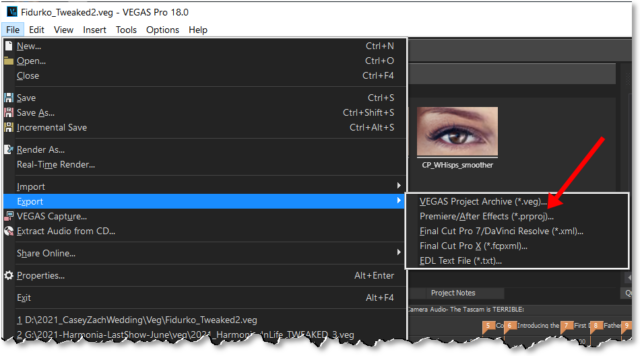
2. Cross-NLE — have you tried the “Export” (File menu) in Vegas to create the Premiere .PRPROJ file? Not saying that would or wouldn’t work well… I haven’t tried it 🙂

-
Hi! Do some searching on Vegas’s motion tracking features.. they are meant to do the kind of thing you are doing.
Basically, it tracks the motion of one event, then applies those key frames to another event’s position so it matches the movement.