

-
Vegas to Premiere?
Posted by John Perez on August 22, 2021 at 4:32 pmI work in Vegas. My editor works with Premier Pro. I tried to sync the dailies in PP but it’s no use. I cannot stand PP, so how can I work in Vegas but hand my editor the sync’d dailies he can cut? Without image degradation?
John Perez replied 5 years ago 4 Members · 6 Replies -
6 Replies
-

Red-rob Rothkopf
August 22, 2021 at 5:39 pmTwo things.
1. Question — when you say “syncing” are you talking about multi-camera footage and takes, trying to sync them in different tracks on the timeline for a multi-cam edit? What method do you use in Premiere for that, and what method in Vegas are you using? I’d think if you used a product like Pluraleyes the process would be similar on both platforms
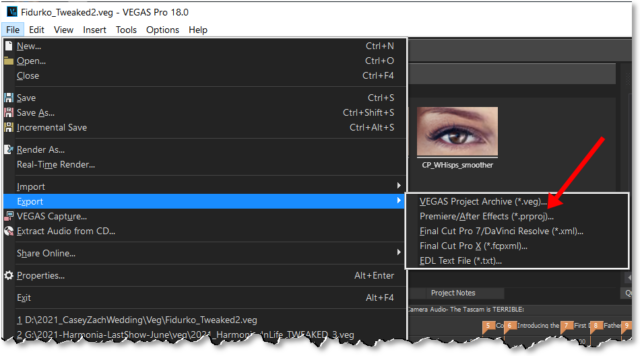
2. Cross-NLE — have you tried the “Export” (File menu) in Vegas to create the Premiere .PRPROJ file? Not saying that would or wouldn’t work well… I haven’t tried it 🙂

-

John Perez
August 23, 2021 at 7:04 amWhat are the uncompressed formats? Which ones for example? Thanks…
-
John Perez
August 23, 2021 at 7:08 amI tried to export is as a PP file and of course it doesn’t work. I knew that it would be too good to be true, but that’s okay, because I’m not going to bother again with PP and it’s hellish timeline again in my life. Uncompressed formats? Codec? Are they the same? I wigged-out on this part of my NLE education/experience.
-

Oliver Peters
August 26, 2021 at 4:03 pmBuild a stringout (timeline) of sync’ed selects and export a .xml for that sequence. Then give the editor the raw camera files and sound, plus the .xml file.
The bigger question I have – Why not just let the editor sync the project himself? That way he can organize it in a many that he is most comfortable with.
-
John Perez
August 28, 2021 at 10:39 amBecause there’s not enough money in the budget for that legwork. String-out. I like…

Reply to this Discussion! Login or Sign Up