Forum Replies Created

Page 5 of 549
  • It sounds like you’re looking for the Center Axis To… command in C4D.

  • You don’t have to be in polygon mode to freeze your transformations in Cinema 4D. It works exactly like it does in Maya.

    In the attribute manager, go to the coordinates tab and there’s a whole freeze transformations section.

  • Michael Szalapski

    January 24, 2022 at 4:03 pm in reply to: Anaglyph 3D Effect with only 1 Adjustment Layer?

    Are you just asking for chromatic aberration kind of effect or genuine 3d glasses?
    AE has a built-in 3d Glasses effect, but it’s dependent on you having two sources to drive it (either footage from two cameras or two precomps with offset cameras).

  • The Maxon One license is a license for the whole kit and caboodle. There are not separate licenses for each part of it which is unfortunate when you end up in this sort of situation.

  • Michael Szalapski

    December 16, 2021 at 5:23 pm in reply to: Halftone dot wave

    If you set your Particle Type in Trapcode Form to Textured Polygon (and then pick an appropriate Sprite), you get them to follow the surface.

  • Michael Szalapski

    December 16, 2021 at 5:15 pm in reply to: Halftone dot wave

    I can’t see your example, but if you set your particles in Form to be Textured Polygons, they’ll flow along whatever shape you make.

  • Michael Szalapski

    December 7, 2021 at 4:19 pm in reply to: loopOut woes

    I have never considered loopOut() to be tempermental. You just have to feed it what it wants! For a loop that repeates, I usually have three keyframes. Beginning, end, and beginning again. And I also usually specify what kind of loopOut it is. cycle vs. continue

  • Michael Szalapski

    November 9, 2021 at 2:11 am in reply to: Problem with PATH and SHAPES.

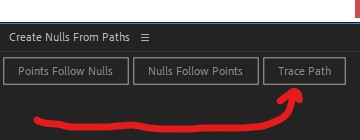
    Open up the Create Nulls From Paths script (in the Window menu).

    Select the path you’d like the shapes to follow.

    Press the Trace Path button.

    It’ll give you a null with a control to put it wherever you’d like along that path (keyframed, so you’ll want to turn off the keyframes [press U to reveal all keyframed properties]).

    Parent a triangle to that null and you’re done!

    Repeat for as many triangles as you need.

  • Michael Szalapski

    November 9, 2021 at 1:47 am in reply to: Problem with PATH and SHAPES.

    There are a number of ways to do this. One would be to use the paths to nulls script panel to place these objects along the path.

  • Michael Szalapski

    November 7, 2021 at 5:49 pm in reply to: Jittery motion on a simple animation

    Users do get choice. Generally speaking, you should be fine. YouTube defaults to playing 60fps videos at that frame rate. If somebody has a poor connection though, it’ll throttle down.

    And also some devices are limiting, but, again, generally speaking you’ll be fine.

Page 5 of 549

We use anonymous cookies to give you the best experience we can.
Our Privacy policy | GDPR Policy